
Disclosure: Hushread is our app. We’ve tried to be fair, and we say where the others are the better choice.
Feedly has four plans. Free costs nothing and covers 100 feeds in 3 folders, with ads and no search. Pro is $8 a month or $72 a year. Pro+ is sold by the year only: $99 for the first year, then $144. Enterprise is priced by quote. Those are the figures Feedly gave a US address on 6 October 2026. Feedly’s pricing page showed us higher prices from India, so read your own screen before you pay.
Feedly plans and prices at a glance
Prices were checked on 6 October 2026 and are in US dollars, as served to a US address (archived copy of Feedly’s price feed). Feed counts and features are from Feedly’s pricing page. The per-month figures in brackets are our arithmetic: each yearly total divided by 12.
| Plan | Price | Feeds | What it adds |
|---|---|---|---|
| Free | $0 | 100, in 3 folders | Web and mobile apps, with sponsored ads |
| Pro | $8 a month, or $72 a year ($6 a month) | 1,000 | Search, notes and highlights, no sponsored ads, sharing integrations, updates up to 10x faster |
| Pro+ | $99 the first year ($8.25 a month), then $144 a year ($12 a month); no monthly option | 2,500 | AI Feeds, mute filters, deduplication, newsletters, Google News feeds, RSS Builder |
| Enterprise | Quote only | 7,500 | Team feeds and boards, Slack and Microsoft Teams, API access, SSO |
The page itself is harder to read. Pro and Pro+ each show one per-month figure with “billed annually” in small type, never the yearly total. Pro’s monthly price only appears when you click the words “billed annually”. The free plan isn’t a card at all: it is a short note under the paid plans.
Why the price on your screen may differ
Your location. We loaded the pricing page from India. It showed Pro at US$6.99 a month billed annually, or US$8.99 billed monthly, and Pro+ at US$8.93 a month for the first year, struck through from US$12.37, with a note that you save US$41. The price feed behind the page gave the yearly totals: $83.88 for Pro, and $107.17 then $148.45 for Pro+.
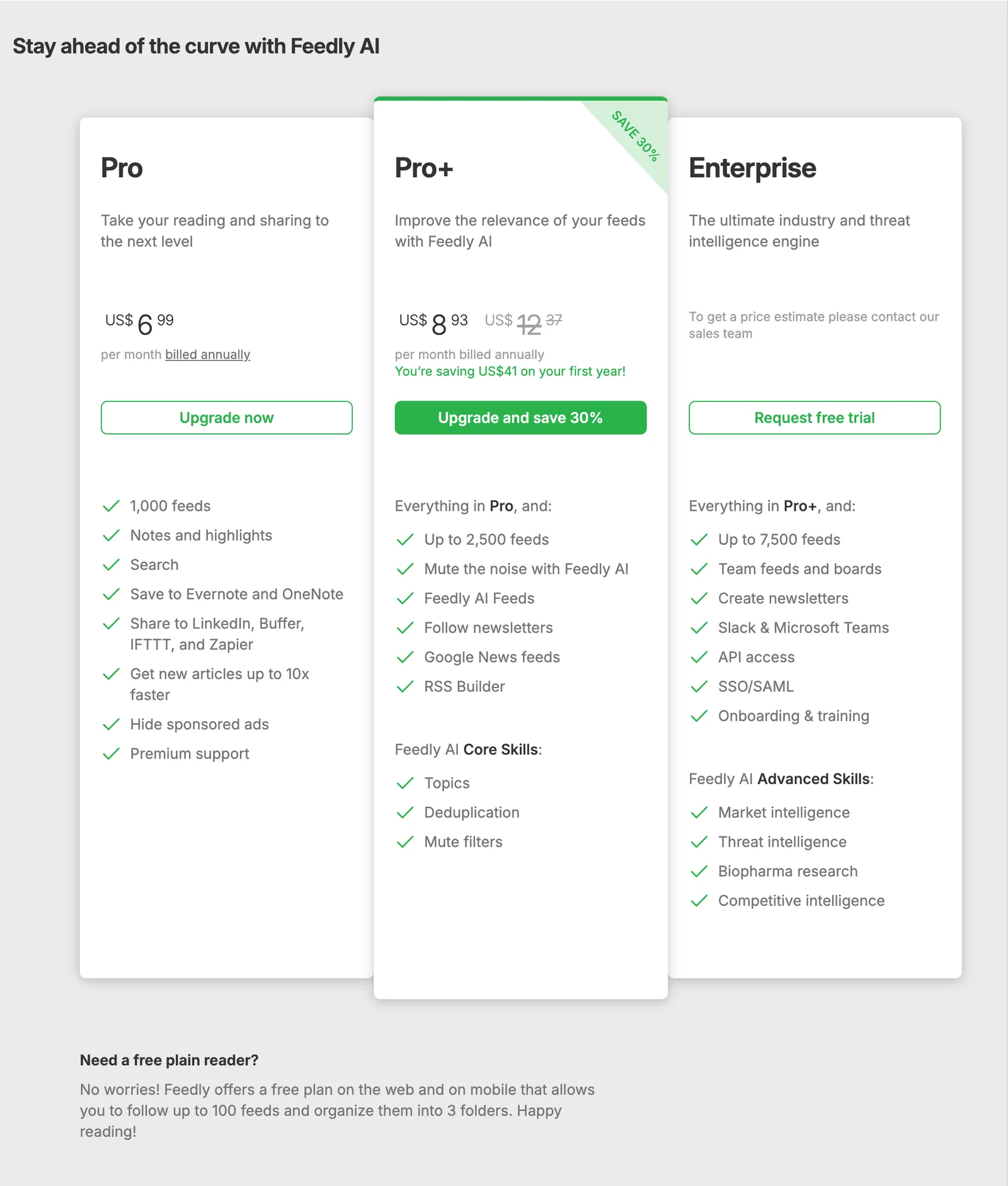 Feedly’s pricing page as it loaded from India on 6 October 2026. A US address is quoted less. Source: feedly.com
Minutes later we had the Internet Archive save the same feed. Its crawlers sit in California, going by an IP lookup archived the same day, and the feed quoted them less. Checked on 6 October 2026:
| US address | India address | |
|---|---|---|
| Pro, billed monthly | $8.00 | $8.99 |
| Pro, billed yearly | $72.00 | $83.88 |
| Pro+, first year | $99.00 | $107.17 |
| Pro+, later years | $144.00 | $148.45 |
Feedly doesn’t explain the gap anywhere we could find, and we tested only those two places. Its terms add that fees are “net of any applicable Sales Tax”, so tax can come on top.
The first-year discount. The Pro+ card carries a “SAVE 30%” ribbon, and the lower price covers the first year only. Under the terms, a subscription then renews at Feedly’s “then-current price”. It isn’t a limited sale either: a February 2024 capture of the feed shows the same $99 and $144.
Stale help pages. Feedly’s article on switching billing still quotes Pro at “$7/month” and “$65/year” (Feedly help, last updated October 2024). Trust the checkout, not the article.
Two sets of names. The pricing page counts “feeds” and “folders”. The help center’s cancellation article says “sources” and “Feeds” instead, so its “100 sources, 3 Feeds” reads as the same limit (Feedly help).
What Feedly Free includes, and what it lacks
Feedly Free works on the web and in the mobile apps, and lets you follow up to 100 feeds organized into 3 folders (Feedly pricing). You also get 3 Boards, which are folders for articles you save (Feedly help).
What it leaves out:
- Search. It is listed under Pro, and the Google Play listing describes searching within your feeds as something Pro adds.
- An ad-free feed. “Hide sponsored ads” is a Pro feature, and the Play listing is marked “Contains ads”.
- Quick updates. Free accounts have their sources checked anywhere from every 30 minutes to once a day, depending on the site. Pro is 15 minutes to an hour, and Pro+ can be as low as 7 minutes (Feedly help, last updated in 2022).
- Notes, highlights and integrations. Saving to Evernote and OneNote, and sharing to LinkedIn, Buffer, IFTTT and Zapier, start at Pro.
- Filtering. Mute filters, deduplication, newsletters and the RSS Builder start at Pro+.
If you cancel a paid plan you drop back to these limits, and Feedly asks you to remove anything above them first (Feedly help).
Pro vs Pro+: what the extra money buys
Pro is for people who have outgrown Free: 1,000 feeds, search, notes and highlights, no sponsored ads, the integrations above and up to 250 Boards (Feedly help).
Pro+ is where the filtering lives. Beyond 2,500 feeds, it adds:
- Mute filters: up to 100. They aren’t on the Pro list; only legacy Pro accounts keep 25 (Feedly help).
- Deduplication: hides articles from different sources whose content overlaps by more than 85% (Feedly help).
- Newsletters: up to 50 (Feedly help).
- RSS Builder: up to 50 feeds for sites that don’t publish one (Feedly help).
- AI Feeds and Google News feeds.
Two catches. On the web, Pro+ is sold by the year only, and switching between monthly and yearly billing is offered for Pro alone (Feedly help). And from the second year Pro+ costs twice what Pro does at US prices: $144 against $72.
App Store and Google Play prices
The US App Store lists Feedly Pro Monthly at $7.99 and Feedly Pro+ Monthly at $15.99 as in-app purchases (App Store). Pro is a cent cheaper than on the web. The app also sells the monthly Pro+ that the website doesn’t, but twelve months at $15.99 comes to $191.88, against $144 a year on the web.
Google Play’s US listing shows in-app purchases of $7.99 to $69.99 per item without naming them (Google Play).
To move from store billing to web billing, you cancel in the store and wait for the paid period to run out (Feedly help).
Trials, refunds and Enterprise pricing
There is no free trial for Pro or Pro+ on the pricing page. The buttons say “Upgrade now” and “Upgrade and save 30%”; only Enterprise has “Request free trial”. The store-billing help article above, last updated in February 2021, mentions a 30-day trial, but neither store listing mentions one now and we couldn’t confirm it still exists.
The pricing page says nothing about refunds, but the terms do. You have 30 days from the start of a subscription, or from any renewal, to cancel and get the fee back; after that it is non-refundable. The help center adds that if you were charged in the past 5 days, the billing page lets you refund yourself (Feedly help).
Enterprise has no public price: the card says to contact sales. Feedly’s Market Intelligence product gives a sense of scale, at $1,600 a month billed annually for up to 10 seats on Standard and $2,400 a month for up to 25 on Advanced (Feedly Market Intelligence). Threat Intelligence says “Request pricing” (Feedly Threat Intelligence) and has a 30-day free trial.
What the same money buys elsewhere
Inoreader. Its free plan covers 150 feeds with search, Google News alerts and no ads (Inoreader pricing): more feeds than Feedly Free, plus two things Feedly keeps for Pro. Inoreader Pro is $7.50 a month billed annually, about $90 a year, or $9.99 monthly. It includes 2,500 feeds, 30 rules, 50 filters that can also remove duplicates, and 20 newsletter feeds. That is priced between Feedly Pro and Pro+, and it covers much of what Pro+ charges $144 for. Inoreader vs Feedly goes through the differences.
Hushread. A different kind of reader, and much cheaper: free for up to 5 sources, then $1.25 a month billed yearly in the US for unlimited sources (pricing, plans and billing). It groups different outlets’ coverage of one event into a single story, where Feedly’s deduplication hides near-copies. It has no newsletters, notes, highlights or integrations, and its free plan is a twentieth the size of Feedly’s, so it is not a like-for-like swap. The details are in our comparison with Feedly.
Our Feedly alternatives roundup covers the rest.
When Feedly’s price is worth paying
- Stay on Free if you follow fewer than 100 feeds, can live with 3 folders and ads, and rarely need search.
- Pay for Pro if you like Feedly and have hit the 100-feed or 3-folder wall, or want search and no ads. It is the wrong plan if filtering is what you’re after.
- Pay for Pro+ if you want newsletters, mute filters, deduplication and the RSS Builder in one hosted app, or you will use AI Feeds. Budget for $144 from year two, not $99.
- Ask about Enterprise if a team shares feeds and boards, or you need market or threat intelligence.
FAQ
Is Feedly free?
Yes. Feedly’s free plan works on the web and in the mobile apps and covers up to 100 feeds in 3 folders. It shows sponsored ads and leaves out search, notes and integrations.
How much does Feedly cost?
On 6 October 2026, Feedly quoted a US address $8 a month or $72 a year for Pro, and $99 for the first year of Pro+, then $144 a year. Enterprise is priced on request. Prices vary by location: from India, Feedly’s pricing page showed Pro at US$6.99 a month billed annually, which is $83.88 a year.
What is the difference between Feedly Free and Pro?
Free covers 100 feeds and 3 folders, with ads. Pro raises that to 1,000 feeds and adds search, notes and highlights, sharing integrations, faster updates and no sponsored ads. Mute filters, deduplication and newsletters are not in Pro; they need Pro+.
Is Feedly Pro worth it?
Pro is worth $72 a year, the US price, if you already like Feedly and need more than 100 feeds, more than 3 folders, search or no ads. If you want filtering or newsletters, compare Pro+ at $144 a year with Inoreader Pro at about $90 first.
Does Feedly have a free trial or refunds?
The pricing page offers no trial for Pro or Pro+, only for Enterprise. Feedly’s terms allow a refund if you cancel within 30 days of the start of a subscription or of a renewal.
Before you pay, open the pricing page on your own connection, click “billed annually” under Pro to compare monthly with yearly, and note what Pro+ renews at. If you leave instead, export your feeds from the web app first; the file leaves out Boards, AI Feeds and Reddit feeds (Feedly help). Check it in our OPML viewer, then see the best RSS reader guide for where to take it.