
Disclosure: Hushread is our app. We’ve tried to be fair, and we say where the others are the better choice.
RSS is a file format that websites use to publish a list of their latest posts in a form software can read. The site keeps that file, called a feed, at a fixed address. An app called an RSS reader fetches the file every so often and shows you whatever is new, from every site you follow, in one list. The specification puts it in two lines: “RSS is a Web content syndication format” and “Its name is an acronym for Really Simple Syndication” (RSS 2.0 specification).
What RSS stands for
Really Simple Syndication, according to the RSS 2.0 specification.
The letters have not always meant that. A separate branch of the format, RSS 1.0, expands them as “RDF Site Summary” (RSS 1.0 specification). You will see other expansions quoted around the web. We only repeat the two we could read in the specifications themselves.
The RSS Advisory Board, which publishes the current specification, lists sixteen versions in order (RSS history). These five mark the main steps:
- 15 March 1999: RSS 0.90, published by Netscape and authored by Ramanathan Guha.
- 10 July 1999: RSS 0.91, published by Netscape and authored by Dan Libby.
- 9 June 2000: RSS 0.91, published by UserLand Software and authored by Dave Winer.
- 19 August 2002: RSS 2.0, from UserLand.
- 30 March 2009: RSS 2.0 version 2.0.11, from the RSS Advisory Board, marked as current.
The last entry matters more than it looks. The specification says RSS “is, for all practical purposes, frozen at version 2.0.1”, with later versions only “for the purpose of clarifying the specification, not for adding new features”. A feed written in 2009 and a feed written this morning follow the same rules. The feed below declares version="2.0", the same version number UserLand published in 2002.
What an RSS feed looks like inside
Most explanations stop at the definition. It is easier to understand a feed by reading one.
We fetched the WordPress news feed, https://wordpress.org/news/feed/, on 7 October 2026. Here is the top of it, trimmed: we removed the namespace declarations, the CDATA wrappers, a few optional elements and the full article text, and cut the description short.
<rss version="2.0">
<channel>
  <title>WordPress News</title>
  <link>https://wordpress.org/news</link>
  <description>The latest news about WordPress and the WordPress community</description>
  <lastBuildDate>Tue, 06 Oct 2026 17:04:14 +0000</lastBuildDate>

  <item>
    <title>WordPress 7.1.3 Maintenance and Security Release</title>
    <link>https://wordpress.org/news/2026/10/wordpress-7-1-3-maintenance-and-security-release/</link>
    <pubDate>Tue, 06 Oct 2026 17:00:00 +0000</pubDate>
    <guid isPermaLink="false">https://wordpress.org/news/?p=21753</guid>
    <description>This security and maintenance release features 7 security fixes and 4 bug fixes. ...</description>
  </item>
Nine more <item> blocks follow, one per post, going back to 12 August 2026.
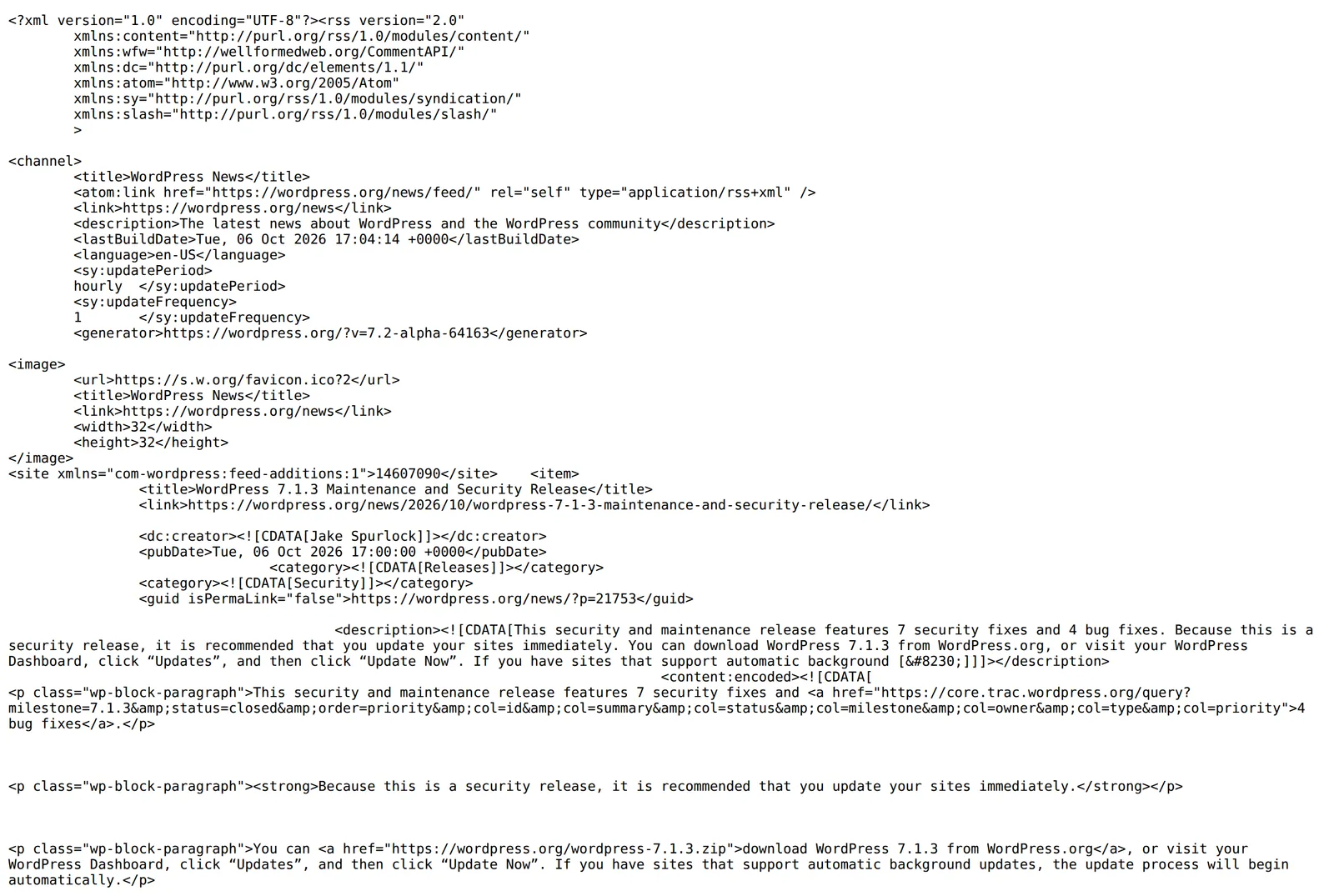 The WordPress News feed opened in Chrome, 7 October 2026. Source: wordpress.org
There are two parts, and the specification defines both.
The channel describes the site. Three elements are required: title, link and description.
The items are the posts. The rules here are loose: “All elements of an item are optional, however at least one of title or description must be present.” In practice almost every item carries these:
| Element | What it holds | How the spec describes it |
|---|---|---|
title | The headline | “The title of the item” |
link | The address of the full post | “The URL of the item” |
description | A summary, or the whole post | “The item synopsis” |
pubDate | When it was published | “Indicates when the item was published” |
guid | A permanent ID for the post | “A string that uniquely identifies the item” |
enclosure | An attached file, such as audio | “Describes a media object that is attached to the item” |
Two things in that table explain most of what you will notice as a reader.
First, description can be a teaser or the complete article. The specification allows both: an item’s description can be “a synopsis of the story”, or the item can be “complete in itself”. The publisher decides. That is why some sites read in full inside your reader and others show two lines and a link.
Second, enclosure is how podcast feeds work: each item points at an audio file. Apple’s requirements for shows submitted by feed say the feed must “adhere to RSS 2.0 specifications” and that “Each episode must have a unique <enclosure> tag” (Apple Podcasts for Creators).
How RSS readers work
A reader does not receive anything from the sites you follow. It asks. This is the part most guides skip, and it explains why new posts sometimes take a while to appear.
1. It fetches the feed on a schedule
The reader requests the feed address again and again, an approach called polling. How often depends on the reader and sometimes on your plan. Feedly publishes its numbers: Pro+ and Enterprise accounts are polled as often as every 7 minutes, Pro between 15 minutes and an hour, and for Basic accounts, the plan below the paid ones, the interval “can vary between 30 minutes to 1 day depending on how popular the site is and how often it publishes” (Feedly docs).
A feed can suggest a pace too. RSS has an optional ttl element, “a number of minutes that indicates how long a channel can be cached before refreshing from the source”. The WordPress feed above does not set one.
2. It asks whether anything changed
Downloading the whole file every time would be wasteful. The WordPress feed above was 283,600 bytes when we fetched it, and most of the time nothing in it is new.
HTTP has an answer for that, the conditional request, and a reader can use it. The first response came with a last-modified header. We sent that date back in an If-Modified-Since header on a second request:
curl -s -o /dev/null -w "%{http_code} %{size_download}\n" -H "If-Modified-Since: Tue, 06 Oct 2026 17:04:14 GMT" https://wordpress.org/news/feed/The server answered 304 with 0 bytes, in place of 200 with 283,600. The date in the command is the one we were given; yours will differ, so copy it from the feed’s response headers. The HTTP standard defines 304 (Not Modified) as the reply to a conditional request that “would have resulted in a 200 (OK) response if it were not for the fact that the condition evaluated to false” (RFC 9110). Some servers send an ETag value to use with If-None-Match instead. Jekyll’s feed at https://jekyllrb.com/feed.xml does, and it also returned 304 when we sent its ETag back.
3. It works out which items are new
When the feed has changed, the reader compares the items with the ones it already holds. That is the job of guid: the specification says “an aggregator may choose to use this string to determine if an item is new”. New items are stored and marked unread. Everything else is skipped.
4. It keeps what the feed drops
The WordPress feed lists ten posts, not the site’s whole archive. The specification sets no limit, but notes that generators may cap how many items appear in a channel. So a feed is a window onto the newest posts: a reader can only show older ones if it stored them while they were still listed, and a feed you add today starts with whatever is in the file right now.
Push, for sites that support it
Polling is not the only route. Feedly’s page for site owners says “If your feeds advertise a push hub, Feedly will subscribe for updates and reduce the number of polls to once a day” (Feedly fetcher). The same page says its fetcher “shouldn’t retrieve feeds from most sites more than once every hour on average”.
RSS, Atom and JSON Feed
You will meet feeds that are not RSS. Atom is the main one: “an XML-based Web content and metadata syndication format”, published as a Standards Track RFC in December 2005 and edited by M. Nottingham and R. Sayre (RFC 4287). It calls posts entries, not items, and is stricter: every feed and every entry must have an id, a title and an updated time.
As a reader you can ignore the difference. NetNewsWire’s help says it plainly: “Atom does the same thing as RSS”, and the JSON Feed format “does the same thing as RSS too” (NetNewsWire help). People say “RSS feed” for all three.
How to use an RSS feed
- Pick a reader. It can be an app on your phone or computer, or a website you sign in to. Our best RSS reader guide compares them.
- Add a site. Paste its ordinary address into the reader’s add box. Many sites announce their feed with a tag in the page that software can find, a technique called autodiscovery (RSS Advisory Board). NetNewsWire, for one, “will search the page and add the feed it finds” (NetNewsWire help).
- If that fails, find the feed address yourself. Our guide to finding the RSS feed of any website lists the methods and the usual URL patterns.
- Read. New posts show up as unread the next time the reader checks the feed.
Feeds are not only for blogs and news sites. YouTube channels have them too, as our YouTube channel RSS feed guide shows, and podcast apps are fed the same way.
Not every site has a feed, and a site can remove one. In that case some readers can watch the page itself. Hushread, our reader, shows a preview of a feed’s latest posts before you add it, and offers to follow the page when a site has no feed (docs). Its free plan holds 5 sources.
FAQ
What does RSS feed stand for?
RSS stands for Really Simple Syndication, according to the RSS 2.0 specification. The older RSS 1.0 specification expands the same letters as RDF Site Summary.
How do RSS readers work?
An RSS reader fetches the feed file of each site you follow on a schedule, and can ask the server to send it only if it has changed. It compares the items in the feed with the ones it has already stored and shows the new ones as unread.
What is an RSS feed and how do you use it?
An RSS feed is a file at a fixed address that lists a site’s latest posts with a title, link, date and summary for each. To use one, paste the site’s address or the feed’s address into an RSS reader, and new posts will appear there without you visiting the site.
Why do some RSS feeds only show a summary?
The publisher chooses. The specification lets an item’s description be either a synopsis that links to the full story or the complete text, so some sites put whole articles in the feed and others only a teaser.
If you only follow two or three sites, visiting them directly is simpler than setting up a reader, and a newsletter does the same job by email. RSS starts to pay off around the point where you can no longer remember which sites you have checked. To try it, open a feed in your browser first, the way we did above, so you can see what your reader will be working with.