
Disclosure: Hushread is our app. We’ve tried to be fair, and we say where the others are the better choice.
To find the RSS feed of a website, open the page source and search for rss+xml. Most sites that have a feed name it there, in a <link rel="alternate"> tag. If nothing turns up, add /feed, /rss or /rss.xml to the site’s address, or paste the address into a feed reader and let it look. Here are five methods, fastest first, each one run on real sites on 6 October 2026.
1. Look for a feed link on the page
Scan the page for the words RSS, Atom or Feed, or an RSS icon, usually in the footer or beside the social media links. Right-click the link and copy its address.
When it works, it takes seconds. xkcd.com lists “RSS Feed” and “Atom Feed” under the comic, and The Verge has an RSS link next to its social links. Just as often there is nothing to click: we found no visible feed link on wordpress.org/news, yet it has a feed.
Don’t expect the browser to point a feed out. Firefox, for one, removed its built-in support for web feeds in version 64, in December 2018 (Mozilla).
2. Search the page source for the feed link
On a computer, open the site and view its source. In Chrome that is Ctrl+U on Windows and Linux, or Cmd+Option+U on a Mac (Chrome shortcuts). Search the source for rss+xml, then for atom+xml.
This is the line to look for, copied from wordpress.org/news:
<link rel="alternate" type="application/rss+xml" title="WordPress News » Feed" href="https://wordpress.org/news/feed/" />The feed URL is the href value. An Atom feed has type="application/atom+xml" instead, as on jekyllrb.com:
<link type="application/atom+xml" rel="alternate" href="https://jekyllrb.com/feed.xml" title="Jekyll • Simple, blog-aware, static sites" />This tag is how a site tells software where its feed lives. The RSS Advisory Board’s autodiscovery specification puts it in the page’s head, with rel, type and href attributes.
- A relative address needs the domain. The Verge’s tag says
href="/rss/index.xml", so its feed ishttps://www.theverge.com/rss/index.xml. - There can be several. wordpress.org/news lists three: posts, comments and a podcast. The specification says the first should be the main feed.
- No match is not proof. The source of bbc.com/news has no feed tag, yet
https://www.bbc.com/news/rss.xmlreturns the BBC News feed.
It works on YouTube too: the source of a channel page such as youtube.com/@mkbhd contains the channel’s feed URL. Our YouTube channel RSS feed guide covers the details.
3. Try the common feed paths
Add each of these to the end of the site’s address, one at a time:
/feed
/rss
/rss.xml
/atom.xml
/feed.xml
/index.xml
Most publishing platforms use one fixed pattern, so knowing what a site runs on tells you where its feed is. We fetched every example below on 6 October 2026, and each returned a feed.
| Platform | Feed URL pattern | Example we fetched |
|---|---|---|
| WordPress | /feed/ (WordPress.com support) | https://wordpress.org/news/feed/ |
| Ghost | /rss/ (Ghost help) | https://www.404media.co/rss/ |
| Substack | /feed (Substack help) | https://on.substack.com/feed |
| Medium | medium.com/feed/NAME (Medium help) | https://medium.com/feed/blog |
| Blogger | /feeds/posts/default for Atom, add ?alt=rss for RSS (Blogger help) | https://android-developers.googleblog.com/feeds/posts/default |
| Squarespace | /PAGE?format=rss (Squarespace help) | https://www.squarespace.com/blog?format=rss |
| Jekyll | /feed.xml, with the jekyll-feed plugin | https://jekyllrb.com/feed.xml |
| Hugo | /index.xml (Hugo docs) | https://gohugo.io/index.xml |
| YouTube | /feeds/videos.xml?channel_id=UC... | https://www.youtube.com/feeds/videos.xml?channel_id=UCBJycsmduvYEL83R_U4JriQ |
/r/NAME/.rss, until 13 November 2026 | https://www.reddit.com/r/rss/.rss |
A few things the table can’t show:
- Sections have feeds too. WordPress adds
/feed/to category, tag and author pages, as inhttps://wordpress.org/news/category/releases/feed/. Ghost does the same with/rss/on tag pages, and Hugo builds anindex.xmlfor each section, such ashttps://gohugo.io/news/index.xml. /rss.xmland/atom.xmlbelong to no single platform. Astro’s guide callsfeed.xmlandrss.xmlcommon names (Astro docs), Hexo’s feed plugin defaults toatom.xml(GitHub), and xkcd.com serves both. Tumblr’s staff blog and Hacker News answer at/rss.- YouTube needs the channel ID, not the @handle. Our YouTube RSS feed generator builds the URL from a channel ID or
/channel/UC...link. - Reddit’s pattern has an end date. It returned a feed today to a browser user agent, but plain
curlgot a 403. Reddit plans to retire its feeds (see step 5). Until then, our subreddit RSS feed guide explains the rate limit. - Medium puts
feedbefore the name. A profile ismedium.com/feed/@usernameorusername.medium.com/feed, a publication ismedium.com/feed/publication-name, a tag inside a publication ismedium.com/feed/publication-name/tagged/tag-name, and a topic ismedium.com/feed/tag/tag-name. A publication on its own domain uses plain/feed. Stories behind Medium’s paywall don’t appear in full.
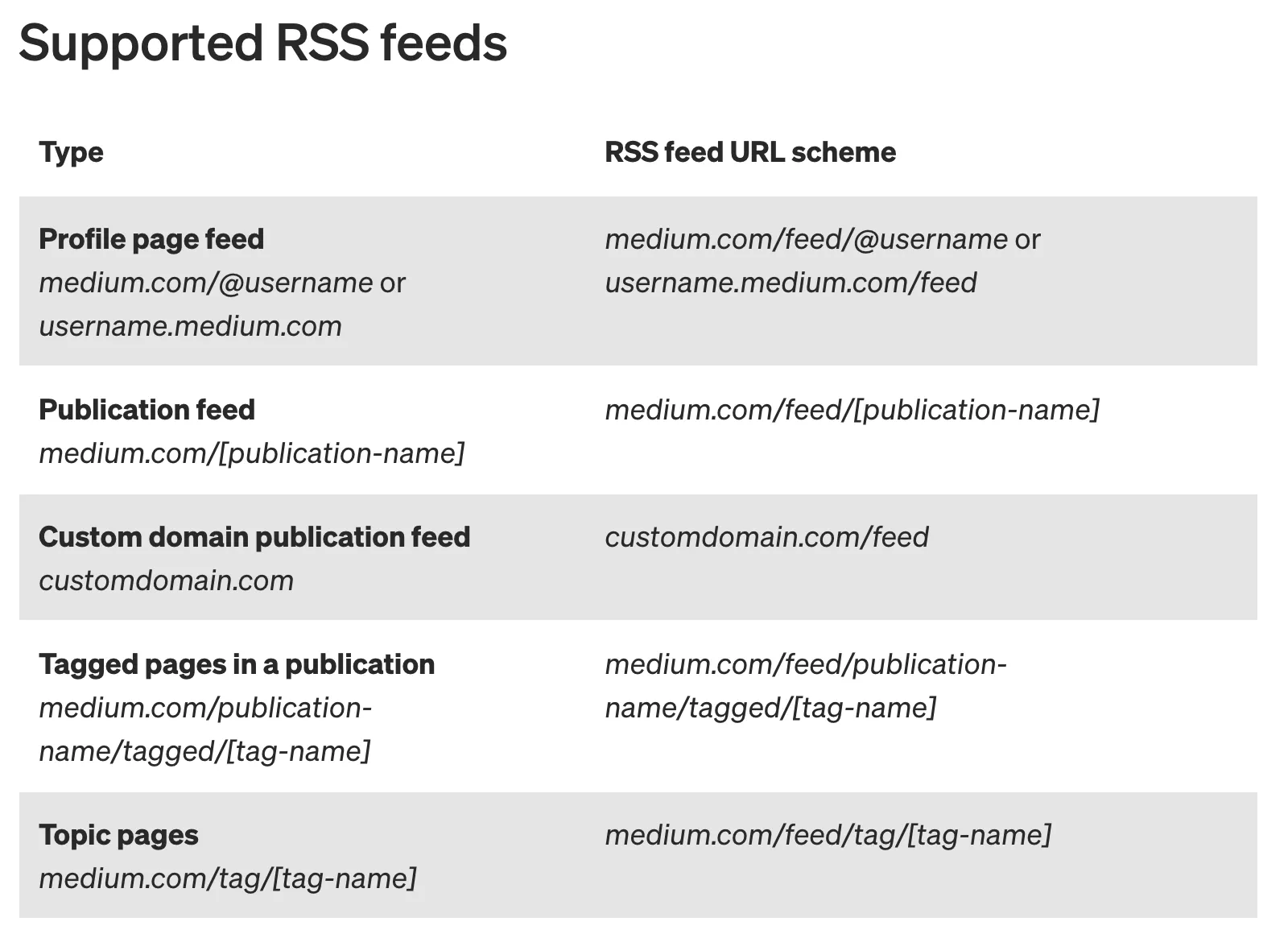 Medium’s supported RSS feeds, 6 October 2026. Source: Medium Help Center
How to tell a real feed from a web page
Open the URL in a browser tab. A feed is XML that starts with <rss or, for Atom, <feed, sometimes after a line beginning <?xml. A web page starts with <!DOCTYPE html>. WordPress.com describes a feed in the browser as “a page of code that might not make much sense to the average viewer” (WordPress.com support).
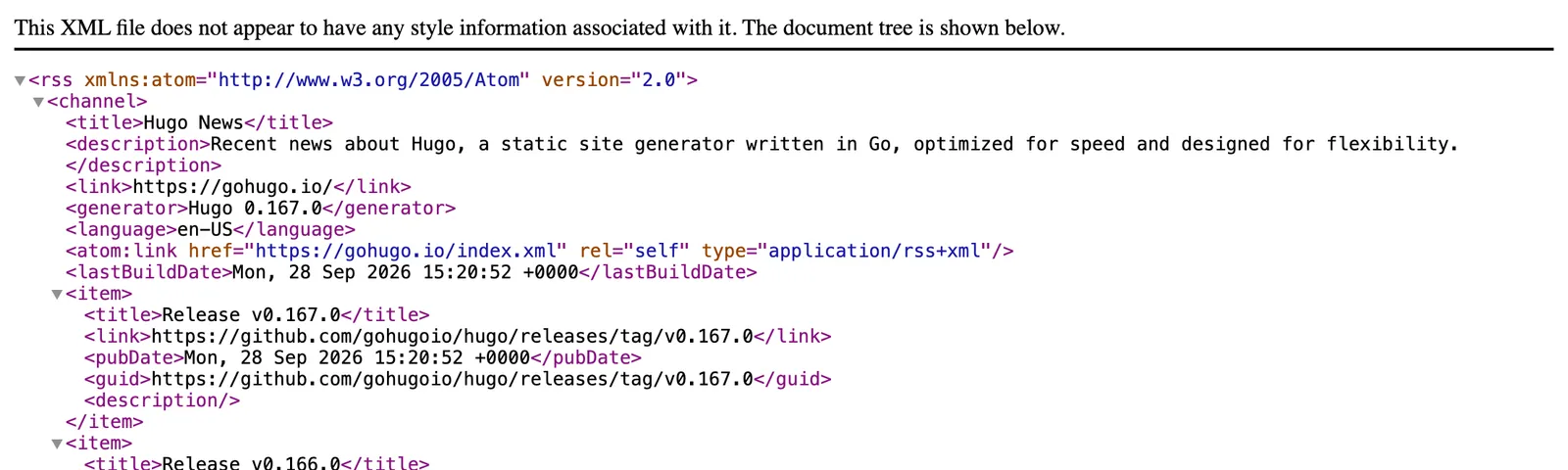 A real feed in Chrome: Hugo’s news feed, 6 October 2026. Source: gohugo.io
Don’t trust a page just because it loads. A wrong guess usually gives a “not found” page: theverge.com/feed and on.substack.com/rss both returned 404 for us. But old.reddit.com/r/rss/.rss loaded without an error and turned out to be Reddit’s login page. From a terminal, this prints the first 300 characters so you can see which one you got:
curl -sL https://gohugo.io/index.xml | head -c 3004. Paste the site address into a feed reader
Feed readers do the searching for you. Paste the site’s ordinary address into the reader’s add box.
- NetNewsWire needs only the site’s URL. If the address isn’t a feed, it “will search the page and add the feed it finds” (NetNewsWire help).
- Feedly “automatically detects RSS feeds for most websites” (Feedly docs). Its feed search gave us The Verge’s main feed plus section feeds for AI and Energy.
- Hushread shows a preview of the feed’s latest posts before you add it (docs).
Discovery isn’t perfect. Feedly’s search for bbc.com returned BBC Future, not BBC News. NetNewsWire’s help page names the cause: sometimes “the feed isn’t advertised in a way that NetNewsWire can understand”. When that happens, paste the direct URL from step 2 or 3.
If you already follow the site in another reader, the feed URL is in its OPML export; our OPML viewer lists every feed URL in the file. Still choosing a reader? See our best RSS reader guide.
5. If the site has no feed
First rule out a feed that existed and was removed.
Check whether the feed was removed
Sites do drop feeds, which leaves old guides and subscription lists pointing at dead addresses. Reddit is the current case: on 30 September 2026 it announced “we’ll stop supporting RSS feeds on November 13, 2026”, and that for feeds outside a community you moderate “there is no replacement” (Reddit).
- Open the old feed URL. A 404, or a redirect to the home page or a login page, means it is gone.
- Read the newest item’s date, in
<pubDate>for RSS or<updated>for Atom. A feed that loads but last changed years ago has been abandoned. - Look it up in the Wayback Machine. Its 19 January 2024 capture of
old.reddit.com/r/rss/.rssis a working feed. The same address gives a login page today.
Follow the page without a feed
Some readers can watch a web page directly.
- Hushread: when a site has no feed, it offers Follow this page, checks the page regularly and turns new articles into feed items (docs). The free plan holds 5 sources.
- Inoreader: web feeds follow websites without RSS. Pro includes 20 of them, at $7.50 a month billed annually (Inoreader pricing).
- Feedly: the RSS Builder is on the Pro+ and Enterprise plans (Feedly docs).
Or generate a feed
A feed generator turns a page into a feed URL that works in any reader. Prices and limits as of 6 October 2026:
| Service | Free plan | Paid plans from |
|---|---|---|
| RSS.app | 2 feeds, 5 posts each, refreshed every 24 hours | $8.32 a month billed annually: 15 feeds, 60-minute refresh |
| FetchRSS | 5 feeds, 5 posts each, refreshed every 24 hours, unused feeds deleted after 7 days | $4.95 a month: 25 feeds, 3-hour refresh |
| PolitePaul | 3 feeds, refreshed every 1.5 hours | $5.54 a month: 20 feeds, 10-minute refresh |
| RSS-Bridge | Free and open source: self-host it or use a public instance | None |
PolitePaul is the service older guides call PolitePol; politepol.com now redirects to it. RSS-Bridge is “a PHP web application” with a bridge that builds a feed from CSS selectors.
For a news site there is a free shortcut: a Google News search limited to one domain. https://news.google.com/rss/search?q=site:theverge.com returned 100 items in our test. We found no Google documentation for these feeds, so treat them as unofficial, and they only hold what Google News has indexed. Our Google News RSS feed generator builds the URL.
FAQ
How do I find the RSS feed URL of a website?
View the page source and search for rss+xml or atom+xml. The feed URL is the href of the <link rel="alternate"> tag. If there is no tag, try adding /feed, /rss, /rss.xml, /atom.xml, /feed.xml or /index.xml to the site’s address.
How do I create an RSS feed for a website without one?
Use a reader that can follow a page directly, or a feed generator such as RSS.app, FetchRSS or PolitePaul. Their free plans cover 2, 5 and 3 feeds, and the first two refresh only once every 24 hours.
Does every website have an RSS feed?
No. Sites on WordPress, Ghost, Substack, Medium, Blogger and Squarespace have one built in, but custom-built sites only have a feed if someone added it. Some sites remove theirs: Reddit has said it will stop supporting RSS feeds on 13 November 2026.
What is the RSS feed URL for a WordPress site?
Add /feed/ to the site’s address, for example https://wordpress.org/news/feed/. Category, tag and author pages have their own feeds at /category/NAME/feed/, /tag/NAME/feed/ and /author/NAME/feed/.
How do I add an RSS feed to my own website?
Check your platform first, because WordPress, Ghost, Squarespace and Blogger already publish one. On a static site, add a feed plugin such as jekyll-feed for Jekyll or @astrojs/rss for Astro, then put the <link rel="alternate"> tag in your page head so readers can find it.
Once you have the URL, paste it into any feed reader. If one or two of your sites have no feed, a free generator plan is enough. If many do, a reader that follows pages directly is less work than keeping a set of generated feeds. And when a site drops its feed on purpose, as Reddit is about to, the old URL will not come back: step 5 is what’s left.