
Disclosure: Hushread is my app. I’ve tried to be fair, and I say where the others are the better choice.
To cancel Apple News+ on an iPhone, iPad or Apple Vision Pro, open Settings, tap your name, tap Subscriptions, tap Apple News+, then Cancel Subscription (you may need to scroll to see it). On a computer, sign in at account.apple.com/account/manage/section/subscriptions and cancel it there (Apple support). If there’s no Cancel button, or you see an expiration message in red, it’s already cancelled. Cancelling only stops the paid part: the free Apple News app keeps working.
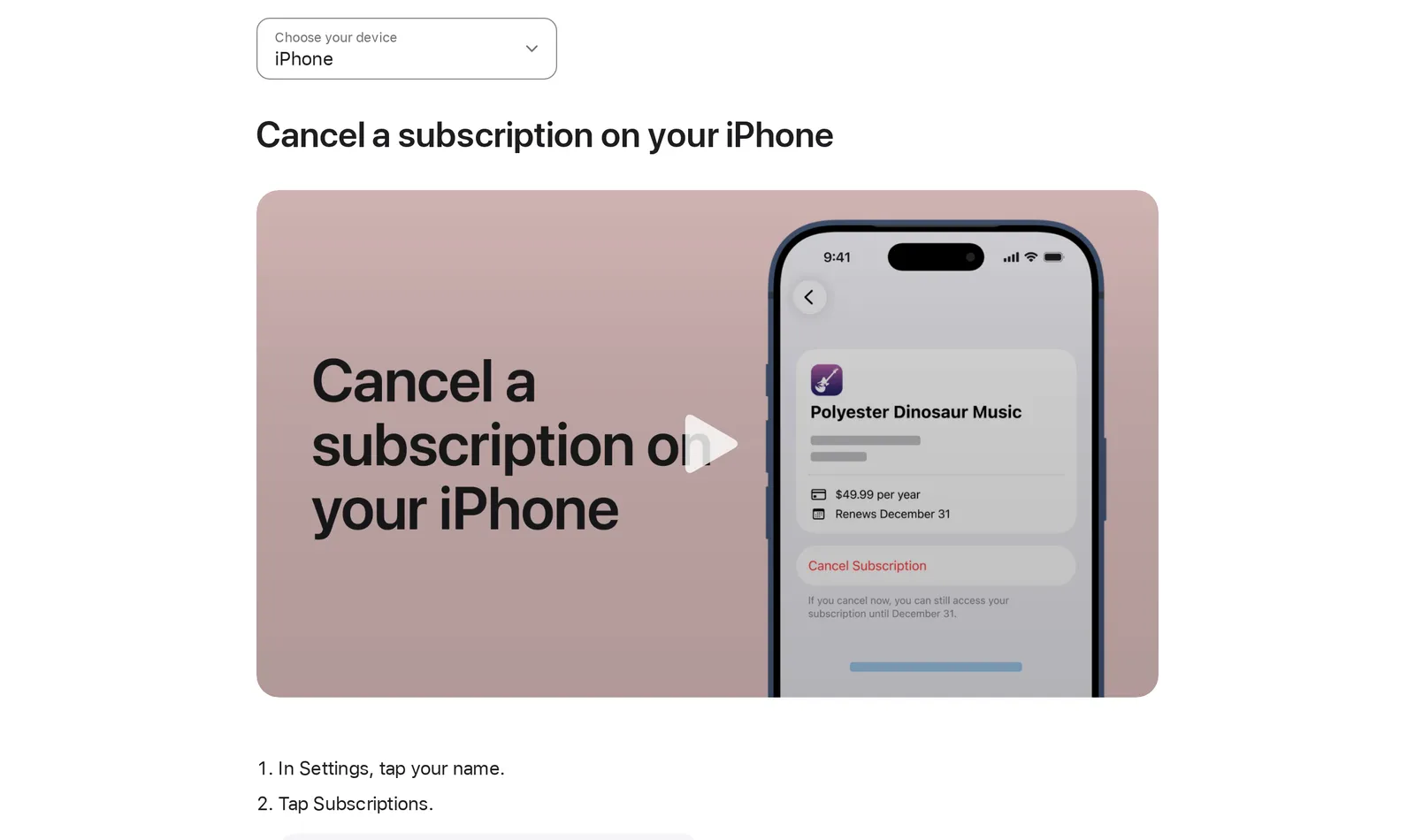 Apple’s “Cancel a subscription from Apple” page, iPhone steps, 9 November 2026. Source: support.apple.com
Cancel from the News app on iPhone or iPad
You can also do it without leaving News. Apple’s iPhone guide says: in the News app, tap Following, scroll down, tap Subscriptions (below Manage), then tap Cancel Subscription and follow the prompts. If you also pay for individual channels in News, select Apple News+ first, then cancel (iPhone User Guide).
Cancel Apple News+ on a Mac
In the News app, choose File > Manage Subscriptions, then follow the onscreen instructions (News User Guide for Mac).
The App Store route works too: click your name at the bottom of the sidebar, click your name again on the page that appears (sign in again if asked), click Subscriptions, choose Apple News+ and click Cancel Subscription (Apple support).
Cancel on the web or a Windows PC
In any browser, sign in at account.apple.com and cancel from the subscriptions section; this is also the route Apple gives for Apple-billed subscriptions if you’re on an Android phone. On a Windows PC, open the Apple Music or Apple TV app, click your name at the bottom of the sidebar, choose View My Account, click Manage next to Subscriptions, then Edit next to the subscription and Cancel Subscription (Apple support).
If News+ came with Apple One
If you get News+ through Apple One Premier, there’s no separate News+ subscription to cancel. Apple’s iPhone guide sends Premier subscribers to its general cancel article, where the subscription you’d cancel is Apple One itself.
If you want to keep Apple Music, Apple TV and the rest but drop News+, switch plans instead. Apple One Premier ($39.95 a month) is the only plan with News+; Individual ($21.95) and Family ($27.95) don’t include it (Apple One).
To switch, go to Settings, tap your name, Subscriptions, tap Apple One, then See All Plans and follow the instructions. The same option is under Subscriptions in the Mac App Store and at account.apple.com (Apple support).
If someone in your family pays
Only the person whose Apple Account pays can cancel. Apple is plain about it: you can’t cancel a family member’s subscription, they have to do it from their own account.
It also works the other way. If you join a family group that already has News+ or Apple One Premier while paying for your own, Apple says your subscription “isn’t renewed on your next billing date” and you use the group’s instead (iPhone User Guide). To stop sharing News+ with a family, the Mac guide lists three options: cancel the subscription, leave the Family Sharing group, or, as organiser, stop using Family Sharing.
Cancelling during the free trial
New subscribers get one month free, or three months when you buy an eligible Apple device, and the plan “automatically renews after trial until cancelled” at $12.99 a month (Apple).
Apple’s rule for any trial is to cancel at least 24 hours before it ends if you don’t want it to renew, and the App Store listing for Apple News says the same of every renewal: the subscription “automatically renews unless it is canceled at least 24 hours before the end of the current period” (App Store). Before you confirm, read the line under the Cancel Subscription button: on a paid subscription, the example screen on Apple’s cancel page says “If you cancel now, you can still access your subscription until December 31”. On a trial, read what that line says on yours before you confirm, since it’s the date your access ends.
Charged after the trial: asking for a refund
If News+ renewed before you cancelled, cancel it first so it doesn’t bill again, then ask Apple for the money back. Sign in at reportaproblem.apple.com, choose I’d like to, then Request a refund, pick a reason, choose the subscription and submit. Apple says some purchases “might be eligible for a refund”, that eligibility varies by country or region, and that you should wait 24 to 48 hours for an update (Apple support). It’s a request, not a guarantee.
Can’t find Apple News+ in your subscriptions
Apple’s checklist for a subscription you can’t find (Apple support):
- Search your email for “receipt from Apple” or “invoice from Apple” and check which Apple Account the receipt names.
- If it’s another Apple Account you use, sign in with that one and cancel there.
- If it’s a family member’s account, they have to cancel it.
- If you have no Apple receipt at all, a different company is billing you, such as a wireless carrier; check your bank or card statement and contact that company.
After you cancel
The free Apple News app stays. Apple’s plans table marks it “Always free”, with editor-picked top stories, local news, My Sports and the Apple News Today briefing (Apple). What goes is everything marked as News+ only. If you’re not sure the subscription was worth it in the first place, my Apple News vs Apple News+ comparison lists what each one includes.
If you cancelled because most of what you read was free anyway, you can follow those outlets directly instead of through Apple’s picks. Add their sites in Hushread and every new article from them lands in one list, newest first, with nothing ranked or injected; the free plan has no limit on sources. It won’t open paywalled magazines, so it doesn’t replace News+ for those.
Apple News can’t follow a site it doesn’t carry, as I explain in Apple News and RSS. Other readers are in Apple News alternatives.
FAQ
How do I unsubscribe from Apple News+?
On iPhone or iPad, go to Settings, tap your name, Subscriptions, Apple News+, then Cancel Subscription. In the News app, tap Following, scroll to Manage, tap Subscriptions and cancel there. On a computer, use account.apple.com.
How long is the Apple News free trial?
One month for new subscribers, or three months if you bought an eligible Apple device. It then renews at $12.99 a month in the US unless you cancel at least 24 hours before it ends.
The Apple News free trial charged me. Can I get a refund?
You can ask. Cancel first, then go to reportaproblem.apple.com, choose I’d like to and Request a refund, and select the subscription. Apple decides case by case and says eligibility varies by country or region.
Do I lose Apple News+ as soon as I cancel?
Not on a paid month, going by Apple’s example cancel screen, which says you can still access the subscription until the date it would have renewed. After that, you’re back on the free Apple News app.
Can I cancel Apple News+ but keep Apple One?
Not on its own. News+ is only in Apple One Premier, so switch to the Family or Individual plan with See All Plans under Subscriptions.
If News+ was paying for one or two titles you read every week, a direct subscription to those is often the better buy. If it was the headlines you wanted, the free Apple News app still has them, or follow the outlets you actually open in an RSS reader.