
Disclosure: Hushread is my app. I’ve tried to be fair, and I say where the others are the better choice.
To cancel a Ground News subscription, cancel it wherever you paid. If you bought it on ground.news with a card, sign in at ground.news/account/subscription and click Manage. If you paid with PayPal, cancel the automatic payment to “Snapwise Inc.” in PayPal. If you bought it in the app, cancel in your iPhone’s Subscriptions settings or in Google Play. Do it at least 48 hours before the renewal date, and keep the confirmation email (Ground News Help). Deleting the app or your Ground account doesn’t stop the billing.
First, find out where you paid
Ground News support can’t cancel an App Store or Google Play subscription for you, so the first job is knowing which of the four routes you used. Ground’s help article gives two ways to check: the receipt email, or the app itself. In the app, go to Settings (the icon at the top right), tap Account, scroll to Subscription Type, and read the line marked Purchased. It says Stripe, PayPal, Google Play Store or Apple App Store.
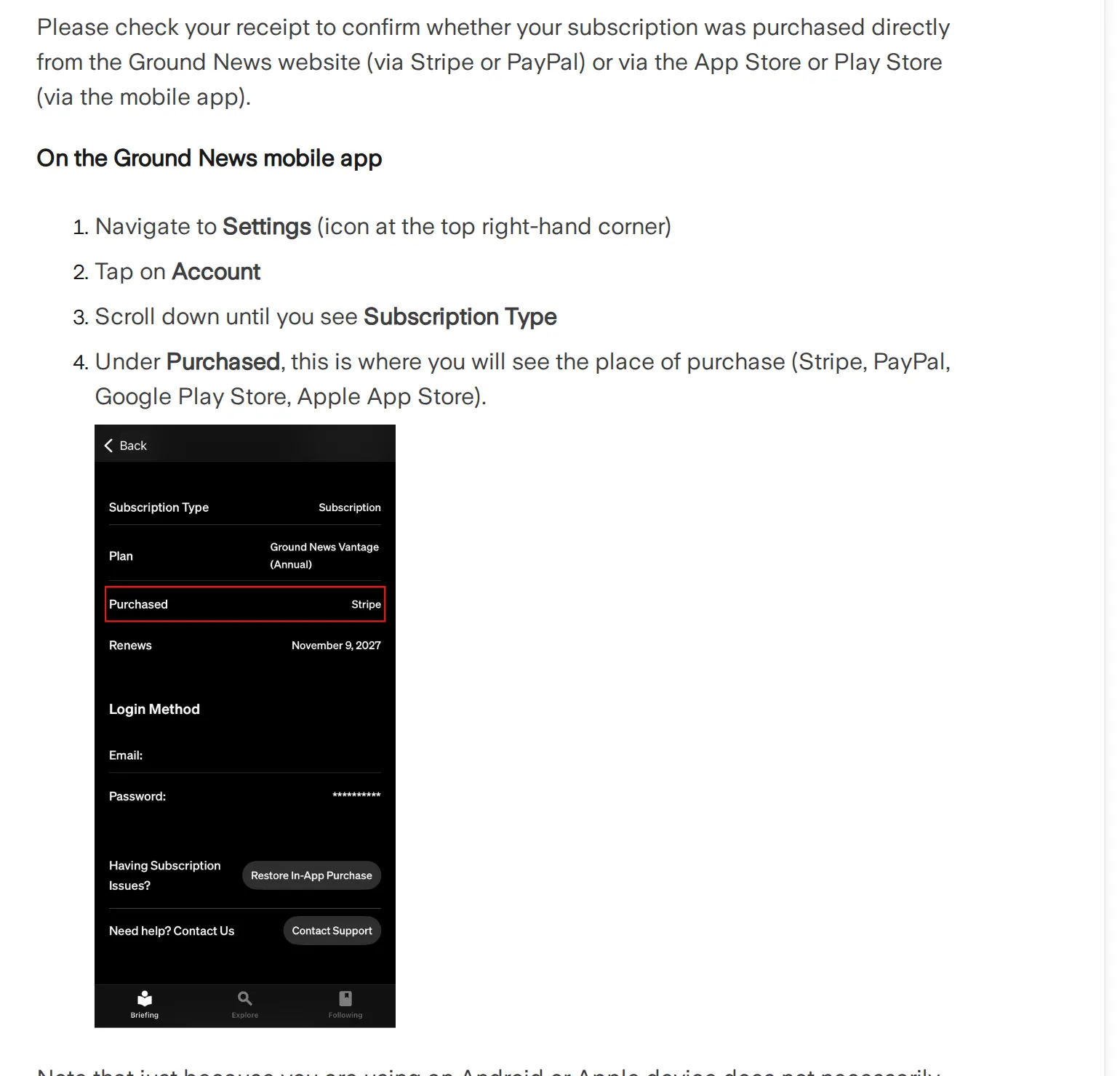 Ground News’s own cancel guide, showing where the app names the place you paid, 10 November 2026. Source: help.ground.news
Stripe means you paid by card on the website. Ground points out that using the app on an iPhone or Android phone doesn’t mean you bought it there: plenty of people subscribe on the website and then sign in on their phone. If Ground News isn’t in your App Store or Google Play subscriptions list, you most likely paid on the website.
Cancel on the Ground News website (card)
- Sign in at ground.news/account/subscription. From the home page it’s My Account > Subscription on a computer, or Account > Account Menu > Subscription in a phone browser.
- Find your plan and click Manage next to it.
- Cancel, then look for the confirmation email.
If the Manage button isn’t there, Ground says you’re probably signed in to a different account from the one that paid. Search your inbox for the subscription receipt, see which address it went to, sign out and sign back in with that one. A paid account that shows “Free” is the same problem.
Cancel a PayPal subscription
PayPal subscriptions are stopped in PayPal, not on ground.news. Sign in on the PayPal website, open Account Settings, and under Payment Preferences click Manage Automatic Payments, or go straight to paypal.com/myaccount/autopay/connect. The payment is listed as Snapwise Inc., the company behind Ground News, not as Ground News. Click it, then Cancel.
Cancel Ground News on iPhone or iPad
If you subscribed in the iOS app, Apple bills you and only Apple can stop it. Open Settings, tap your name, tap Subscriptions, tap Ground News, then Cancel Subscription. You might need to scroll to find the button. If there’s no Cancel button, or you see an expiration message in red, it’s already cancelled (Apple support).
On a computer, the same list is at account.apple.com/account/manage/section/subscriptions. If Ground News isn’t there, Apple suggests searching your email for “receipt from Apple” to see which Apple Account was charged. It may be another one you use, or a family member’s, and Apple says you can’t cancel a family member’s subscription: they have to.
Cancel Ground News on Android
Google Play subscriptions are cancelled in Google Play. Go to subscriptions in Google Play, select Ground News, tap Cancel subscription and follow the instructions. Google is explicit that uninstalling the app doesn’t cancel the subscription (Google Play Help).
Which deadline to believe: 24 or 48 hours
Ground’s two pages disagree. The help article says to cancel “at least 48 hours prior to the renewal of the subscription term to avoid additional charges”. Its Refund & Cancellation Policy says “at least 24 hours prior” (Ground News).
Use 48. Nobody gets charged for cancelling early, since you keep everything you’ve paid for until the period ends. Ground says it emails a reminder at least 7 days before a renewal and that these sometimes land in spam, so add Ground News to your contacts if you’re on an annual plan.
Cancelling the Vantage free trial
The 7-day Vantage trial needs cancelling like any other subscription: Ground’s trial page says it turns into a paid Vantage plan unless you cancel before the trial ends (Ground News Help). On the US App Store, Vantage is $99.99 a year or $9.99 a month (App Store), so that’s what a forgotten trial costs.
If you started the trial in the iPhone app, Apple’s rule is to cancel at least 24 hours before the trial ends. For a web trial, go by Ground’s 48 hours. Either way, cancel on day five rather than day seven.
Ground News refunds: what you get back depends on the day
Cancelling only stops the next charge. It doesn’t return money already taken, and you keep paid features until the end of the period you’ve paid for. A refund is a separate request.
For subscriptions bought on the Ground News website, which are billed yearly (monthly plans exist only in the app, per Ground News Help), the refund policy has three steps. A request within 48 hours of the original purchase gets “a full refund minus any transaction fees”. After 48 hours, the refund is “prorated according to how many months remain on your subscription”, again minus fees. After 7 days, there’s no refund at all, though access continues to the end of the annual term. Ground also says it can only refund active subscriptions, and can’t refund promotional offers or gift subscriptions. A group subscription bought by a school or other institution is the administrator’s to cancel, through Ground’s support team.
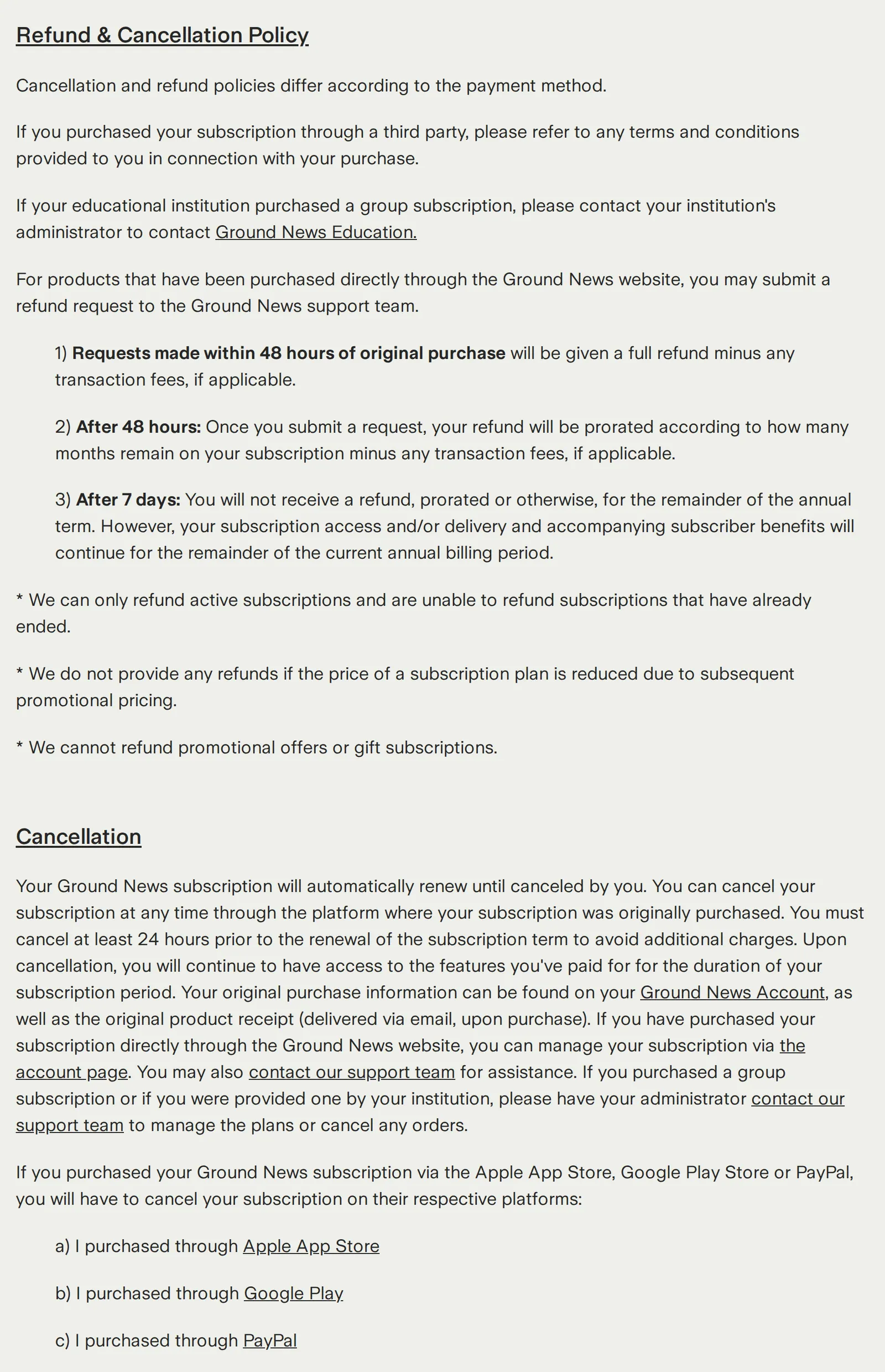 Ground News’s Refund & Cancellation Policy, 10 November 2026. Source: ground.news
To ask, email [email protected] or call +1 (866) 471-9181, the contacts Ground gives on its cancel page; its troubleshooting page also lists [email protected] for billing problems. The help article is stricter than the policy: a request within 48 hours “may receive a full refund (minus fees)”, and “no exceptions will be made”. If a renewal surprised you, write the same day.
If Apple or Google billed you
Ground’s refund policy sends store buyers to the store’s own terms. For Apple, sign in at reportaproblem.apple.com, choose I’d like to, then Request a refund, and pick the subscription. Apple says some purchases might be eligible and to allow 24 to 48 hours for an update (Apple support).
For Google Play, go to play.google.com, click your profile picture, then Payments & subscriptions > Budget & order history, and click Report a problem next to the charge. Google usually decides within a day, up to four. Its own page says to contact the developer instead when more than 48 hours have passed since the purchase (Google Play Help), and Ground’s policy points store buyers back to the store’s terms. In practice, a Play refund is worth asking for only inside those first 48 hours.
Two things that don’t cancel it, and one that undoes it
- Deleting your account data. Ground says filling out the “Data Deletion” form in the app or on the website “will not cancel your subscription”. Cancel first, then delete.
- Uninstalling the app. The store keeps billing.
- Restore In-App Purchase reactivates a cancelled subscription, so don’t press it after cancelling. My Ground News not working guide covers a paid plan that isn’t recognised.
If you haven’t had a cancellation email from whoever billed you, Ground’s view is that no cancellation was received. Check again before the renewal date.
What’s left after you cancel
The free plan stays, without factuality scores or ownership data (Ground News); what each paid tier adds is in Ground News free vs paid. If the free plan covers what you actually opened the app for, cancelling costs you little.
If what you used was the side-by-side view of how different outlets covered one event, Hushread does that for the outlets you choose, on every plan: add their sites or feeds and articles about the same event fold into one story with a timeline. It’s free with no limit on sources, and Pro, at $2.08 a month billed yearly, adds instant alerts when a source you pick publishes (Hushread plans). It has no bias or factuality labels and no Blindspot, so if those are why you subscribed, Ground’s paid plans are still the tool for it.
FAQ
How do I cancel my Ground News subscription?
Cancel where you paid: at ground.news/account/subscription with Manage for card payments, in PayPal’s automatic payments for PayPal, in iPhone Settings > your name > Subscriptions for App Store purchases, or in Google Play’s subscriptions for Android. Do it at least 48 hours before renewal.
How do I unsubscribe from Ground News in the app?
The app doesn’t cancel anything itself. It shows where you paid under Settings > Account > Subscription Type > Purchased, and you cancel on that platform: Apple, Google Play, PayPal or the Ground News website.
Can I get a refund from Ground News?
For website purchases, email [email protected]: within 48 hours you get a full refund minus fees, after that a refund prorated by the months left, and after 7 days nothing. App Store and Google Play purchases are refunded, if at all, by Apple or Google.
Can I use Ground News without a subscription?
Yes. The free plan compares coverage across outlets, saves articles, follows up to 30 interests and shows 6 Blindspot stories a day. Factuality scores and ownership data need a paid plan.
Does deleting my Ground News account cancel the subscription?
No. Ground says the Data Deletion form doesn’t cancel a subscription, and uninstalling the app doesn’t either. Cancel with whoever bills you first.
If you liked the paid features and only a surprise renewal stung, cancelling now and resubscribing later is fine: you keep access to the end of the period either way. If you’re leaving for good, the other coverage-comparison apps are in Ground News alternatives, and Hushread vs Ground News sets out what you gain and lose by trying Hushread instead.