
Disclosure: Hushread is my app. I’ve tried to be fair, and I say where the others are the better choice.
If the Ground News app is not working, the fix depends on what you see. “Something went wrong” on launch and “Invalid Login” with Google are both bugs Ground News lists as open, and the workaround for each is to delete the app, reinstall it and sign in again. A feed that won’t load can come down to a VPN, an ad blocker or a weak connection. And if you’ve paid but the app says Free, use Restore In-App Purchase or sign in with the exact method you subscribed with.
What Ground News says is broken right now
Update the app first. The current iOS version needs iOS 17.6 or later (App Store). The Android listing was last updated on 7 October 2026. While the app is broken, the website still takes the same login, so you can keep reading at ground.news (Ground News help).
Then open the Known Issues & Bug Fixes page. It’s the closest thing Ground News has to a status page, and it was last edited on 28 October 2026. It lists four open bugs, all on mobile.
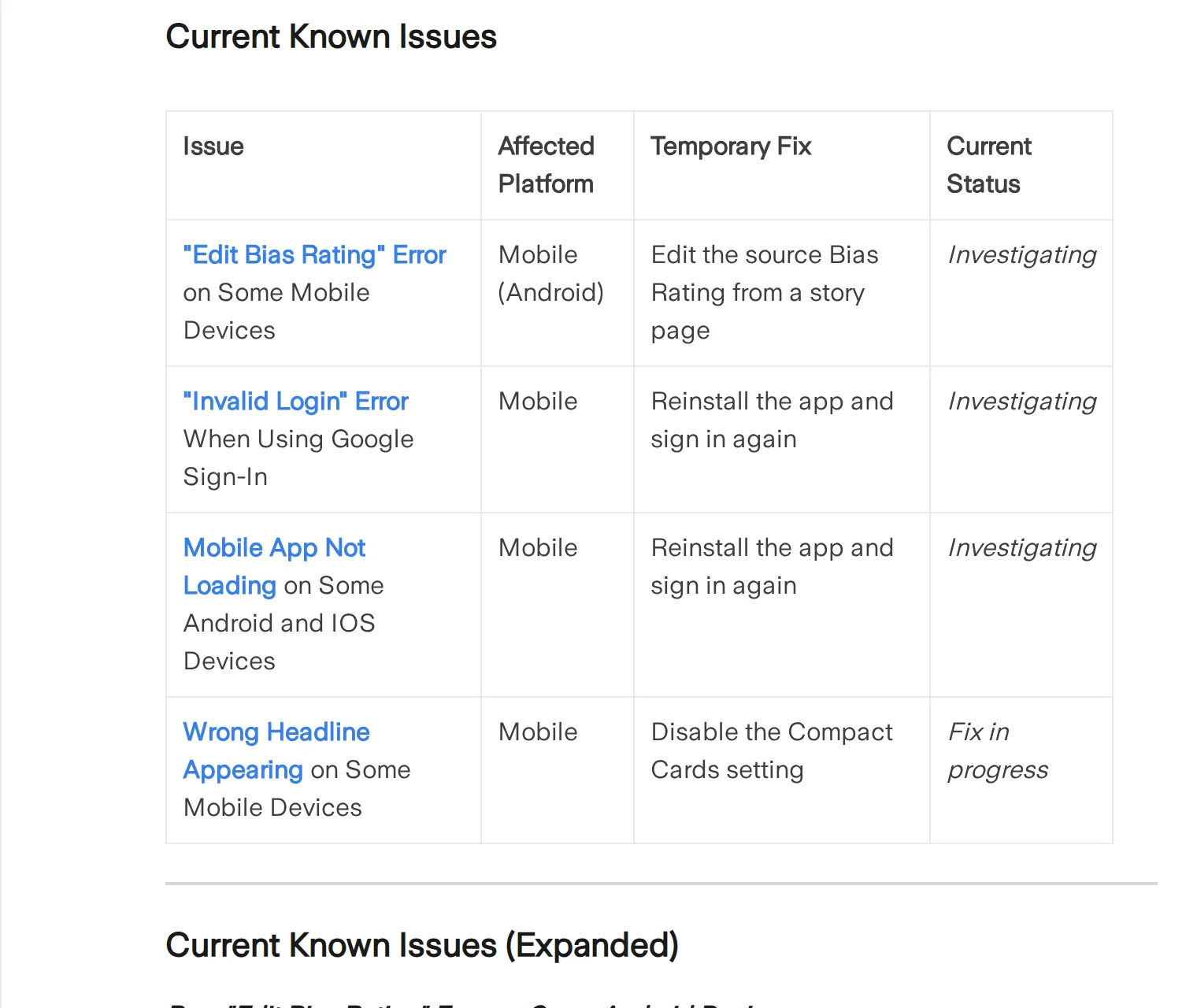 Ground News’s list of open bugs on 2 November 2026. Source: help.ground.news
| What you see | Whose problem | Fix |
|---|---|---|
| “Something went wrong” on launch | Ground News, open bug | Delete, reinstall, log back in |
| “Invalid Login” with Google | Ground News, open bug | Reinstall, or ask for a temporary password |
| Feed won’t load | Often your connection | VPN or ad blocker off, change network, reinstall |
| Headline doesn’t match the story | Ground News, open bug | Turn off Compact Cards |
| “Edit Bias Rating” error on Android | Ground News, open bug | Edit from a story page |
| Paid, but the app says Free | Your account or store | Restore, or match the sign-in method |
| Paywall on an article | Usually the publisher | Filter out paywalled sources |
| No notifications | Settings on two levels | Check the app, then the phone |
Ground News app not loading
If you get “Something went wrong” when you open the app, on iPhone or Android, this is the listed bug. Delete the app, reinstall it from the App Store or Google Play, and log back in. Ground News’s status for it is “Investigating”.
If the app opens but the feed stays empty, follow Ground News’s feed article in order:
- Turn off your VPN or ad blocker for a moment, then reload. You can turn it back on afterwards.
- Disconnect from your Wi-Fi, then reconnect or join a stronger network, and reopen the app.
- If it’s still blank, uninstall and reinstall.
The first two steps apply on the website too. If the site loads and the app doesn’t, that points to the app rather than your account.
“Invalid Login” and other sign-in problems
The Google sign-in bug has the same first step: delete the app, reinstall, and sign in with Google again. If that fails, Ground News says to email [email protected] for a temporary password.
Login trouble can also come from having more than one way in. A Ground News account can have an email and password plus linked Google, Apple or Facebook sign-ins (Ground News help). If you can’t remember which you used, email [email protected] and they’ll help find the account. For a forgotten password, use “Forgot password?” on the sign-in page and check spam (Ground News help).
Ground News subscription not recognized
Which route you take depends on where you bought it (Ground News help).
Bought in the App Store or Google Play. Open the app and go to Profile > Manage Account > Restore In-App Purchase. Ground News says this reactivates a cancelled subscription, so don’t press it if you cancelled on purpose.
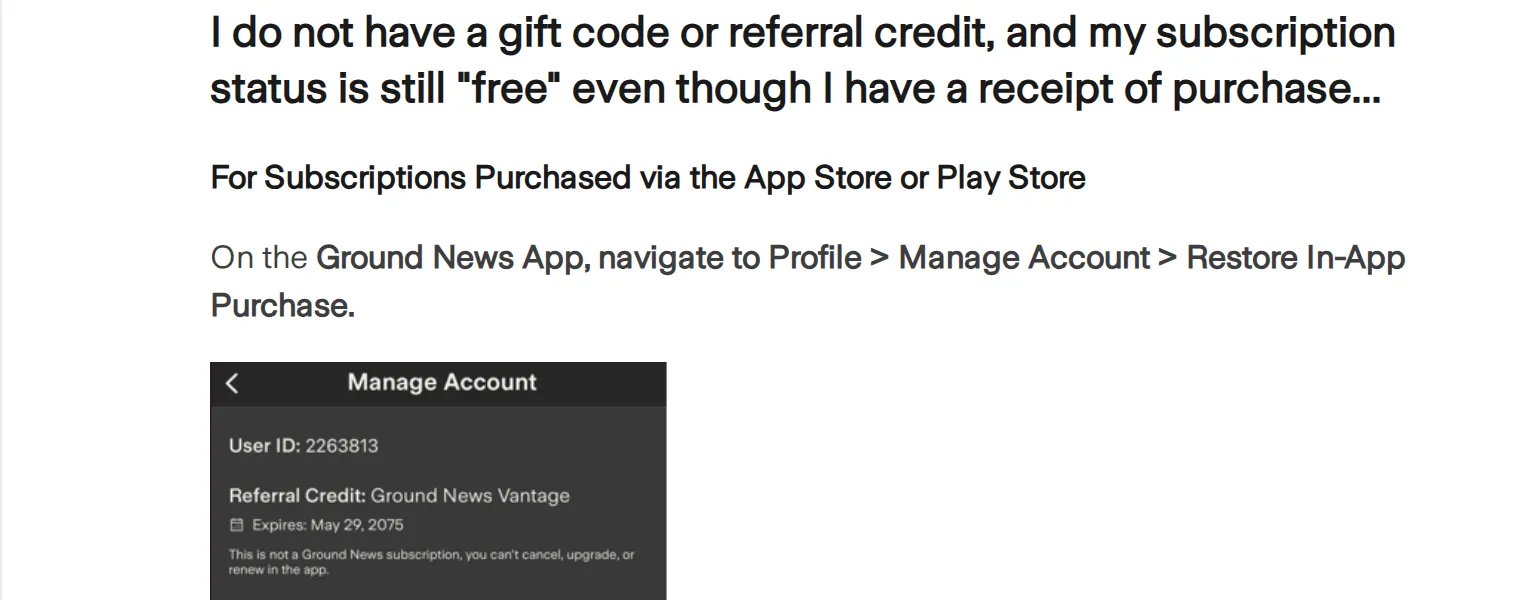 The restore path on Ground News’s help page, 2 November 2026. Source: help.ground.news
If Restore just keeps loading, you probably bought it on the website, so use the next route instead.
Bought on ground.news. Sign in at ground.news/login with the same credentials you subscribed with. A web subscription works in the app, wherever you bought it (Ground News help). If you subscribed with a social login, use that same one.
Signed in to the wrong account. In the app, tap Profile, then the settings cog, scroll down and tap Sign Out. Then sign back in with the original account.
None of that worked. Check whether the email on the subscription is hidden or mistyped. iCloud Private Relay, for one, creates an anonymised address. Then email [email protected] with your receipt number. With no receipt, send your name as entered at checkout, the last four digits of your card and the payment date. Comments on the help articles aren’t answered, so don’t leave one there.
Ground News notifications not working
Notification settings sit in a different place on each platform (Ground News help).
- Android: tap the Alerts tab (the bell), then the Settings icon at top right.
- iPhone: tap your profile icon, the Settings icon at top right, then Manage Notifications under Preferences.
Check Daily News Update while you’re there, since it can be switched off in the app. If the app settings look right, look at the phone. On iPhone, open Notifications in Settings, tap Ground News and turn on Allow Notifications (Apple). On Android it’s Settings > Notifications > App notifications, though menu names vary by phone (Android Help).
If both are on and alerts still don’t come, it may not be you. A paying reviewer on Google Play said on 9 September 2026 that notifications “just stopped”. This isn’t on the known issues list, so report it to [email protected].
Ground News widget not working
Ground News’s Personalize Your News Feed and Fix a Problem articles don’t cover widgets, and the known issues list doesn’t mention one. A Google Play review from February 2026 said “Widget not working”. Your options are the generic ones: remove the widget, add it again, and update the app. If that fails, report it to [email protected].
Paywalls after you’ve paid
A Ground News subscription doesn’t remove publishers’ paywalls (Ground News help). If the wall belongs to the newspaper, your subscription is working. Premium+ subscribers can hide paywalled sources with Sort & Filter or the Universal Paywall Filter.
If you’re tired of fixing it
Four open bugs don’t make a bad app, and if bias labels and Blindspot are why you’re there, nothing I’d suggest replaces them, so stick with the fixes above. Hushread vs Ground News goes through what each is for. Pricing is in Ground News alternatives.
If you mainly want to read one event across several outlets, there’s a simpler route. In Hushread you add the outlets yourself and the feed runs newest first. Articles about the same event link into one story, on every plan, and big stories get a full timeline. The free plan has no limit on sources. There are no bias labels and no Blindspot, and grouping occasionally splits one event into two stories.
FAQ
Why is my Ground News app not loading?
Ground News lists an open “Something went wrong” bug on iOS and Android, and says a VPN, ad blocker or weak connection can also stop the feed. Delete and reinstall the app, log back in, and try without the VPN.
Is Ground News down?
Ground News’s Known Issues page is where it lists problems, and on 2 November 2026 it showed bugs on some devices rather than an outage. If ground.news loads in a browser while the app doesn’t, the app is the first thing to look at.
Why does Ground News say I have a free account?
You’re probably in a different account from the one that paid, or the purchase needs restoring. Try Profile > Manage Account > Restore In-App Purchase, then sign in with the original method.
How do I contact Ground News support?
Email [email protected] for app problems and [email protected] for billing. Comments on help articles get no reply.
Is there a Ground News widget fix?
Not from Ground News: its known issues list doesn’t mention widgets. Remove and re-add the widget, update the app, and report it to [email protected] if it stays broken.
If a reinstall fixes it, stay put. If the same bug keeps coming back, try Hushread with your main outlets alongside it for a week.