
Disclosure: Hushread is my app. I’ve tried to be fair, and I say where the others are the better choice.
If the SmartNews app is not working in early November 2026, it probably isn’t your phone. SmartNews says a security incident that started on October 31 knocked out parts of the app. By its November 3 update, reading articles and push notifications were back to normal, personalization was still coming back, local news needed a workaround, Facebook sign-in was waiting on an app update, and Missions and Rewards were paused with no restart date (SmartNews Help Center). If your problem is on that list, the table below says what to do. If it isn’t, the usual fixes further down are the ones SmartNews’s own help pages give.
What’s broken right now, and what to do
| Feature | SmartNews’s status (Nov 3) | What you can do |
|---|---|---|
| Reading and browsing articles | Back to normal | If a channel looks stuck, see the general fixes below |
| Local news | Workaround available | Force close, re-enter your zip code, clear the cache |
| Signing in with Facebook, staying signed in | Fix identified, coming in a new app version | Update the app when the new version arrives |
| Missions and Rewards | Paused, no restart date | Nothing; points can’t be earned or redeemed yet |
| Push notifications | Back to normal | Run the notification checks below |
| Personalization | Gradually being restored | Wait; SmartNews says you may see improvements over the next few days |
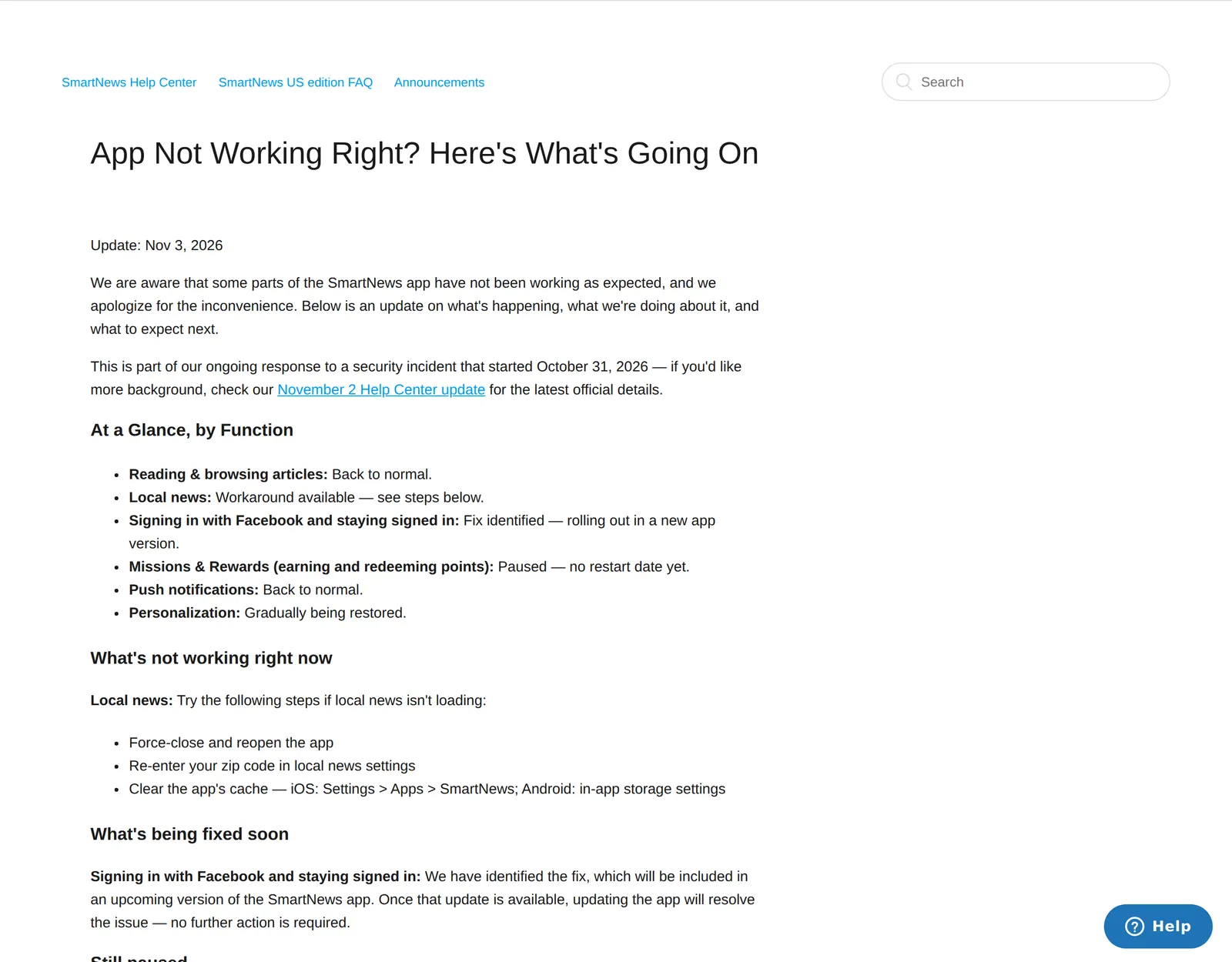 SmartNews’s status article for the incident, 5 November 2026. Source: support.smartnews.com
To clear the cache, SmartNews points you to Settings > Apps > SmartNews on iPhone and to the app’s storage settings on Android. If your feed looks generic or ignores the channels you follow, that’s the personalization restore, not your settings.
What happened: two incidents in ten days
These are two separate events, which is why some people saw the app fail twice.
October 22. SmartNews posted that it had “identified a potential security issue” and had “temporarily suspended some of our services” (SmartNews newsroom). In an update, it said core services were restored, that a third party had exploited “a vulnerability in our server environment”, and that as of 11:00 p.m. ET on October 22 it had found no evidence that personal information or information related to ad delivery had leaked (SmartNews Help Center).
October 31. A new notice said SmartNews had again suspended some features as a precaution (SmartNews newsroom). Its November 2 update says “a third party gained unauthorized access to some of the systems we operate” that day, that features were suspended or restricted through November 1, and that it was still investigating the scope (SmartNews Help Center).
The newest newsroom notice, dated November 4, repeats the same status as of 3:00 a.m. EST that day and warns that some other features may also not be working as expected (SmartNews newsroom). SmartNews hasn’t said whether any accounts were affected by the second incident. Its November 2 update asks anyone with questions about points or rewards to contact the help center.
Is SmartNews down today?
SmartNews posts outage notices in the Announcements section of its help center, which is where the June 8 to 9, 2026 outage was posted too (SmartNews Help Center). So if the app won’t load, check there first. If there’s no fresh notice, the problem is more likely at your end, and the fixes below apply.
SmartNews not loading: the general fixes
SmartNews’s own article on news not loading blames “a weak network signal or a temporary server problem” and suggests four checks (SmartNews Help Center):
- Switch between Wi-Fi and mobile data and see if anything changes.
- Open a website in your browser to confirm you’re online at all.
- Turn off any VPN, ad blocker or child-safe filter for a moment.
- Move somewhere with a better signal, or wait and try again.
If the feed loads but won’t update, pull down firmly on any channel to refresh. SmartNews says there’s no manual-only refresh setting, and that if the feed still looks stuck after a pull-down, force-closing the app and reopening it makes a fresh connection (SmartNews Help Center).
SmartNews not working on iPhone or an older Android
SmartNews now supports iOS 17.0 and above and Android 9.0 and above (SmartNews Help Center). The US App Store listing agrees on iOS 17.0 for iPhone and iPad (App Store).
Android 8.0 and 8.1 lost support on April 13, 2026. You can keep using the version already installed, but it can’t be updated, and SmartNews says it can’t guarantee the app will keep working correctly (SmartNews Help Center). Since the Facebook sign-in fix arrives as an app update, an Android 8 phone won’t receive it.
SmartNews local news not working
Apart from the current incident, local news covers US zip codes only, excluding Puerto Rico and the Northern Mariana Islands. For zip codes inside that area, SmartNews’s fix is to reset the zip code, clear the cache and restart the app (SmartNews Help Center).
If a tab named after your city disappeared, that was on purpose: SmartNews replaced city channels with one Local channel, just left of Top, which follows your location or a zip code you enter (SmartNews Help Center).
Local was hit in the June outage and again in this one. If it’s the reason you open the app, a second route to your town’s news that doesn’t depend on SmartNews is worth having. In Hushread you’d paste your local paper’s website, which works even when the paper has no feed, and add your town’s name as a topic; both arrive newest first next to your other sources, with nothing ranked or injected. It’s free, with no limit on sources. Unlike SmartNews, it won’t find local outlets for you from a zip code: you add your paper yourself. My local news app comparison covers the other options for a single town.
SmartNews notifications not working
Push notifications are back, according to SmartNews. If yours still aren’t arriving, its notifications article has four steps (SmartNews Help Center):
- In SmartNews, tap Profile (bottom right), then the Settings gear, then Notifications, and turn notifications off and back on.
- In your phone’s settings, check notifications are allowed. On iPhone: Settings > Notifications > SmartNews. On Android: Settings > Apps > SmartNews > Notifications, with the categories you want switched on.
- Let it run in the background. On iPhone, turn on Background App Refresh for SmartNews; on Android, make sure battery optimization doesn’t have it set to Sleeping or Restricted.
- Restart the phone, open SmartNews, scroll for a minute and wait.
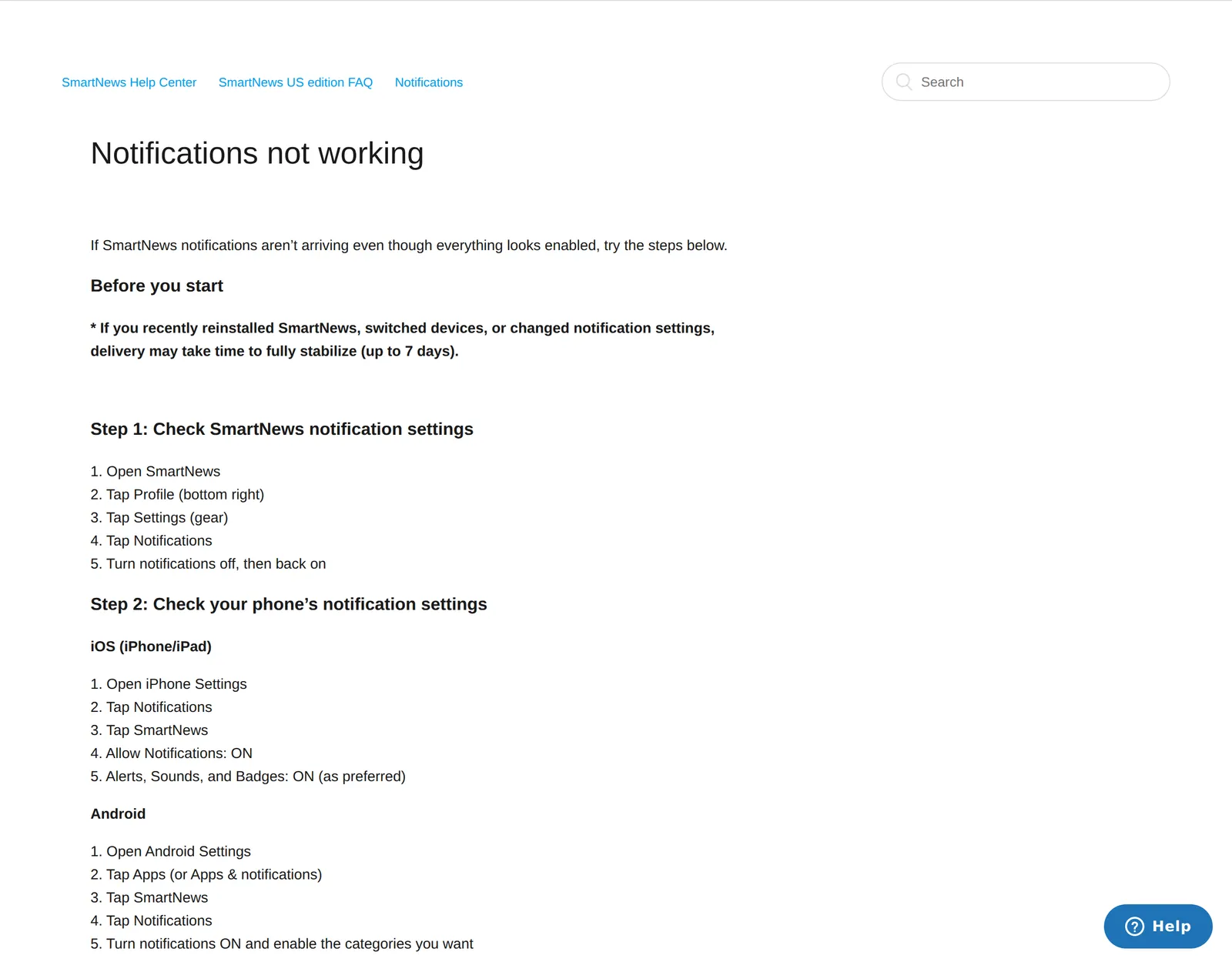 SmartNews’s notification troubleshooting article, 5 November 2026. Source: support.smartnews.com
Reinstalling won’t fix notifications quickly. SmartNews says that after a reinstall, scheduled notifications can take about a week to come back, because a reinstall resets the device token its servers use to reach your phone (SmartNews Help Center). If you’ve just reinstalled, that delay is expected.
Can’t log in to SmartNews
Facebook sign-in is the known problem right now, and SmartNews says updating the app will fix it once the new version is out. For email logins, its login article says to simply try again first, and if that fails (SmartNews Help Center):
- Request a new link, because links expire quickly.
- Open the email on the same phone the app is on. If the link opens the app without logging you in, copy the whole URL and paste it into Safari or Chrome instead of tapping it.
- If you get an error straight after entering the verification code, stop requesting new ones. SmartNews says repeated requests extend a temporary lock, and to wait a full 24 hours before trying again.
Things that look broken but aren’t
- The Profile tab is missing. The header hides as you scroll. Drag down on the channel feed and the search bar and Profile icon slide back (SmartNews Help Center).
- A shared link opens the download page. Tap Read Full Article on that page to go to the publisher’s site without installing anything (SmartNews Help Center).
Contacting SmartNews
If none of this works, SmartNews’s own Profile tab article says to contact support through the contact options in your device’s app store and to include your device token. To copy it, open Profile, tap the Settings gear, scroll to the bottom and long-press the version information.
FAQ
Why is SmartNews not working today?
Most likely the security incident that began on October 31, 2026. SmartNews’s November 3 update says reading and notifications are back, while local news needs a workaround, Facebook sign-in needs an app update and rewards are paused.
Why is SmartNews local news not working?
The incident affected local news. SmartNews’s fix is to force-close the app, re-enter your zip code and clear the cache. Local news covers US zip codes only, not Puerto Rico or the Northern Mariana Islands.
Why is the SmartNews app not working on my iPhone?
Check the incident status first, then your iOS version: SmartNews needs iOS 17.0 or later. On an iPhone that can’t run iOS 17 you can’t get the current version, so fixes like the coming Facebook sign-in update won’t reach you.
When will SmartNews rewards be back?
SmartNews hasn’t said. Its November 3 update says earning and redeeming points is paused with no restart date, and that tapping Missions in the app opens that update so you can check for news.
Is SmartNews safe after the hack?
For the October 22 incident, SmartNews said it found no evidence that personal information was leaked. For the October 31 incident it said it was still investigating the scope, so watch its help center for an update.
If the fixes worked, SmartNews is still a decent free app for US headlines and local news, and staying put is reasonable. If this month made you want a feed built from sources you picked, my SmartNews alternatives roundup compares the options, and Hushread is one of them.