
Disclosure: Hushread is our app. We’ve tried to be fair, and we say where the others are the better choice.
Google Discover is the feed of articles and videos Google recommends in the Google app, on google.com and, on some Android phones, one swipe right of the home screen. People leave it because it is built from their Google activity instead of a list they chose, and because users report it repeating the same topics, leaning on clickbait and vanishing on some phones. It also never reaches the iPhone home screen. The best Google Discover alternative depends on which of those bothers you. On the Android home screen, use Smart Launcher’s Your Feed, or Samsung News on a Galaxy. To let someone else keep choosing, Google News, Flipboard and SmartNews are free. To choose every source yourself, use an RSS reader such as Feedly or Inoreader, or Hushread.
Why people leave Google Discover
- You can nudge it, but you can’t pick its sources. Google’s help page lists what you control: follow or unfollow a topic, like a card, and “Not interested in [Topic]” or “Don’t show content from [Source]” (Google support). Following a publisher, added in September 2025, lets you “see more of their content” (Google blog). In August 2026 Google said a new menu option would let you ask for “more (or less) of” something (Google blog). Every control means more or less. None means only. As Android Police put it in April 2026, “You can’t control exactly what sources Google Discover draws from” (Android Police).
- Clickbait and repeats. Google listed “Reducing sensational content and clickbait in Discover” as a goal of its February 2026 Discover core update (Google Search Central). In July 2025, Reporters Without Borders said Discover had “increasingly showcased websites with clickbait headlines and questionable or entirely false content” (RSF). In January 2026 a Samsung forum user wrote that their feed was “more than half soccer” and “I tap see less like this but nothing changes” (Samsung Community).
- It runs on your Google activity. Google describes Discover as showing “content related to their interests, based on their Web and App Activity” (Google Search Central). Its help page adds Search Services History, app and contact info from your devices, and location.
- It disappears or breaks. Samsung says “The availability of Google Discover may vary depending on your country, carrier, and model” (Samsung support). A Galaxy S25 Ultra owner reported in April 2025 that the feed “keeps disappearing and only comes back when I restart my phone”, and a January 2026 reply said it was still happening (Samsung Community).
- It isn’t on the iPhone home screen. Google’s iPhone page lists two places to find Discover: the Google app, and google.com in your browser (Google support). Only the Android page adds “On some devices, swipe right from your device’s home screen.”
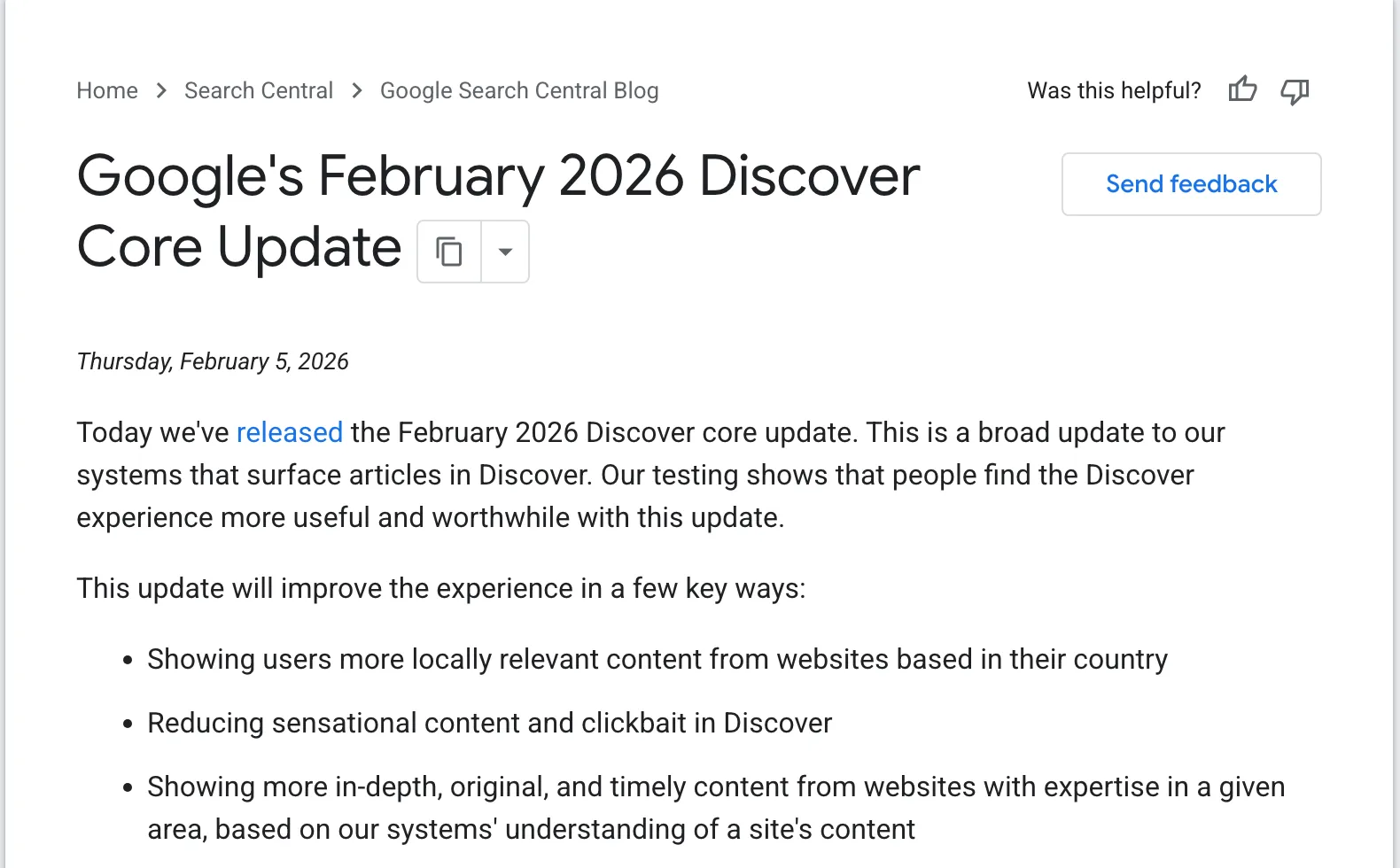 Google’s announcement, captured 6 October 2026. Source: developers.google.com
How to turn off Discover on Android
Google’s steps (Google support):
- Open the Google app.
- At the top right, tap your profile picture or initial, then Settings, then General.
- Turn off Discover.
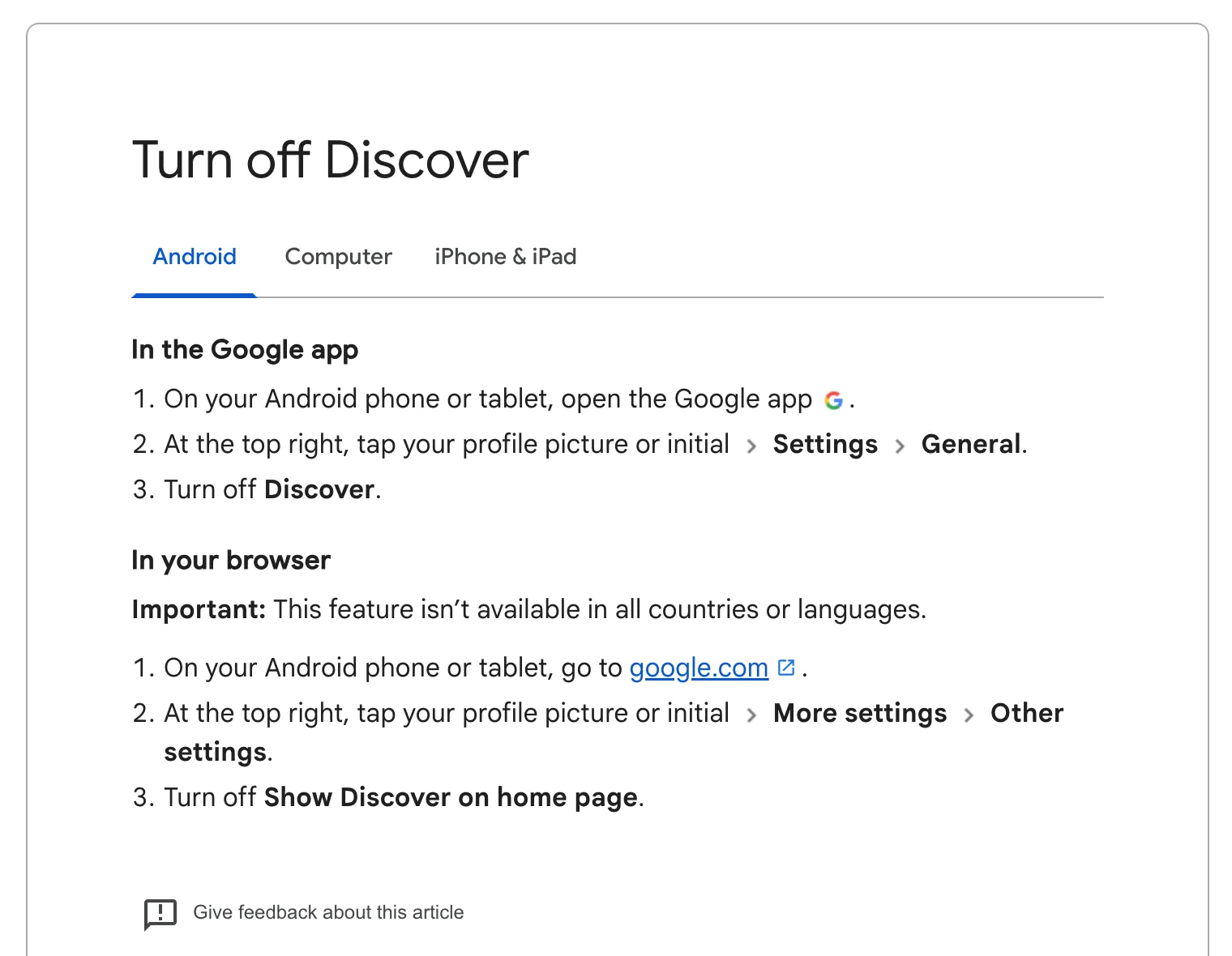 Google’s help page, captured 6 October 2026. Source: support.google.com
One catch, per that Android Police piece: the switch “won’t remove the page, so swiping right will still show a blank page.”
In a browser, go to google.com, tap your profile picture, then More settings, then Other settings, and turn off Show Discover on home page. Google says this one isn’t available in all countries or languages.
On a Galaxy, touch and hold a blank part of the home screen, swipe right to the Discover or Samsung News page, and tap the switch at the top (Samsung support). In Chrome, open a new tab, tap More at the top right, then Customize new tab page, then Discover feed, and turn it off (Chrome help).
Google Discover alternatives at a glance
Checked on 6 October 2026, US prices:
| Option | Who picks the stories | Where it runs | Price |
|---|---|---|---|
| Smart Launcher (Your Feed) | You, by RSS | Android home screen | Free to install; Pro is an in-app purchase |
| Samsung News | Samsung’s partners and an algorithm | Galaxy phones and tablets | Free |
| Google News | Google, plus what you follow | Android, iPhone, web | Free, with ads |
| Flipboard’s curators, in topics you pick | Android, iPhone, web | Free, with ads | |
| SmartNews | Editors and an algorithm | Android, iPhone | Free, with ads |
| Feedly or Inoreader | You, by RSS | Web, Android, iPhone | 100 or 150 feeds free; Pro $6 or $7.50 a month, billed annually |
| Hushread | You | iPhone, iPad, Android, web | 5 sources free; Pro $1.25 a month billed yearly |
1. Smart Launcher’s Your Feed: a home-screen feed you fill yourself
Smart Launcher is a replacement Android home screen. Since version 6.5, announced in November 2024 and released that December, it has included Your Feed, which its makers call “a customizable alternative to the Google Discovery panel”. It is built on RSS, so you follow suggested sources or add any site by its feed URL (Smart Launcher blog, changelog). Version 6.6, in January 2026, added a reading mode, bookmarks and topic browsing (changelog). The launcher is free to install with in-app purchases (Google Play), and the Pro price varies by country (Smart Launcher docs). The changelog says Your Feed is “Enabled by default to all new users”, but not whether any of it needs Pro.
The downside: you have to replace your whole launcher to get it, it is Android only, and your feeds stay on the device with no sync (Smart Launcher blog).
2. Samsung News: the built-in swap on a Galaxy
Galaxy phones and tablets “come with both Google Discover and Samsung News”, and you choose which one sits a swipe right of the home screen (Samsung support). Samsung describes it as personalized news from “250+ partners”, available only through the Galaxy Store (Samsung). It is free, needs no Samsung account, and lets you follow or hide publishers (Samsung Canada).
The downside: it is another recommendation feed. Samsung says it “utilizes algorithms and user preferences”, and nothing on its pages mentions adding a source of your own. That Canadian help page lists only the United States and Canada.
3. Google News: same company, more control
Google News is a separate app with a Following tab for topics, sources and locations (Google support). It is free with ads on Android (Google Play), free on iPhone (App Store) and on the web at news.google.com.
The downside, in Google’s words: “Computer algorithms determine which stories show up on Google News and in what order.” If Google’s ranking is why you’re leaving, see our Google News alternatives.
4. Flipboard: a magazine of topics
On Flipboard you pick topics, which it fills with stories “curated by experts”. You can also follow people on Threads and Mastodon (Google Play). It is free with ads on Android, free on iPhone (App Store), and it works in a browser at flipboard.com.
The downside: the stories inside each topic are picked for you.
5. SmartNews: headlines with no setup
SmartNews describes its feed as a “thoughtful blend of editor and algorithmic curation” (SmartNews). It is free with ads on Android (Google Play) and iPhone. The US App Store lists “Ads-free SmartNews” purchases at $4.99 and $3.99, with no period given (App Store), and the plan’s terms limit it to the US edition (SmartNews terms).
The downside: like Discover, the feed is chosen for you, with ads in it.
6. Feedly or Inoreader: an RSS reader
An RSS reader is the opposite of Discover: you add the sites, and it shows what they publish. Feedly’s free plan follows up to 100 feeds in 3 folders. Pro has 1,000 feeds and hides sponsored ads (Feedly). In the US it is $72 a year, which is $6 a month (archived price feed); an address in India is quoted more (Feedly pricing). Inoreader’s free plan follows 150 RSS feeds. Pro is $7.50 a month billed annually, for 2,500 (Inoreader). Both have iPhone and Android apps (Feedly on the App Store, Inoreader on Google Play).
The downside: nothing arrives until you add it, and every outlet’s version of a big story shows up separately. Our best RSS reader guide compares more of them. To follow a subject instead of an outlet, our Google News RSS feed generator turns a search into a feed.
7. Hushread: your sources, newest first
Hushread is an RSS and news reader for iPhone, iPad, Android and the web. You pick the sources: RSS feeds, websites without a feed, subreddits, YouTube channels, public Facebook pages, and topics. A topic is a word or phrase tracked across the web, the nearest thing here to following an interest in Discover. The feed shows every article newest first, with nothing ranked or injected, and coverage of one event from different outlets is linked into a single story. There are no ads.
The downside: the free plan holds 5 sources, so most people replacing Discover will need Pro, at $1.25 a month billed yearly in the US. Your feed holds only what you added, so it won’t surprise you the way Discover can. There is no swipe-right page, only a home-screen widget that shows your latest article. And it is built by one person. More in our guide to a news app without an algorithm.
When staying with Discover is the right call
Stay if what you like is being surprised. Google itself calls Discover “serendipitous” (Google Search Central), and a reader you fill yourself mostly shows you what you already chose. As Android Police put it, “a wider net can catch interesting articles from sources you haven’t specified”. If the feed mostly works, prune it with “Don’t show content from [Source]” before you replace it.
FAQ
What is the best Google Discover alternative?
It depends on who you want choosing. Inoreader (150 feeds free), Feedly (100 feeds free) and Hushread (5 sources free) show only what you follow. Google News, Flipboard and SmartNews are free and choose for you.
Is there a Google Discover alternative for iPhone?
Yes. On iPhone, Discover lives only inside the Google app and on google.com, so any news app is a like-for-like swap: Google News, Flipboard, SmartNews, Feedly, Inoreader and Hushread all have iPhone apps. Launcher feeds such as Smart Launcher’s are Android only.
What is the best Google Discover feed alternative on Android?
For the home screen, Smart Launcher’s Your Feed gives you an RSS feed you control, at the cost of switching launchers. On a Galaxy, Samsung News can take Discover’s swipe-right page, though Samsung’s help page lists it only for the US and Canada.
Why is Google Discover not working?
First check it is switched on: Google app, profile picture, Settings, General, Discover. Google’s help page also lists turning on Search Services History and Personalized recommendations as step one of customizing Discover. Beyond that, Samsung says availability varies by country, carrier and model.
If Discover’s surprises are the part you’d miss, stay and prune it. If you’d rather an app chose for you, Google News, Flipboard and SmartNews cost nothing. For your own sources in order, Hushread is free with up to 5 sources on iOS, Android and the web. Try Hushread.