
Disclosure: Hushread is my app. I’ve tried to be fair, and I say where the others are the better choice.
A Google Alerts RSS feed still exists in 2026, but only for alerts you manage while signed in to a Google account. Edit the alert, open Show options, set Deliver to to RSS feed instead of your email address, click Update Alert, then copy the address behind the RSS icon next to the alert. It looks like https://www.google.com/alerts/feeds/<number>/<number>, and it’s an Atom feed any reader can take. Deliver to takes one destination, so the alert goes to the feed instead of your inbox.
Why you don’t see the RSS option
Google’s own help never mentions feeds. It says “Click Create Alert. You’ll get emails whenever we find matching search results” (Google Alerts Help), and that’s the whole delivery story it tells, so nothing promises the feed will keep existing. The option is real all the same: Feedly’s help says an alert can be “delivered as RSS feed” (Feedly docs), and rss.app’s June 2026 walkthrough says to “find the Deliver to dropdown” and switch it from your email address to RSS Feed (rss.app).
That menu lives on the signed-in form. Signed out, Show options opens five settings (How often, Sources, Language, Region, How many) and ends at an Enter email box. There’s no delivery menu at all, so an alert created that way can only be email.
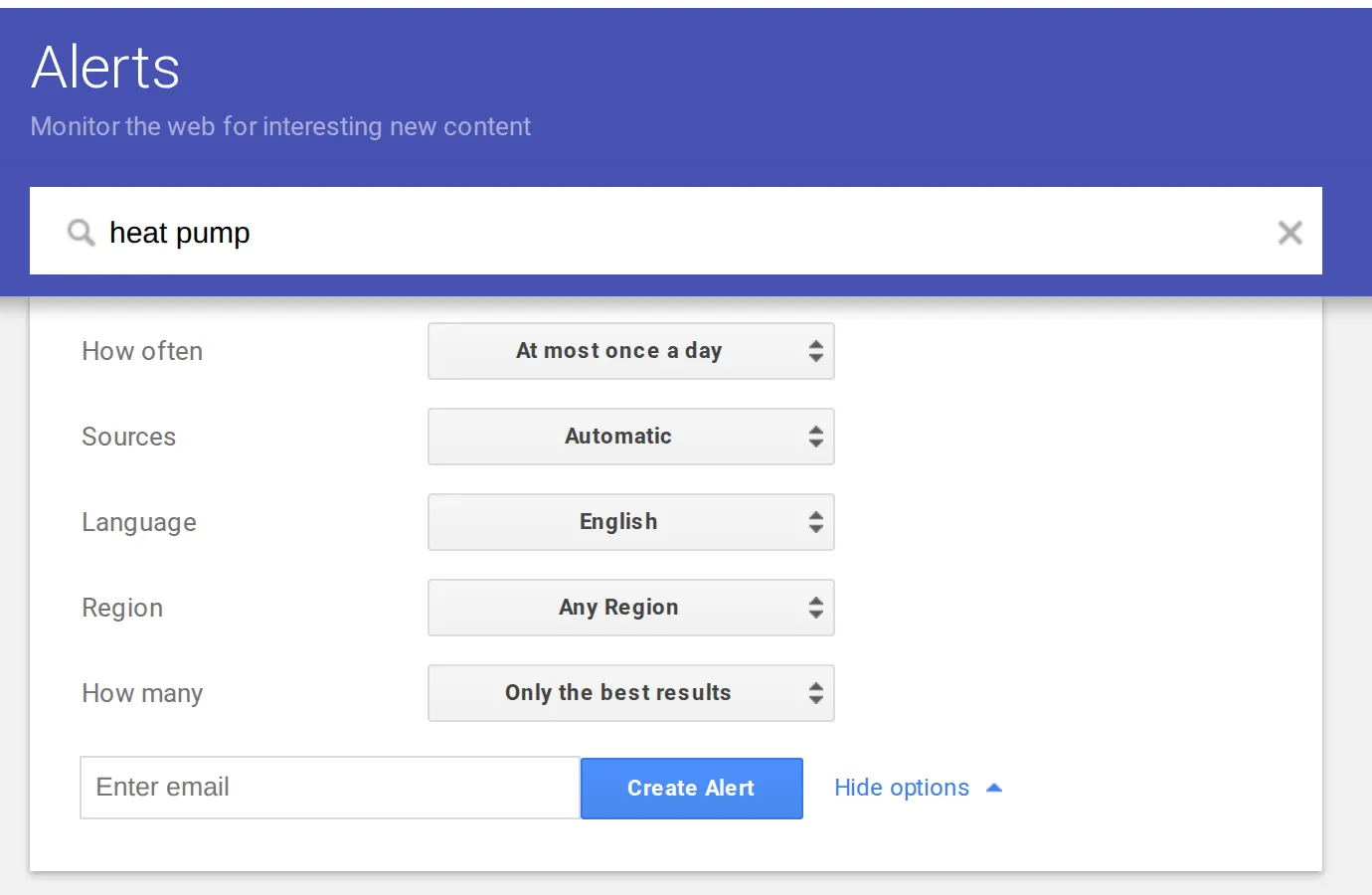 The Google Alerts form for “heat pump”, signed out, 23 October 2026. Source: google.com/alerts
So the first step is Sign in at the top right of the Alerts page. Any Google account works, and it doesn’t need Gmail: Google’s help says “You don’t need to have a Gmail address to create a Google Account” and you can use an email address you already have (Google Account Help).
How to turn a Google Alert into an RSS feed
- Sign in at google.com/alerts.
- For a new alert, type the words and click Show options. For an existing one, click Edit next to it under My Alerts. Google’s help covers this part: “Next to an alert, click Edit”, then “If you don’t see any options, click Show options.”
- Set Deliver to to RSS feed.
- Click Create Alert or Update Alert.
- An RSS icon appears next to the alert in My Alerts. Click or right-click it and copy the URL.
- Paste that address into your reader’s add-feed box.
Since Deliver to holds one destination, an alert set to RSS no longer goes to your inbox. If you want both, make two alerts with the same words, one for each.
The How often setting doesn’t matter much for a feed: your reader fetches it on its own schedule. How many does. It starts on “Only the best results”; switch it to “All results” if you’d rather filter the extras yourself than have Google drop them.
What a Google Alerts feed actually contains
On 23 October I opened three public alert feeds, for “startup”, “Seedstars” and “upstart”. Their addresses are listed on a feed directory, so anyone can read them.
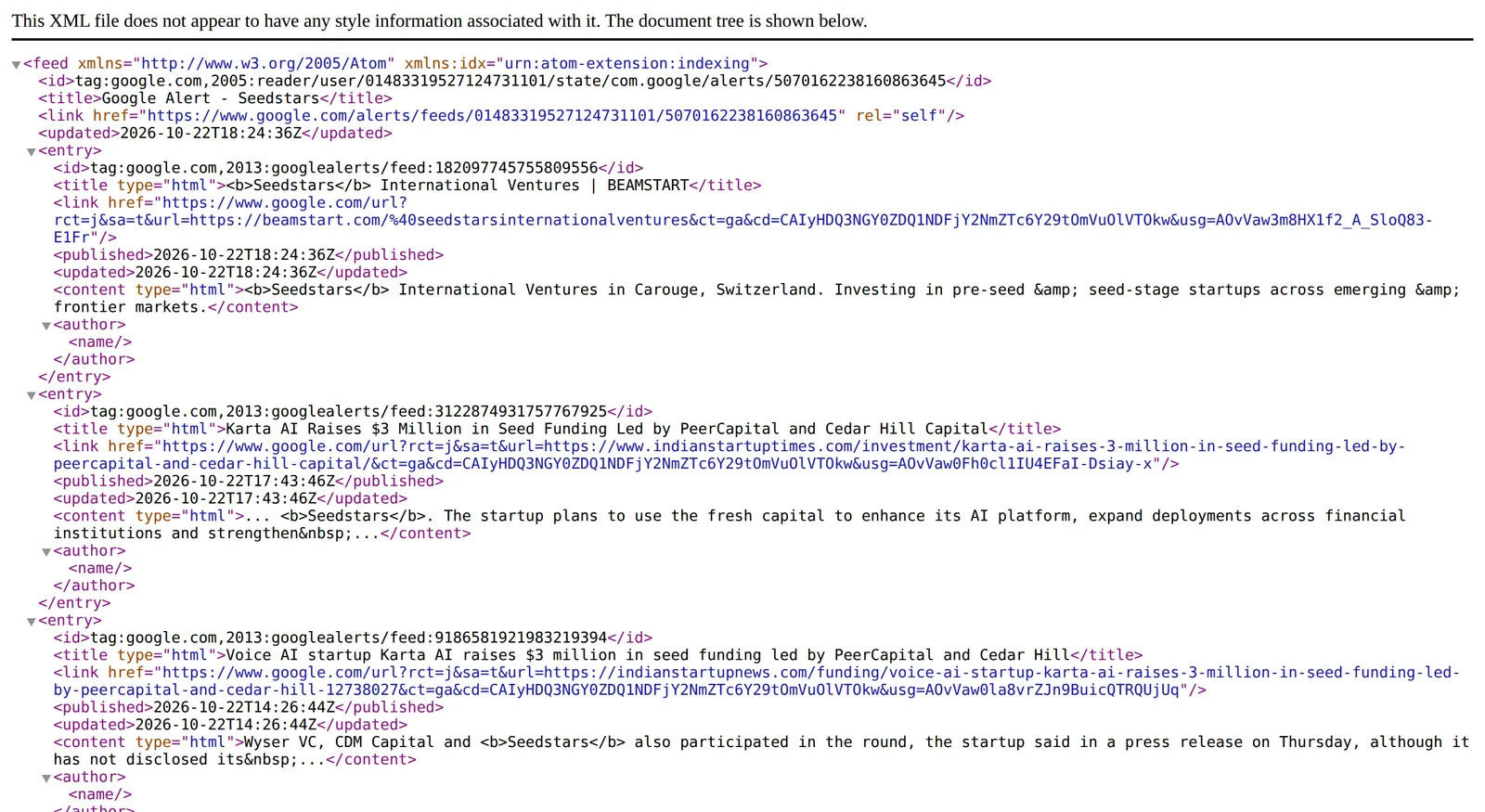 The Atom feed of a Google Alert for “Seedstars”, opened in a browser on 23 October 2026. Source: the feed as listed on feeder.co
- It’s Atom, not RSS. The feed opens with
<feed xmlns="http://www.w3.org/2005/Atom">. Every reader I know of takes both, so this only matters if you’re writing your own script. - Links go through Google. Every entry links to
https://www.google.com/url?...&url=<the real article>&.... You land on the article after a redirect, and the real address is only visible inside that parameter. - Titles carry markup. When the keyword is in a title, it’s wrapped in
<b>tags, sent as escaped HTML (type="html"). The Atom standard says markup in such a title “MUST be escaped” (RFC 4287), and good readers turn it back into bold text. A careless one shows<b>Seedstars</b>literally. - The body is a snippet. One or two lines from the page, often cut off with an ellipsis. No picture, and the author field is empty.
- About a day’s worth. The “startup” feed held 20 entries, all from a single six-hour stretch. The quieter two held 14 entries spanning 39 hours and 16 spanning 28 hours. If your reader refreshes once a day, a busy alert can drop results before you ever see them.
- Duplicates. The “upstart” feed listed the same Simply Wall St article twice, once as its normal page and once as the AMP version. The “Seedstars” feed carried one funding round three times, from three outlets.
None of this is broken. It’s what you get from a feed made out of search results instead of from a publisher.
Google Alerts feed vs a Google News feed
The other way to follow a phrase in a reader is a Google News search feed, which needs no account at all: https://news.google.com/rss/search?q=Seedstars. The rest of that format is in my Google News RSS feed guide. To skip the URL syntax, build one with the Google News RSS feed generator.
I ran “Seedstars” through both on the same day. The Google News feed, limited to the past two days with when:2d, gave 10 news articles (the feed). The alert feed had 14 entries over roughly the same two days, and 6 articles were in both. The difference was what each one counts as a result:
| Google Alerts feed | Google News search feed | |
|---|---|---|
| Account needed | Yes, to switch on RSS | No |
| What it searches | Google Search: news plus other pages | Google News only |
| In my “Seedstars” test | News, a LinkedIn post, a startup directory profile, an events page | News articles only |
| Links | google.com/url redirect | news.google.com redirect |
| Settings | Sources, language, region, best or all results | Search operators and country codes in the URL |
Pick the alert when you care about mentions anywhere, a LinkedIn post or a conference listing included. Pick the Google News feed when you only want journalism, or don’t want a feed tied to your Google account.
Things to know before you rely on it
- Anyone with the link can read it. A feed address opens without signing in. That’s how readers fetch it, but it means a shared or published feed URL is public. Keep it to yourself if the alert is for your own name.
- Results can be thin or late. That’s an Alerts problem, not an RSS one; the coverage complaints are collected in my Google Alerts alternatives post.
Following the topic in Hushread instead
If what you actually want is “tell me when this phrase shows up”, there’s a version with no Google account and no feed address to copy. In Hushread, type the words into Add source and tap Track ”…” on the internet; the topic arrives in your feed with every new article from any outlet, and Hushread opens the original article, not a Google redirect (Hushread docs). A Notify rule on the same words sends a push alert for every matching article, from the iPhone, iPad and Android apps (rules).
It’s built on Google News search, so it finds news, not the LinkedIn posts and directory pages an alert picks up. The free plan has no limit on sources, topics included. If you want the wider web results as well, paste the alert’s feed address into Hushread as a source: a Notify rule set to All sources then covers the alert and the topic in one place.
FAQ
Does Google Alerts still have RSS feeds?
Yes. Live alert feeds at google.com/alerts/feeds/... were serving results from the past day on 23 October 2026. The option to switch an alert to RSS appears only when you’re signed in to a Google account.
How do I get Google Alerts to RSS?
Sign in at google.com/alerts, edit the alert, open Show options, set Deliver to to RSS feed and click Update Alert. Copy the link behind the RSS icon next to the alert and paste it into your reader.
Can I use Google Alerts without Gmail?
Yes for email: the signed-out form takes any email address. For an RSS feed you need a Google account, but it doesn’t have to be a Gmail inbox you use.
Why does my Google Alerts feed show bold tags or Google links?
The feed puts <b> markup around your keyword in each title and wraps every link in a google.com/url redirect. A reader that doesn’t decode the title shows the tags as text; the redirect still takes you to the article.
Do I still get emails after switching an alert to RSS?
Not for that alert: Deliver to holds one destination, either your email address or RSS feed. Set up a second alert with the same words if you want email as well.
If you want mentions anywhere on the web and don’t mind a Google account, the alert feed is free and does the job. If you only follow the news, a Google News search feed skips the account, and Hushread skips building the feed at all.