
Disclosure: Hushread is my app. I’ve tried to be fair, and I say where the others are the better choice.
When RSS feed images are not showing, the reader is usually not at fault: the feed has no picture in it, or it puts the picture somewhere readers don’t look. Of 16 major news feeds I checked, seven carried no article images at all (Al Jazeera, DW, CNBC, TechCrunch, Bloomberg, Nature and Hacker News). Three kept pictures only inside the article HTML, and CBS used a tag that isn’t part of RSS. Only five used the standard Media RSS tags made for exactly this. Open the feed, search it for media:content, media:thumbnail, enclosure and <img, and you’ll know in a minute which case you have and what fixes it.
How to check whether a feed has images
Paste the feed URL into a browser. Chrome shows the raw XML; if your browser downloads the file instead, open it in a text editor. Then search the page (Ctrl+F, or Cmd+F on a Mac) for these four strings, in this order:
media:contentormedia:thumbnail. These come from Media RSS, a module that “supplements the<enclosure>capabilities of RSS 2.0” and is now kept by the RSS Advisory Board (Media RSS specification). Amedia:thumbnailis meant for “representative images”, which is exactly what a reader puts next to a headline.enclosure. The original RSS 2.0 way to attach a file, with three required attributes:url,lengthandtype(RSS 2.0 specification). Its own example is an MP3, and it’s mostly used for podcasts, but some feeds attach a JPEG this way.<img(or<img). A picture inside the article body. A reader shows it when you open the item, but a list view may not use it as a thumbnail. Look at what thesrcpoints to: NPR adds a tracking-pixel<img>to every item, so a hit isn’t always a photo.<image>. Near the top of the feed, this is the channel’s logo: the spec defines it as an image “that can be displayed with the channel”, not with each story. Inside an<item>, it’s non-standard.
If none of the four turns up inside the items, there is no picture to show, and no reader setting will add one.
16 news feeds checked for images
Checked on 18 October 2026. “Where” is the tag that carries each item’s picture.
| Outlet | Feed | Where the image is | Notes |
|---|---|---|---|
| BBC News | feeds.bbci.co.uk/news/rss.xml | media:thumbnail | 240 × 135 pixels |
| The New York Times | rss.nytimes.com/…/HomePage.xml | media:content | Mostly 1,800 pixels wide |
| The Guardian | theguardian.com/world/rss | media:content | Three sizes, 140 to 700 wide |
| Wired | wired.com/feed/rss | media:thumbnail | Every item |
| Ars Technica | feeds.arstechnica.com/arstechnica/index | media:content and media:thumbnail | Plus images in the text |
| NPR | feeds.npr.org/1001/rss.xml | <img> in the article HTML | 7 of 10 items |
| The Verge | theverge.com/rss/index.xml | <img> in the article HTML | Atom feed |
| ProPublica | propublica.org/feeds/propublica/main | <img> in the article HTML | Full articles |
| CBS News | cbsnews.com/latest/rss/main | Non-standard <image> in each item | 60 × 60 pixels |
| Al Jazeera | aljazeera.com/xml/rss/all.xml | None | Channel logo only |
| DW | rss.dw.com/rdf/rss-en-all | None | Channel logo only |
| CNBC | search.cnbc.com/…/view.xml?…id=100003114 | None | |
| TechCrunch | techcrunch.com/feed | None | 32-pixel site icon only |
| Bloomberg | bloomberg.com/feeds/technology/news.rss | None | Channel logo only |
| Nature | nature.com/nature.rss | None | Channel logo only |
| Hacker News | hnrss.org/frontpage | None | Links to other sites by design |
The three with pictures only in the article HTML look fine once you open a story; whether the list shows a thumbnail depends on the reader. Section feeds for most of these outlets are in the best RSS feeds for news.
Why the picture is missing, and what fixes each case
The feed has no images
TechCrunch’s feed is generated by WordPress (it says so in its <generator> line), and stock WordPress feeds leave featured images out: “Featured images don’t get included in WordPress RSS feeds by default” (FeedPress).
For a reader, the fix is to get the picture from the article page instead of the feed. Some readers do that for you. Hushread fetches the article page for every source, keeps the article body and its images, and shows them without the ads or page clutter, so a story from a feed with no pictures still opens with its photos. Inoreader lists a similar feature, “read the whole article when a feed sends only a snippet”, on its features page. Where a site blocks automated fetching, no reader can get the page, and the story stays text-only.
The image is in a tag your reader ignores
CBS is the clearest example. Each item has an <image> line holding a 60 × 60 thumbnail URL. The feed even declares the Media RSS namespace at the top, then never uses it:
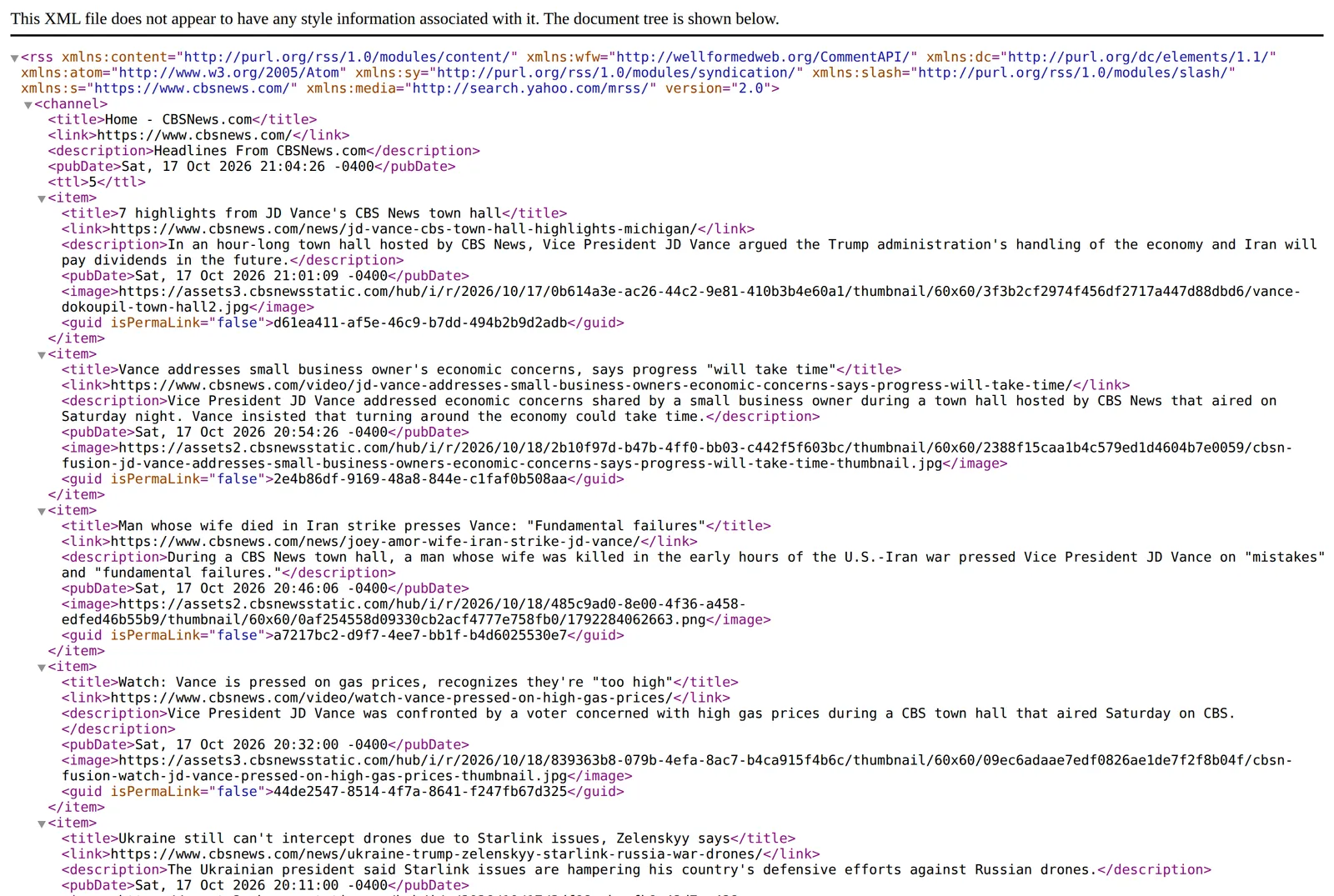 The CBS News main feed as Chrome shows it, 18 October 2026. Source: cbsnews.com
RSS 2.0 has no <image> element inside an item, so a reader that follows the spec skips it. Tools that read every tag they can find do better. The Feedzy WordPress plugin, for one, documents its order: media:content or enclosure first, then itunes:image, then media:thumbnail, then the first image in the content (Feedzy docs). Even then, a 60-pixel picture looks blurry anywhere bigger than an icon.
A reader that fetches the article page is again the practical answer.
The image is too small
BBC’s feed carries a picture with every item, but it’s a 240 × 135 thumbnail, fine in a list and soft in a card or magazine layout:
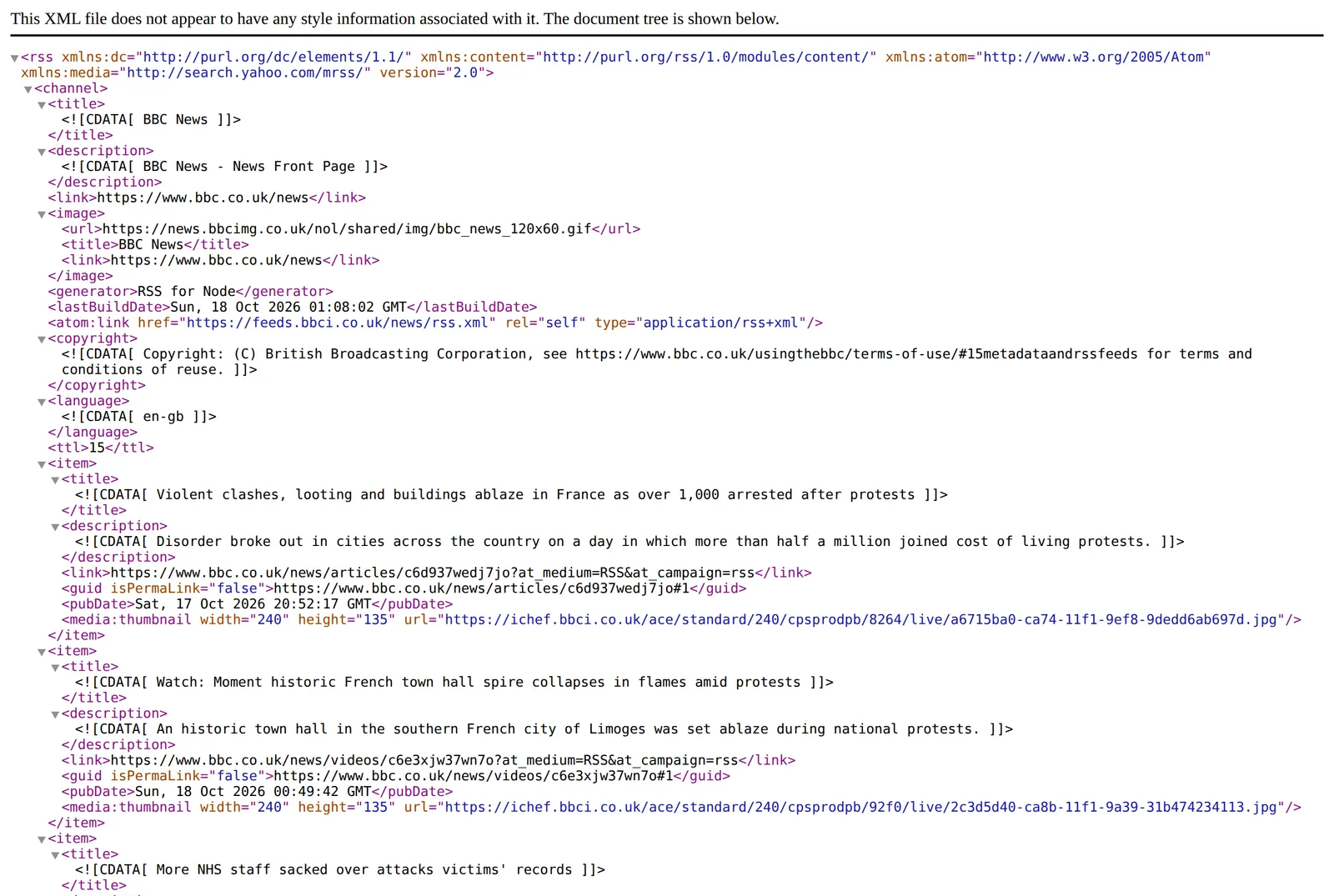 The BBC News front page feed, 18 October 2026. Source: feeds.bbci.co.uk
Dan Q wrote in April 2026, passing on a reader’s tip, that swapping /240/ for /1200/ in the image address returns a much larger version (danq.me). It worked when I tried it: the same photo came back 1,200 pixels wide, 92 KB instead of 6 KB. That’s an unofficial trick that only helps if your reader or a proxy rewrites the URL for you, and the BBC could change its image paths at any time.
The image host blocks your reader
Some sites refuse image requests that don’t come from their own pages (hotlink protection) or from known browsers. The picture’s URL is right there in the feed, but the reader gets an error or a blank instead. Feedzy lists “hotlink protection or site restrictions” as a cause in the same help page. To check, copy the image URL out of the feed and open it in a browser: if it loads there but not in your reader, the host is filtering requests. Inoreader routes article images through a “secure image proxy”, which it says keeps them “out of reach of third-party trackers and network blocks”, so some blocked images load there that don’t load elsewhere.
The feed is badly built
Open RSS rebuilds feeds with problems, and its guide lists “Correcting skewed images and fix sizing and alignment issues” among the fixes: add openrss.org/ to the start of the page address. If the reader shows no new stories either, the feed is failing outright, and why an RSS feed stops updating walks through the checks.
If you publish the feed
Put one picture per item in a media:content element (with medium="image") or a media:thumbnail, using the namespace http://search.yahoo.com/mrss/, and make it at least a few hundred pixels wide. On WordPress, FeedPress points to a plugin plus theme support for post thumbnails, since the default feed leaves featured images out. Check the result with the four-string search above.
FAQ
Why does my RSS feed have no images?
Most likely because the publisher doesn’t include any. Seven of the 16 big news feeds checked here (including Al Jazeera, TechCrunch and Bloomberg) carry no article images, and WordPress feeds leave featured images out by default.
Why is my RSS reader not showing images?
Either the feed has none, the picture is in a tag the reader doesn’t read (CBS uses a non-standard <image> tag), or the image host blocks the reader. Open the feed and search for media:content, media:thumbnail, enclosure and <img to see which.
What is media:content in RSS?
It’s the Media RSS element that attaches a picture, video or audio file to an item, with attributes for the URL, the type of object and its size. Alongside media:thumbnail, it’s the tag designed for the picture that goes with a story.
Can you use an enclosure for an RSS image?
Yes. An <enclosure> with type="image/jpeg" is valid RSS 2.0, and tools such as Feedzy pick it up. It needs url, length and type, and since it’s mainly used for podcasts, media:content is the safer choice for a picture.
If the feeds you follow already carry media:content, the fix is in your reader’s settings or layout, and switching apps won’t help. If they’re in the text-only half of that table, look for an outlet with a fuller feed in full-text RSS feeds, or use a reader that opens the article for you, such as Hushread.