
Disclosure: Hushread is my app. I’ve tried to be fair, and I say where the others are the better choice.
The best Google Scholar alerts alternative is a set of feeds from the places papers first appear: a PubMed search turned into RSS for biomedicine, arXiv or bioRxiv category feeds for preprints, and each journal’s table-of-contents feed. Put them in one feed reader and you see new papers as they’re published, in one list, instead of waiting for Scholar’s emails. Keep Scholar for the one job feeds can’t do: telling you when someone cites your paper. Semantic Scholar does that too, by email.
What Google Scholar alerts do, and what they don’t
Scholar alerts are email only. You click the envelope icon on a search results page and Scholar “periodically” emails you newly published papers that match. Scholar says it sends them “right after we add new papers”, which “usually happens several times a week”, except on holidays (Google Scholar help). The same page covers citation alerts (follow your profile and pick New citations to my articles) and author alerts (follow a colleague’s profile and pick New articles by this author). The help has no RSS option anywhere.
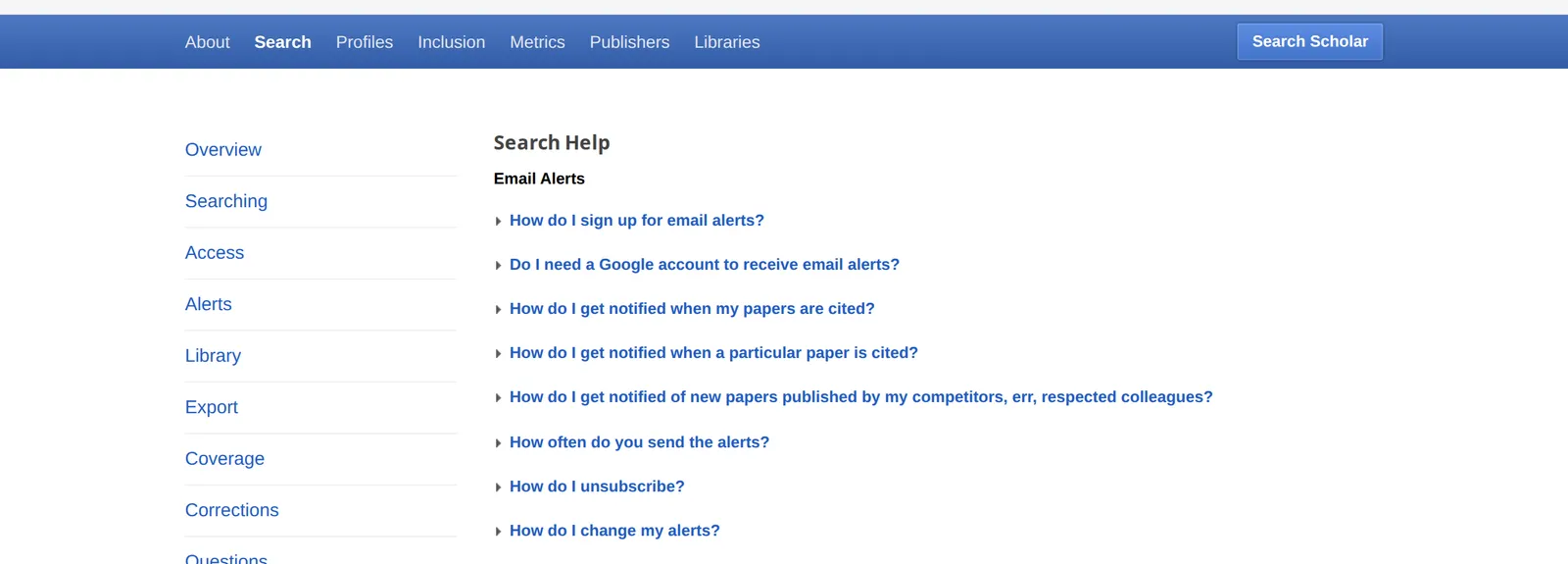 Google Scholar’s alerts help, 18 November 2026. Source: scholar.google.com
That leaves three gaps. Alerts land in an inbox among everything else. You can’t follow a journal, only a search, an author or a paper; Scholar’s help puts it as “we index papers, not journals”. And an alert goes out only after Scholar has added the paper to its index, while a journal or preprint feed carries it when it’s posted.
Which alternative for which need
I opened every feed below on 18 November 2026.
| You want | Use | What it gives you |
|---|---|---|
| New papers matching a search, biomedicine | PubMed Create RSS | Up to 200 newest matches per feed |
| New preprints in a field | arXiv or bioRxiv category feed | One day’s arXiv announcements; bioRxiv’s latest 30 |
| Every paper in a journal | The journal’s table-of-contents feed | Each new issue or article as it’s posted |
| Citations of your papers | Scholar or Semantic Scholar alerts | An email when a new paper cites yours |
PubMed RSS feed for a saved search
PubMed turns any search into a feed. Run the search, click Create RSS under the search box, name the feed, choose how many items it shows, click Create RSS again and copy the link into your reader. PubMed’s help says you can edit the limit= number in that link to show up to 200 items (PubMed help).
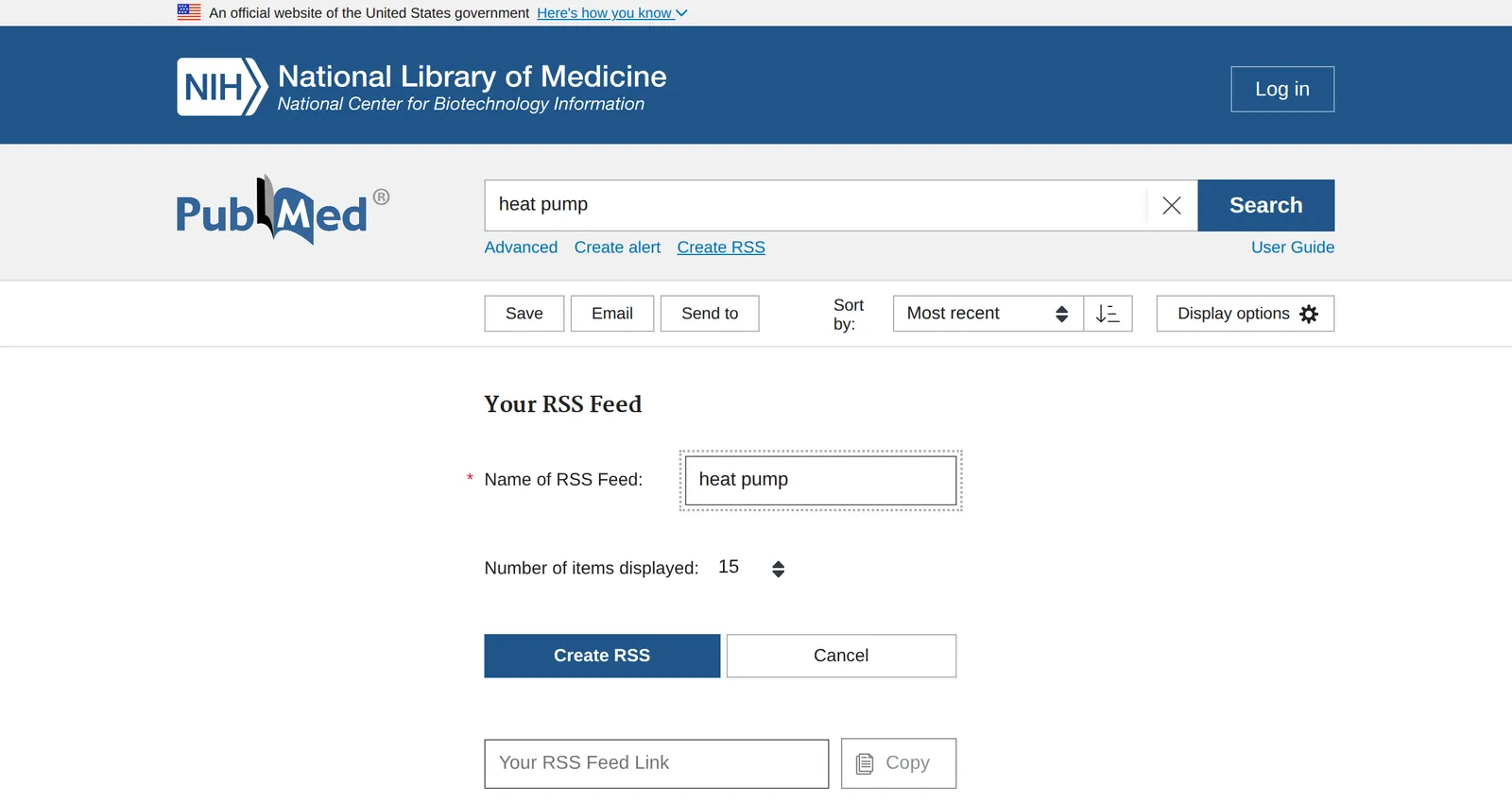 PubMed’s Create RSS panel, 18 November 2026. Source: pubmed.ncbi.nlm.nih.gov
The feed needs no account. PubMed’s Create alert link, next to it, is the email version, and it needs a My NCBI login.
arXiv RSS feed by category
arXiv publishes a feed for every subject area at https://rss.arxiv.org/rss/<category>, with an Atom version at /atom/. Join categories with a plus sign, such as cs.AI+q-bio.NC, and the feeds update daily at midnight Eastern Standard Time (arXiv help).
The size of a feed depends entirely on the category. On 18 November, https://rss.arxiv.org/rss/q-bio.NC (neurons and cognition) held 15 entries, of which 3 were new submissions; the rest were cross-lists from other categories and updated versions. The same day’s cs.AI feed held 717 entries, 135 of them new. If you follow a busy category, a keyword rule in your reader matters more than the feed. My guide to AI news RSS feeds has more on taming arXiv’s computer science lists.
bioRxiv feeds
bioRxiv’s feeds carry the latest 30 posts, across all subjects or in one, in Atom format. You can combine subjects with a plus sign, and multi-word subjects take underscores, as in subject=genetics+plant_biology (bioRxiv). The neuroscience feed, https://connect.biorxiv.org/biorxiv_xml.php?subject=neuroscience, returned 30 preprints, all posted on 17 November. Thirty is a day’s worth in a big subject, so check the feed often or narrow the subject.
Journal RSS feeds: table of contents alerts
Most journals publish a feed of each new issue, or of articles as they’re posted online. It’s the most precise alternative: you get everything in the journals you read, and nothing else. Four I follow:
- Nature:
https://www.nature.com/nature.rsscarried 75 items dated 11 to 16 November, research papers and news together. - Nature subject feeds:
https://www.nature.com/subjects/neuroscience.rsscarried 30 items from across nature.com’s journals, Scientific Reports most often, spanning 16 and 17 November. A subject feed is the closest thing to a topic alert from one publisher. - Science: the table-of-contents feed at
https://www.science.org/action/showFeed?type=etoc&feed=rss&jc=scienceheld 44 items, all from the 12 November issue. It updates once a week, with the issue. - PLOS ONE: the Atom feed at journals.plos.org/plosone/feed/atom carried 30 entries, all published 17 November.
A smaller journal is the same hunt: look for an RSS icon or link on its current-issue page. My guide to finding the RSS feed of any website has the tricks for when there’s no icon.
Semantic Scholar: the other citation alert
If what you’ll miss from Scholar is citation alerts, Semantic Scholar is the nearest substitute. It offers author alerts (new papers or new citations for an author), paper alerts (new citations of a paper) and topic alerts (new papers that mention a research topic), sent once a day or once a week (Semantic Scholar FAQ). Alerts need an account, and like Scholar’s, they arrive by email.
Putting the feeds in one place
Any feed reader takes these addresses. The useful part is what the reader does with 200 PubMed matches, a daily arXiv list and a dozen journals. For readers that can alert on a keyword, see RSS readers with notifications.
In Hushread, paste each feed address and put them in a folder, so new papers from PubMed, arXiv and your journals arrive newest first in one list. A Notify rule on a gene, a method or a colleague’s name sends a push alert for every matching paper across all of them, and a Mute rule hides the ones you never read.
Every plan, free included, follows as many sources as you like, and Notify rules work on every plan; Pro, $2.08 a month billed yearly, adds an alert the moment a chosen source publishes (plans). Hushread doesn’t track citations or export to a reference manager, so keep Scholar or Semantic Scholar for that, and Zotero for your library.
FAQ
Is there an alternative to Google Scholar alerts?
Yes: feeds for new papers (PubMed Create RSS, arXiv and bioRxiv category feeds, journal table-of-contents feeds) and Semantic Scholar for citation alerts by email.
Does Google Scholar have an RSS feed?
No. Google Scholar’s help describes only email alerts for searches, citations and authors, and offers no RSS option.
How do I get a PubMed RSS feed?
Run your search on PubMed, click Create RSS under the search box, choose a name and the number of items, click Create RSS and copy the link. You can raise the limit= value in the link to 200, and no account is needed.
How do I get an arXiv RSS feed?
Use https://rss.arxiv.org/rss/ followed by the category, such as q-bio.NC or cs.AI, and join categories with a plus sign. The feeds update daily at midnight Eastern Standard Time.
How do I get table of contents alerts for a journal?
Look for an RSS link on the journal’s current-issue page and add it to a feed reader. Nature’s is nature.com/nature.rss, and Science’s table-of-contents feed carries each weekly issue.
If citation tracking is what you rely on Scholar for, keep Scholar’s alerts or move them to Semantic Scholar; feeds won’t replace that. If you want every new paper in your field, as it’s posted, the feeds above in any reader do it better than an inbox. Hushread is one way to read them.