
Disclosure: Hushread is my app. I’ve tried to be fair, and I say where the others are the better choice.
To listen to news on iPhone, open the News app, tap Audio, then tap Apple News Today for a free spoken briefing of the day’s top stories. That only works in the US, UK, Canada and Australia. Anywhere else, or for an article Apple’s editors didn’t pick, use a news podcast in the Podcasts app, or open the article in Safari, tap the Page Menu button and tap Listen to Page: your iPhone reads it aloud, free, with no Apple News needed.
Those are really two different things. A briefing is someone else’s choice of stories, read by a person. Text-to-speech reads the exact article you chose, in a synthetic voice.
| Way to listen | Cost | Where it works | What you hear |
|---|---|---|---|
| Apple News Today | Free | US, UK, Canada, Australia | A weekday briefing from Apple’s editors |
| Apple News+ audio stories | $12.99 a month | US, UK, Canada, Australia | Narrated versions of selected News+ articles |
| News podcasts (NPR, BBC) | Free | In the Podcasts app | Hourly or daily bulletins |
| Safari Listen to Page, Speak Screen, Accessibility Reader | Free | Built into iOS | The article you opened, read by the iPhone’s voice |
| A reader app that reads aloud | Varies | Varies | Articles from sources you picked |
Prices checked on 25 October 2026 on apple.com in the US.
Listen to Apple News Today (free)
Apple News Today is “an audio briefing of the day’s top stories hosted by Apple News editors” (Apple Support). To play it:
- Open the News app.
- Tap Audio, then tap Apple News Today below Apple News Podcasts.
- Tap an episode, then the Play button.
If you don’t subscribe to Apple News+, a preview of a News+ audio story plays when the briefing ends. To get a notification when a new episode is out, tap Following, swipe to the bottom, tap Notifications & Email below Manage, and turn on Apple News Today.
Apple describes it as a weekday morning show hosted by Shumita Basu (Apple), and the same show is in the Podcasts app, where most recent episodes ran 13 to 17 minutes and a few ran 30 to 40 (Apple Podcasts).
The catch is the country list. Apple’s feature availability page lists Apple News, Apple News+ and Apple News Audio in just four countries (Apple). Outside them, say in India or Germany, the News app isn’t offered.
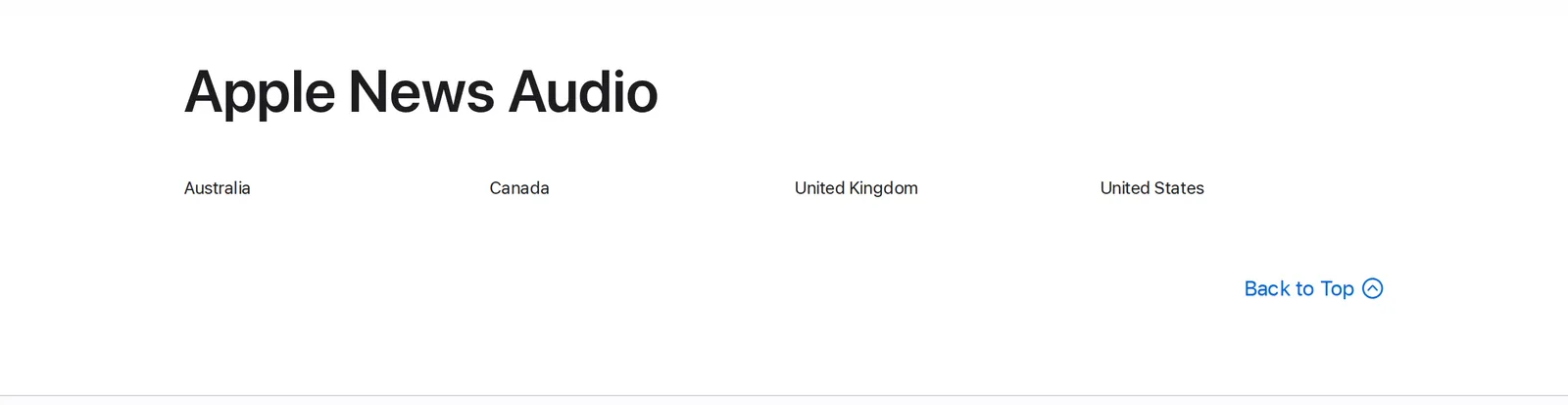 Apple’s iOS and iPadOS 27 Feature Availability page, Apple News Audio, 25 October 2026. Source: apple.com
Apple News+ audio stories (paid)
With Apple News+, you can listen to “professionally narrated versions of some of the best stories available in Apple News+”. It costs $12.99 a month after a free trial, or comes in the Apple One Premier bundle at $39.95 a month (Apple). Audio stories, Apple News Today and the In Conversation interview show also play offline, and Apple says audio works with CarPlay.
In the News app, tap Audio to see the stories. Subscribers get an Up Next queue and a For You list based on their interests. Tap a story to play it, tap the mini player for speed (tap 1x) and AirPlay, and use the More button on any story in a feed to choose Play Next or Play Last (Apple Support). Without a subscription, you only hear previews.
It’s the best-sounding option here, because people read the stories. But “select” is the key word: you hear what Apple chose to narrate, not the article you were about to read. If what you want is a magazine read aloud on the drive, it’s worth the money. If you want the news from outlets you picked, it isn’t the tool.
Listen to news podcasts
Short news bulletins in the Podcasts app are the easiest free option outside Apple’s four countries, and they need no setup. Follow a show and new episodes come to you.
- NPR News Now: “The latest news in five minutes. Updated hourly.” (Apple Podcasts). Good for a quick check at any hour.
- BBC Global News Podcast: world news twice a day on weekdays and daily at weekends, with recent episodes around half an hour long (Apple Podcasts).
A podcast is a fixed program. It’s made for a big audience, so it won’t cover your town, your industry or the company you work for unless that makes national news.
Have your iPhone read any news article aloud (free)
This is the method I use most, because it reads the article I picked, not a bulletin. Your iPhone has three built-in ways to do it.
Listen to Page in Safari
For a news site in Safari, this is the quickest. Open the article, tap the Page Menu button in the address bar, then tap Listen to Page. To pause, tap the Page Menu button again and tap Pause (Apple Support). Apple says it works on “supported webpages”, so on some pages the option won’t be there. Then use one of the next two.
Speak Screen
- Open Settings, tap Accessibility, then Read & Speak.
- Tap Speak Screen and turn it on. Show Controller keeps the controls on screen.
- Open an article and swipe down with two fingers from the top of the screen.
The controls that appear let you pause, change the rate and skip forward or back. You can also ask Siri to “Speak screen.” Under Read & Speak you can pick the voice and speaking rate (Apple Support). It works in any app, including news apps that aren’t a browser. On a cluttered page, though, it reads what’s on screen, menus and captions included, which is where the next option is better.
Accessibility Reader
Accessibility Reader shows the text in a clean full-screen view and reads it aloud, and Apple says it works with any app on your iPhone. Turn it on under Settings › Accessibility › Read & Speak › Accessibility Reader, and turn on Autoplay if you want it to start reading by itself.
To use it on an article, tap the Share button and choose Accessibility Reader, or open it from Control Center (or with a triple-click of the side button, once you’ve added it to your Accessibility Shortcut). Then tap Play. You can skip, change the speed and drag the slider to a point in the audio (Apple Support). On an Apple Intelligence iPhone (iPhone 15 Pro or later), Cleanup Content in its More menu also strips ads and other clutter.
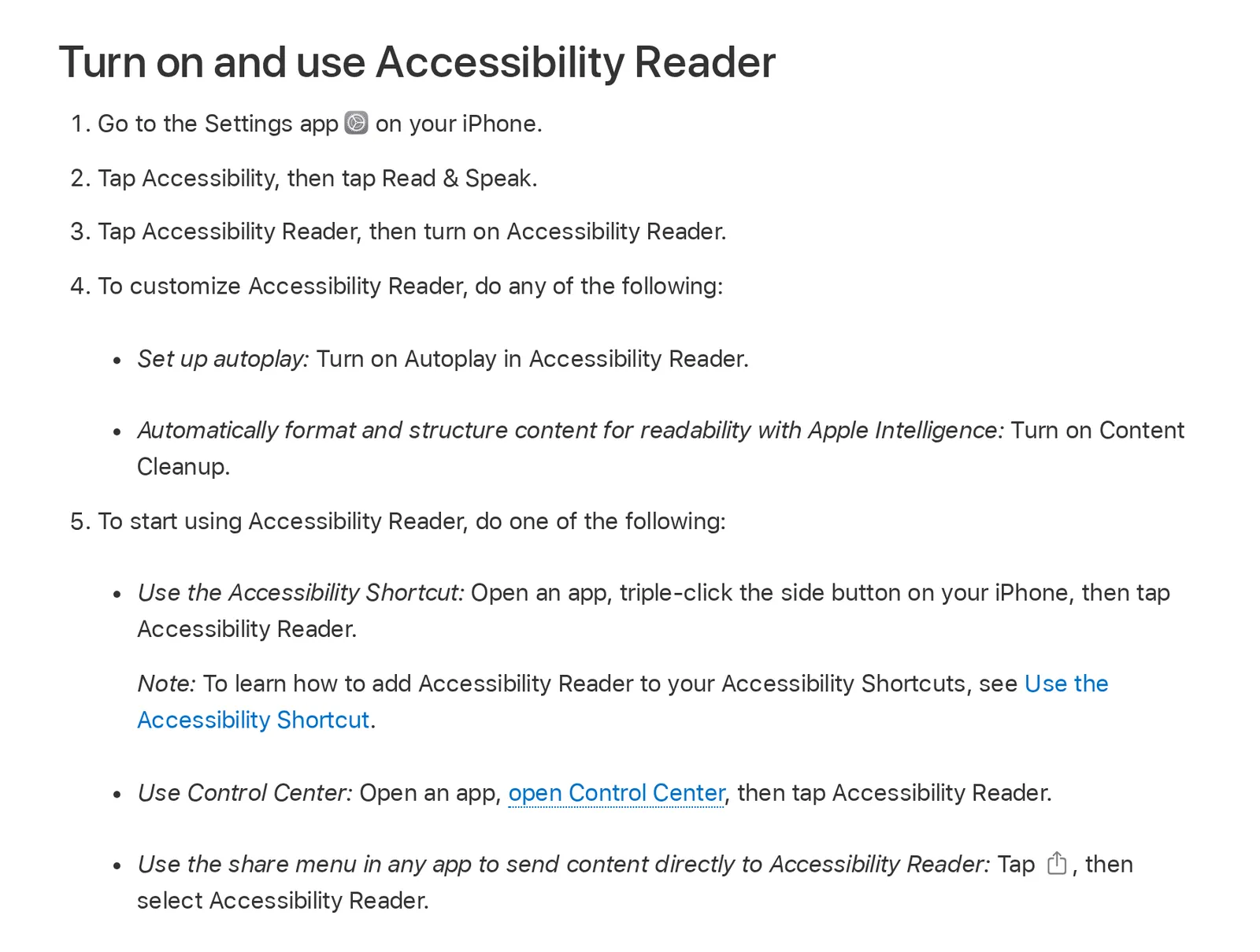 Apple’s iPhone User Guide for iOS 27, “Read or listen to text in apps with Accessibility Reader”, 25 October 2026. Source: support.apple.com
The voice is the iPhone’s own. It’s clear but flat, and it reads one article at a time, so you go back to the screen between stories. Paywalled articles stay paywalled: it can only read what’s on your screen.
Listen to news from sources you choose
The options above give you either Apple’s editors’ picks, a broadcaster’s bulletin, or one article at a time. If you want to hear the outlets you follow, in your own order, you need a news or RSS reader that reads aloud.
In Hushread, you add the sources yourself (news sites, RSS feeds, topics, subreddits, YouTube channels), and the feed shows every article from them, newest first. Open any article and tap the headphones button: it’s read aloud in a natural voice, and on iPhone it keeps playing when you lock the screen or switch apps, with controls on the Lock Screen (Hushread docs). For the overview, tap Listen in Trending to hear a spoken summary, about a minute long, of the stories your sources are covering most (Hushread docs).
It doesn’t depend on Apple News, so Apple’s four-country limit doesn’t apply. The free plan has no limit on sources. It doesn’t play podcasts or radio, and the voice is a synthetic one, not a person. Other readers do this differently, and the best RSS readers for iPhone compares them.
FAQ
Can you listen to Apple News?
Yes. Apple News Today is a free weekday audio briefing in the News app’s Audio tab, and Apple News+ subscribers can also listen to narrated versions of selected stories. Both are only available in the US, UK, Canada and Australia.
How do I get my iPhone to read news articles to me?
In Safari, tap the Page Menu button and then Listen to Page. In other apps, turn on Speak Screen under Settings › Accessibility › Read & Speak, open the article and swipe down with two fingers from the top of the screen, or send the article to Accessibility Reader from the Share button.
Is there a free audio news app for iPhone?
The free options are Apple News Today in the News app, news podcasts such as NPR News Now in Apple Podcasts, and the iPhone’s own Listen to Page and Speak Screen, which read articles aloud.
Can I listen to Apple News outside the US?
Only in the UK, Canada and Australia. Elsewhere, Apple’s News app isn’t available, so use a news podcast or have your iPhone read articles with Listen to Page, Speak Screen or Accessibility Reader.
Can I listen to the news in the car with CarPlay?
Apple says Apple News audio works with CarPlay. Start an episode or story before you set off, so you aren’t working the phone while you drive.
If you live in one of Apple’s four countries and like a human voice, Apple News Today and a podcast or two cover most people, and nothing here needs installing. If you’re elsewhere, Apple News alternatives covers the apps you can get instead. And if you want your own outlets read aloud, pick them first with how to read the news without wasting time, then add them to Hushread and tap the headphones.