
Disclosure: Hushread is my app. I’ve tried to be fair, and I say where the others are the better choice.
Take the choosing away from the app. Pick 8 to 12 sources yourself, read them newest first in one place, sort them into folders by how often they matter, mute the words you’re done with, keep one alert for the thing you truly can’t miss, and read each event once instead of once per outlet. Then give it one fixed 20-minute slot a day.
That is the whole of how to read the news without wasting time, and most advice stops at its first half: “set a time, use fewer sources”. The time actually goes on the second half. An app chooses what comes next, the same story arrives from five outlets, and alerts pull you back in between. The steps below fix those three, with the settings, on Android, iPhone and the common readers.
Why “too much news” is a setup problem
Plenty of people already avoid it, at least some of the time. The Reuters Institute’s 2026 Digital News Report puts news avoidance at 42%, “essentially flat” on the year and up from 29% in 2017 (Reuters Institute). Its 2025 report found that 79% of people across markets “either have never received alerts or have actively disabled them because they say they get too many or they are not relevant to their lives” (Reuters Institute).
Avoiding the news works, but you miss the parts you’d have wanted. A fixed slot you can finish is the other way out.
Step 1: pick 8 to 12 sources, on purpose
Write the list before you open any app. I’d suggest this shape:
- one or two general outlets for the big picture (a national paper, a public broadcaster)
- one local source for your city or region
- two to four specialist sources for your work or a subject you follow closely
- one or two long-form or explainer sources for the weekend
- one wild card you disagree with often, so the list doesn’t become an echo
Twelve is a ceiling, not a target. Every extra general outlet mostly adds copies of stories you already have. Prefer section feeds (world, business, your city) over a home page feed: they’re quieter. Working feed addresses for the big outlets are in the best RSS feeds for news, and if you’re leaving another reader, an OPML export brings your list across in one go.
Some sources you’ll want have no feed at all. In Hushread you paste the site’s address and choose Follow this page, and it checks the page and turns new articles into feed items, so a missing feed doesn’t knock a source off your list (Hushread docs). Newsletters are the one thing Hushread won’t take: it has no newsletter inbox, so those stay in your email.
Step 2: folders by how often they matter
Sort sources by when you need them, not by topic. Three folders cover it:
- Daily: the two or three sources you read every morning.
- This week: specialist sources you skim twice a week.
- Weekend: long reads and explainers.
The daily folder is your 20 minutes. Everything else waits for its turn, which is most of the time saved. Set the Daily folder as the screen your reader opens on, if it lets you, so you never land on everything at once. In NetNewsWire the built-in Today smart feed and hiding read articles do a similar job (NetNewsWire).
Step 3: mute the words you’re done with
Every news diet has topics you’ve decided not to follow day by day: a celebrity trial, a sport you don’t watch, a story you’ll catch up on when it’s over. A mute rule removes them before you see them.
In Hushread, open the menu, tap Rules, type a keyword or phrase, and pick Mute, Mark read or Notify. A rule can also match on tone (positive, negative or neutral, judged by AI), and it can apply to all sources, one folder or one source:
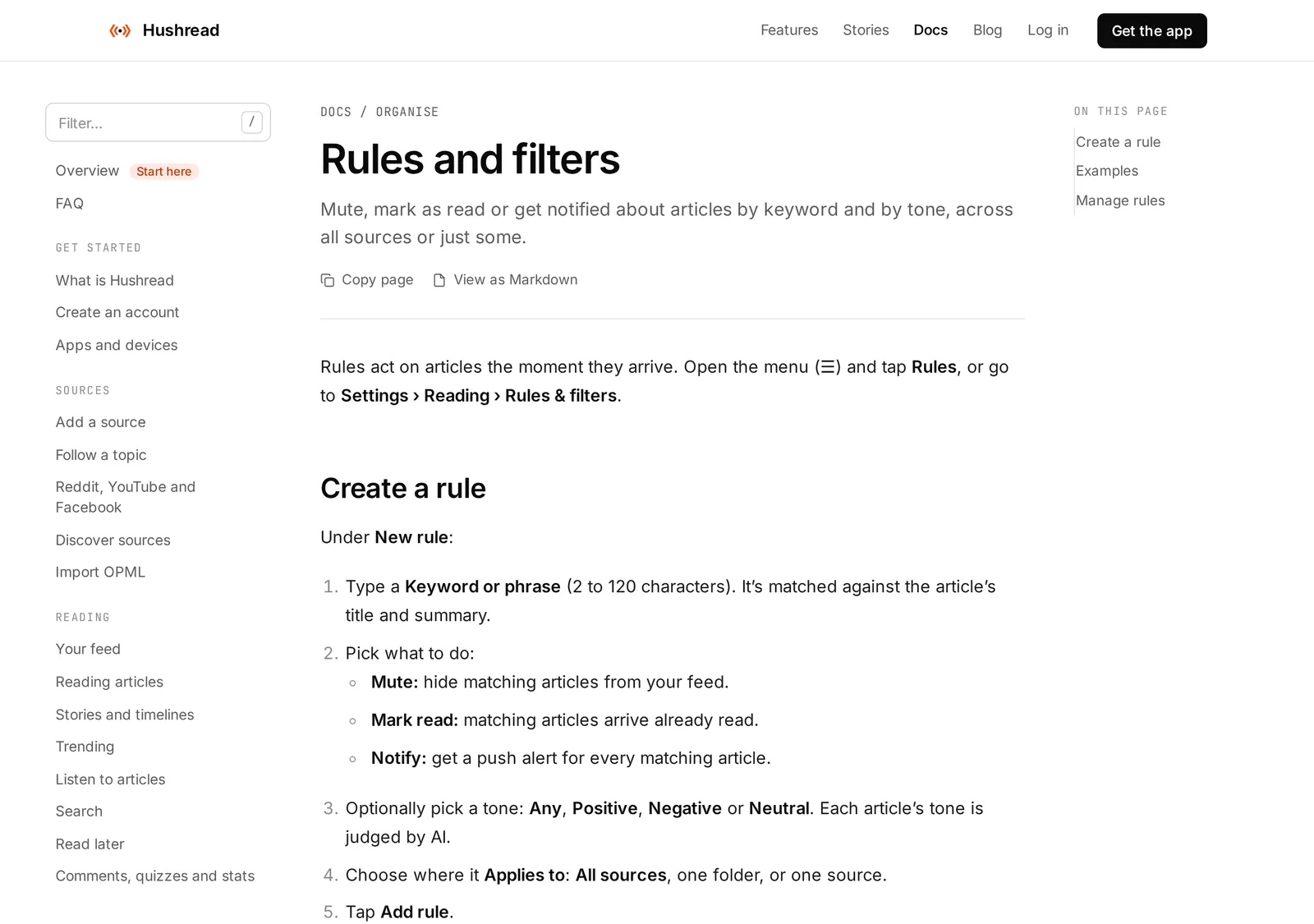 Hushread’s rules documentation, 20 October 2026. Source: hushread.com
Mark read is the gentler option, and the one I’d start with: matching stories arrive already read, so they’re out of the way but still there if you go looking. A Mark read rule with no keyword and the tone set to Negative skims past a day of pile-ups without hiding any story outright.
In Inoreader and Feedly this is a paid feature. Inoreader’s rules and filters are on Pro, with 30 rules and 50 filters (Inoreader pricing), and the plans are broken down in Inoreader pricing. Feedly’s mute filters are listed for its Pro legacy, Pro+, Business and Enterprise plans, from 25 to 500 filters (Feedly help). NetNewsWire’s feature list doesn’t include keyword filtering, so there you control noise by choosing quieter feeds.
Step 4: one alert, everything else off
Alerts are where a 20-minute habit leaks into the whole day. Keep one: the subject where you’d genuinely act within the hour, such as your company’s name, your child’s school or a storm warning for your city. In Hushread that’s a Notify rule with the keyword, and it fires for every matching article from your sources even when their own alerts are off (Hushread docs). Any reader with keyword alerts can do the same; RSS readers with notifications compares them.
Then turn off the news apps you’re replacing. On Android, Google’s steps are: open Settings, tap Notifications then App notifications, tap the app and switch it off, or switch off only some of its categories:
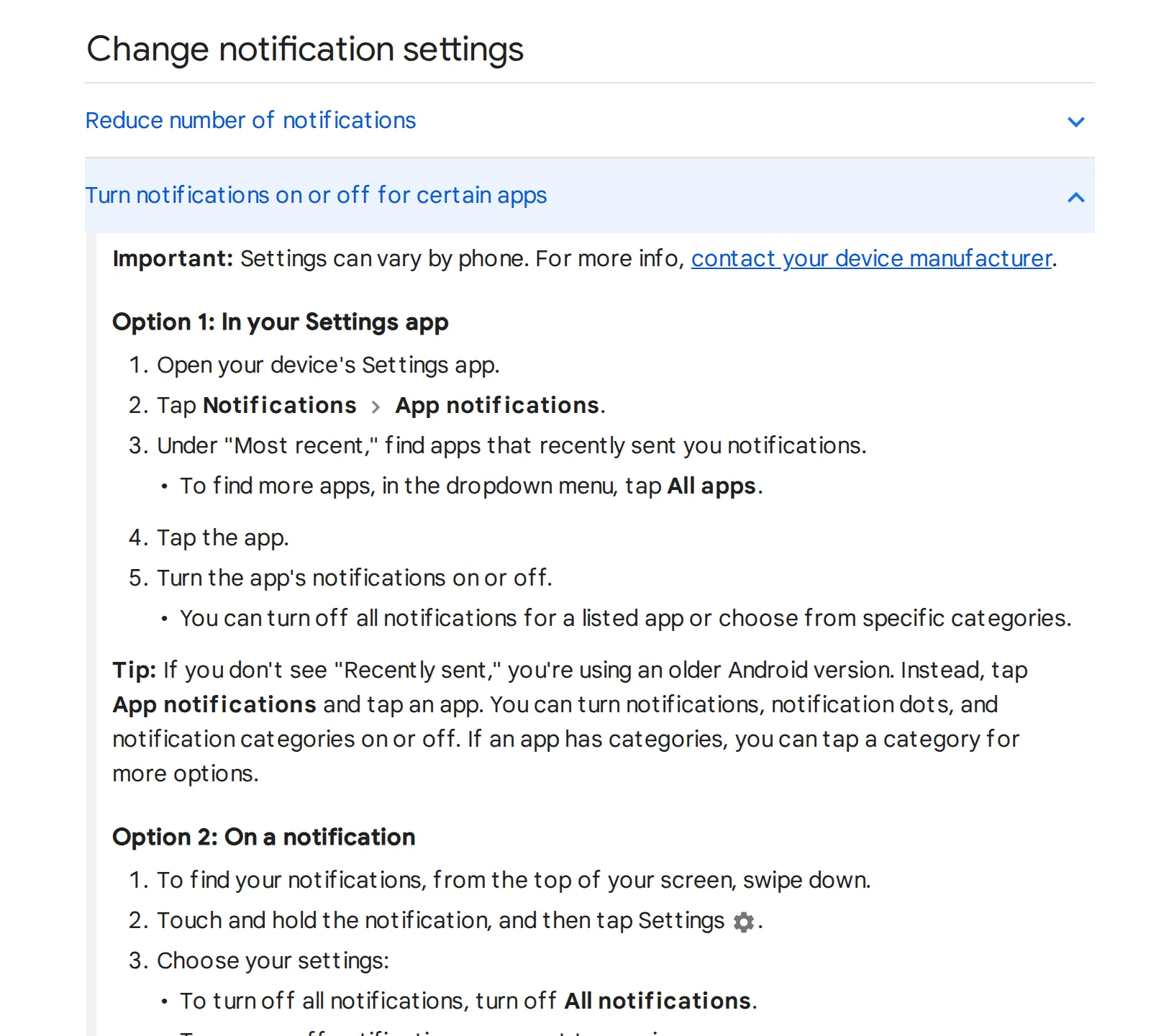 Android Help, “Control notifications on Android”, 20 October 2026. Source: support.google.com
Google notes that “Settings can vary by phone”, so the labels may differ on yours.
On an iPhone, open Settings, tap Notifications, tap the app and turn off Allow Notifications. If you’d rather not lose a news app’s alerts entirely, the Notifications screen also has Scheduled Summary: you set the times, choose the apps, and their notifications arrive together in one batch instead of through the day (Apple Support). One summary timed for your news slot turns a day of interruptions into a single list.
Step 5: read by story, not by article
Even with 8 to 12 sources, a big event arrives once per outlet that covers it. The later copies rarely add much, and reading every version is how a 20-minute routine quietly doubles.
Hushread shows one card when several articles tell the same story, with an Also mentioned in strip naming the other outlets, so you read one version and open another only for a second angle. Stories covered by 8 or more publishers get a See whole story timeline (Hushread docs). The grouping is automatic and occasionally splits one event into two stories. Some other readers filter exact copies and NewsBlur groups coverage too, as RSS readers that remove duplicates shows; otherwise, the fix is fewer general outlets.
A news reading routine, minute by minute
Why 20 minutes: it’s long enough to read the three to five stories that matter on a normal day, and short enough to fit before work without a second session creeping in later.
- Minutes 0 to 2: open the Daily folder and scan the headlines top to bottom without opening anything.
- Minutes 2 to 12: open the stories that matter today. Read one version of each.
- Minutes 12 to 15: save anything long for later instead of starting it now.
- Minutes 15 to 18: mark the rest of the folder as read and close it.
- Minutes 18 to 20: one look at This week on the days it’s due. On other days, stop at 18.
Marking the leftovers read is the step people skip. An unread count of 300 is what turns a 20-minute habit into an hour of guilt the next day.
What this setup won’t fix
It won’t tell you whether a source is reliable: picking good ones is still your job, and Hushread has no bias or factuality labels. It won’t get you through paywalls. Hushread’s free plan has no source limit, so a 10-source list costs nothing. Pro, $2.08 a month billed yearly ($24.99 a year in the US), adds instant alerts when a source you pick publishes; the one Notify rule in step 4 is free (Hushread plans).
FAQ
How do I keep up with the news without getting overwhelmed?
Choose 8 to 12 sources, read them in one place in a fixed daily slot, mute the topics you’ve stopped following, and keep a single alert. Reading one version of each story instead of every outlet’s saves the most time.
What is a good news reading routine?
One 20-minute slot at the same time each day: scan the headlines, read the three to five stories that matter, save long pieces for later, and mark the rest as read. Specialist and long-form sources go in separate folders you open once or twice a week.
How do I deal with too much news?
Cut the number of sources first, then turn off news app notifications except for one subject you’d act on, or batch them with Scheduled Summary on an iPhone. Mute rules remove whole topics.
How much time should I spend on the news each day?
Twenty minutes covers a normal day if the sources are chosen and the repeats are gone. Big breaking stories may need more, but that’s the exception the one alert is for.
If one outlet’s app already gives you what you need, keep it and just turn off its alerts. This setup pays off when you follow several outlets and specialists and want them done in one sitting; Hushread is one way to build it, and any reader with folders and mute rules is another.