
Disclosure: Hushread is my app. I’ve tried to be fair, and I say where the others are the better choice.
When news notifications are not working on an iPhone, the cause is usually one of two switches. The first is the iPhone’s own: Settings › Apps, the news app, Notifications, Allow Notifications (Apple Support). The second is inside the news app, where you pick which channels, topics or alert types it sends, and if they’re switched off there, nothing arrives. If both are on, the alerts are being held back by the iPhone: muted for a day from the Lock Screen, silenced by a Focus, batched into a Scheduled Summary, or sent to your Apple Watch.
1. Check the iPhone’s switch for the app
Open Settings, tap Apps, tap the news app, tap Notifications, and turn on Allow Notifications. Apple adds a hint worth reading twice: “If Notifications doesn’t appear, the app might not be able to send notifications.” On the same screen, look under Alerts: notifications can appear on the Lock Screen, in Notification Center or as banners, and with all three unticked you won’t see its alerts anywhere (iPhone User Guide). If the alerts arrive but make no sound, tap Sounds on the same screen, if the app offers it, and pick one.
2. Check the switch inside the news app
Your iPhone only decides whether an app may notify you. What the app sends is set in the app, often per channel or topic, and often stored with your account.
Apple’s settings screen links straight to it: for some apps, tap App Name Notification Settings at the bottom of the screen to open the app’s own notification settings. Where to find it in the big ones:
- Apple News: tap Following, swipe to the bottom, tap Notifications & Email below Manage, and turn on the channels you want plus Apple’s own, “such as Apple News Top Stories, Apple News Spotlight, and more” (iPhone User Guide). Apple also notes that “Some channels you follow may send notifications”, so a channel that never alerts may simply not send any.
- Google News: profile picture, News settings, Notifications, then the Get notifications switch, Number of notifications from Low to High, and each type. Google says that “To change your notifications, you must sign in to your Google Account” (Google News Help), so sign in before you look for the switches.
- The New York Times: the You tab, the gear at the top right, then Push Notifications Settings (NYT Help Center).
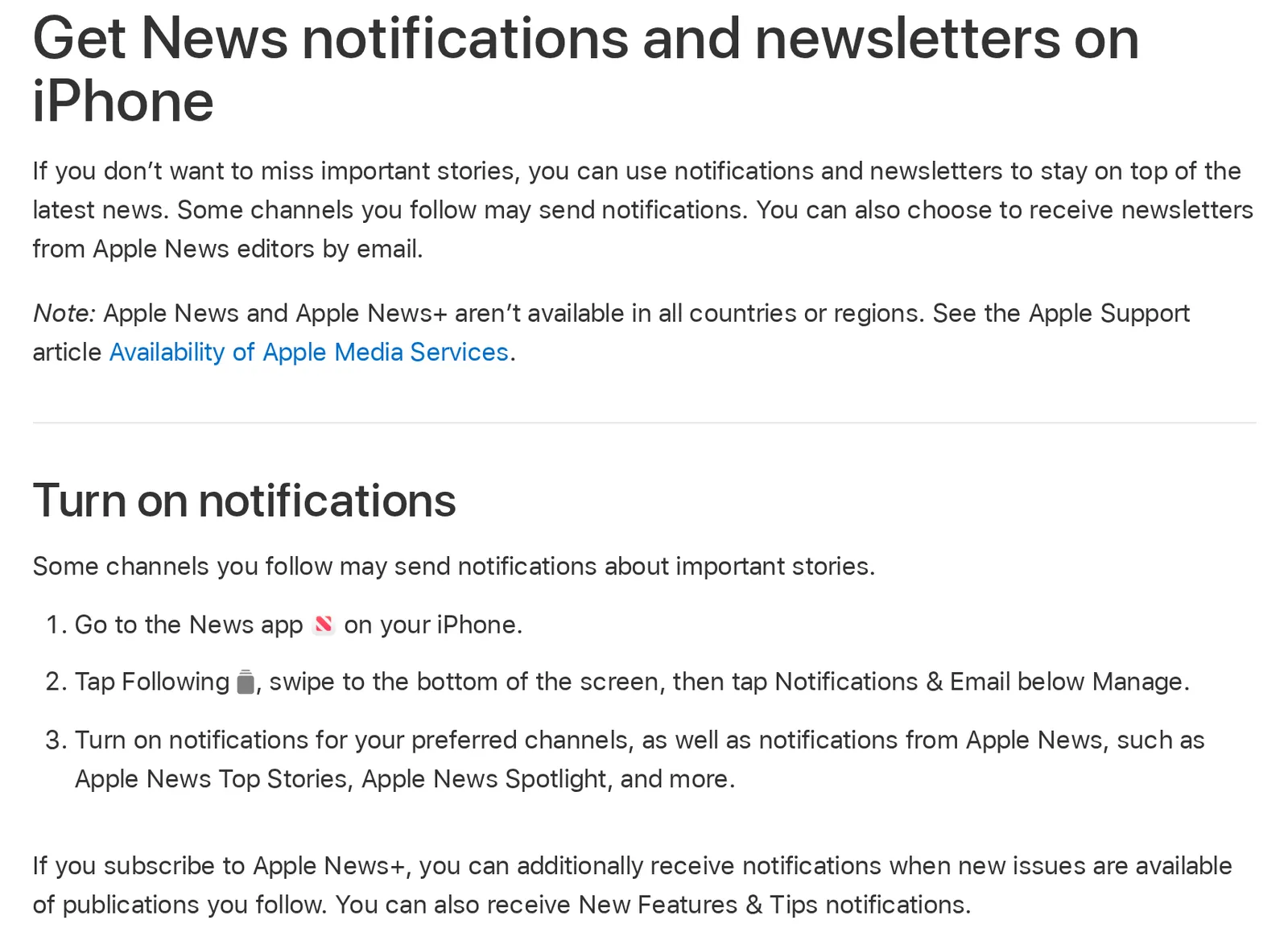 Apple’s iPhone User Guide for iOS 27, 8 November 2026. Source: support.apple.com
Apple News has more failure points than most: if alerts from News stop, my Apple News not working guide covers the app itself.
3. Unmute the app on the Lock Screen
A swipe you forgot about can silence a news app for a day. Swipe left on a notification, tap Options, and you can mute the app’s notifications “for an hour or a day”. Muted alerts still arrive, but they go “directly to Notification Center” without appearing on the Lock Screen, playing a sound, lighting up the screen or presenting a banner. To undo it, swipe left on one of its notifications in Notification Center, tap Options, then Unmute (iPhone User Guide).
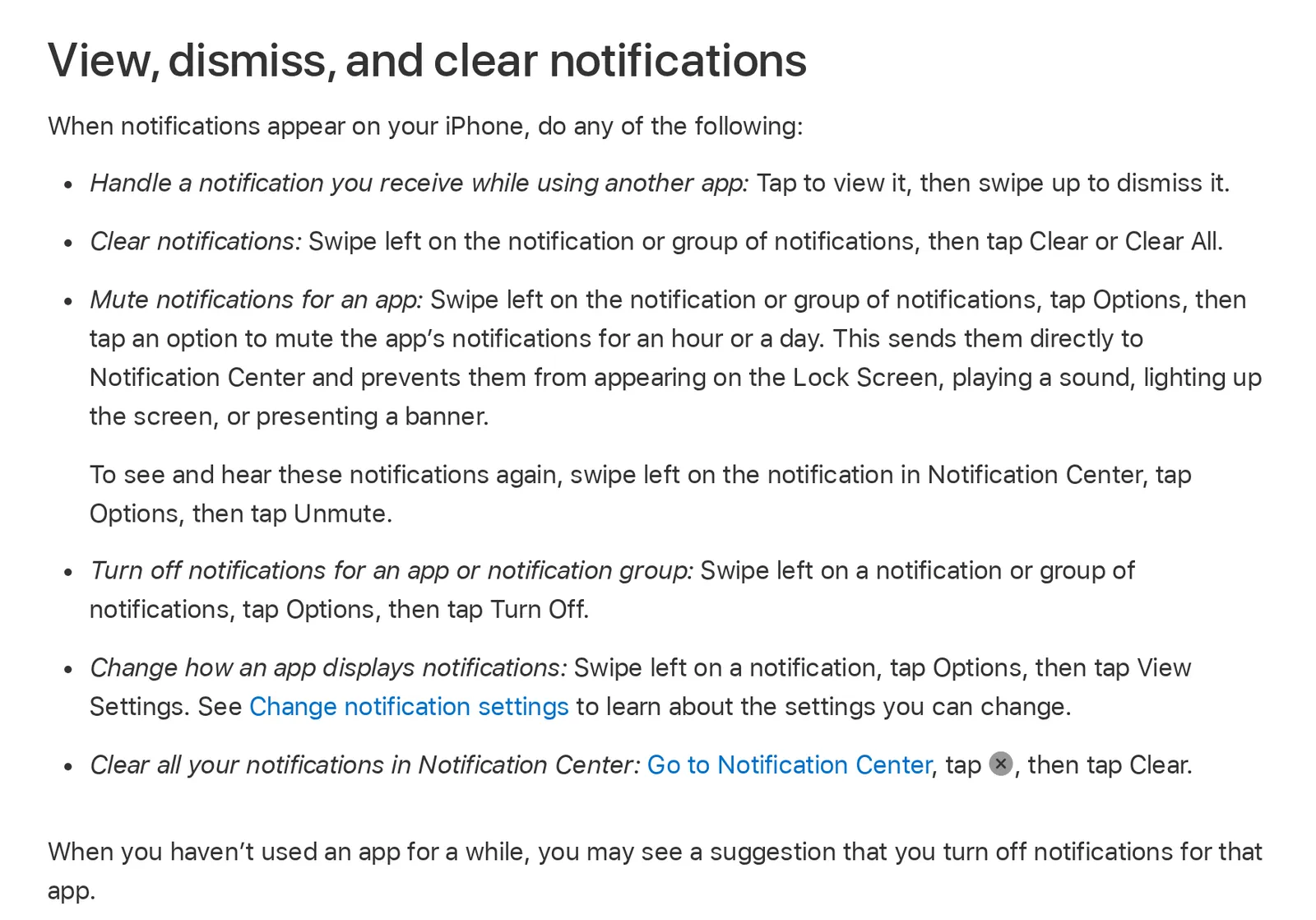 Apple’s iPhone User Guide for iOS 27, 8 November 2026. Source: support.apple.com
The same Options menu has Turn Off, one tap from the mute buttons. And the last line on that page explains a lot of quiet news apps: “When you haven’t used an app for a while, you may see a suggestion that you turn off notifications for that app.” A news app you only ever read through its alerts is exactly that app, and accepting the suggestion switches it off.
4. Check Focus
A Focus silences every app that isn’t on its allowed list. Open Control Center: if a Focus name is showing, it’s on, and tapping it turns it off. Apple also asks you to check whether a linked device, such as an Apple Watch or iPad, is in a Focus, and notes that you can’t allow apps under the Driving Focus (Apple Support).
To let one news app through while another Focus is on, go to Settings › Focus, tap the Focus, tap Apps, make sure Allow Notifications From is selected and add the app. In the same place you can turn on Time Sensitive Notifications, which lets every app send time-sensitive alerts straight through (iPhone User Guide).
5. Take it out of Scheduled Summary
Scheduled Summary is built to delay things. Under Settings › Notifications › Scheduled Summary, the apps you include send their alerts in a bundle at the times you set. That’s fine for a daily read and wrong for breaking news. Tap the news app under Settings › Notifications and, under Notification Delivery, choose Immediate Delivery (iPhone User Guide).
On an iPhone with Apple Intelligence, two more settings change what you see. Prioritize Notifications puts the ones it judges important “at the top of the stack”, and the Reduce Interruptions Focus “shows you the most important ones, but silences notifications that are less important” (iPhone User Guide). If you use that Focus, a news alert can be judged less important and held back. Add the app under Customize Focus › Apps to let it through.
6. Look at your Apple Watch
With a paired Apple Watch, an alert goes to one device, not both. Apple’s rule: “If your iPhone is locked or asleep, you get notifications on your Apple Watch, unless your Apple Watch is locked.” While you’re using the iPhone, it gets them instead (Apple Support). So if the alerts reach your wrist while the phone sits locked in your pocket, nothing is broken. To stop a news app reaching the watch, open the Watch app on your iPhone, tap My Watch, then Notifications, tap the app, choose Custom, then Notifications Off (Apple Support).
7. Did you just reinstall or move to a new iPhone?
Reinstalling a news app is the classic fix that makes things worse. Your in-app choices from point 2 may be gone, so open the app and set them again. And the publisher’s servers need time to learn your new install. SmartNews puts a number on it: after a reinstall, “please allow approximately one week for your scheduled notifications to resume”, because the device token its servers use “is reset during the reinstallation process” (SmartNews Help Center). Other news apps don’t publish a figure, but it’s a reason to give a reinstalled app a few days before deciding it’s broken.
8. Still nothing: restart, update, then ask the developer
Restart the iPhone and update the news app from the App Store. If alerts only lag when the battery is low, turn off Low Power Mode in Settings › Battery (tap Power Mode first on iPhone 15 and later): Apple lists “Turns off Background App Refresh” among the things it does, though notifications aren’t on its list (Apple Support).
If only one app is affected after all this, its developer is the right contact. Apple says the App Store listing shows who made an app and where to get support (Apple Support).
When the problem is what gets sent
Sometimes every switch is on and the alerts that do come aren’t the ones you wanted. The editor decided an election result was breaking news and the factory closure in your town wasn’t. No setting on the iPhone changes that.
In Hushread, a Notify rule on a word, such as your town or your employer, sends a push when an article from your sources matches, even from sources whose own alerts are off (Hushread docs), so the story you care about doesn’t wait for someone else to call it breaking. Pushes work in the iPhone, iPad and Android apps, not on the web. Notify rules work on the free plan, which has no limit on sources; alerts for every new post from a source are part of Pro, and new sources start with them off (Hushread docs).
FAQ
Why am I not getting news notifications on my iPhone?
Usually because either the iPhone’s Allow Notifications switch for the app is off, or the alerts are switched off in the app’s own notification settings. If both are on, check for a muted app, a Focus, Scheduled Summary or a paired Apple Watch.
Why are breaking news notifications not working?
Breaking news is normally its own alert type inside the news app, so check that it’s switched on there, not just in the iPhone’s Settings. Then make sure the app isn’t in a Scheduled Summary or silenced by a Focus.
Why did my news app stop sending notifications by itself?
Your iPhone may have suggested turning them off because you hadn’t used the app for a while, or you muted it for a day from the Lock Screen. Check Settings › Apps › the app › Notifications, and unmute it from Notification Center.
Why are my news notifications not working after reinstalling the app?
A reinstall can clear the app’s own notification choices and gives the publisher’s servers a new token for your phone. Open the app, set its alerts again, and allow some time: SmartNews says about a week for its scheduled notifications.
How do I get news notifications to show on my Lock Screen?
In Settings › Notifications, tap the app and tick Lock Screen under Alerts, and make sure its delivery is Immediate Delivery, not Scheduled Summary.
If one news app’s alerts are right for you once they arrive, fix its switches and stay with it. If too many alerts are the real problem, how to stop breaking news alerts goes the other way, switch by switch. To pick the subjects yourself, how to set up news alerts compares the tools, from Google Alerts to a reader such as Hushread.