
Disclosure: Hushread is my app. I’ve tried to be fair, and I say where the others are the better choice.
To set up news alerts for a topic, decide first whether you want an email or a push on your phone. For email, go to google.com/alerts, type the topic, open Show options and set Sources to News, then click Create Alert. For a push, open the Google app, search the topic and tap the Get Notified bell next to its name. Apple News and the outlets’ own apps can alert you too, but only about the channels you follow, not about a word or phrase.
Which news alert tool does what
| Tool | Delivery | Watches | Best for |
|---|---|---|---|
| Google Alerts | Any word or phrase, across Google’s index | A name, a company, a niche subject | |
| Google app, Get Notified | Push | A topic Google recognises | Teams, shows, big ongoing subjects |
| Google News app, Follow | The Following tab | Topics, places and sources | Reading a topic daily, not alerts |
| Apple News | Push | Channels you follow, plus Apple’s own picks | Breaking news from outlets you trust |
| An outlet’s own app | Push | That outlet’s chosen categories | One publication’s breaking news |
| A feed reader with keyword rules | Push | Your keyword, in the sources you chose | Alerts without the noise of the whole web |
Google Alerts: email for any word or phrase
Google Alerts is still the most flexible way to watch a topic, because it takes any word or phrase you type. Google’s steps are short: go to Google Alerts, enter the topic in the box at the top, click Show options to change the settings, then Create Alert. After that, “You’ll get emails whenever we find matching search results” (Google Search Help).
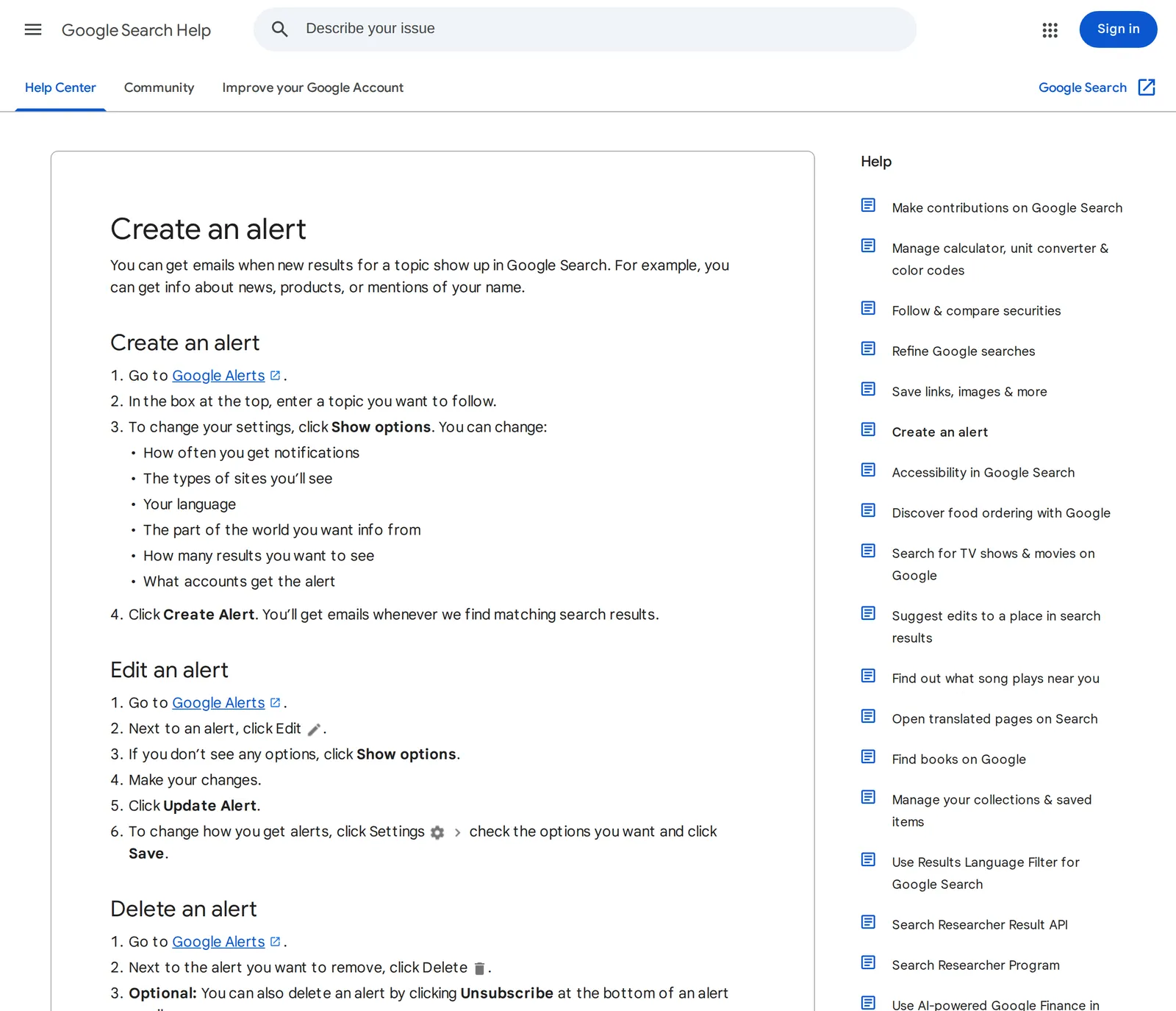 Google’s “Create an alert” help page, 24 October 2026. Source: support.google.com
The options decide whether it’s a news alert or a web alert. On the alerts page, How often offers As-it-happens, At most once a day or At most once a week. Sources lists Automatic, News, Blogs, Web, Video, Books, Discussions and Finance, and picking News limits it to news sources instead of Automatic’s mix. How many is either Only the best results or All results. For a subject you care about, I’d pick News, All results and At most once a day: As-it-happens on a busy topic fills an inbox fast.
An alert emails you new Google Search results for what you typed, so the way you write the topic matters as much as the settings:
- Quote phrases. Google Search treats words inside quotes as an exact phrase, and
-in front of a word leaves it out, as in its own examplejaguar speed -car(Google Search Help). Alerts are built on Search results, so the same operators should narrow an alert:"heat pump subsidy"in quotes rather than three loose words. - If alerts stop arriving. Google’s Alerts help page says to check you’re signed in to the right account, look for a message saying your alerts were disabled and click Enable, check that the inbox isn’t full, check your spam folder, and, in Gmail, add [email protected] to your contacts.
To change or remove an alert later, go back to Google Alerts and click Edit or Delete next to it, or click Unsubscribe at the bottom of an alert email. If you’d rather read the results in a feed reader than in email, Google Alerts RSS feed shows how to get an alert as a feed and what those feeds look like.
The Google app: push alerts about a topic
For a notification on your phone rather than an email, the tool is the Google app, not Google News. Google’s help gives the same three steps for Android and iPhone: open the Google app, search for the topic, and at the top, next to the topic name, tap Get Notified. If the bell isn’t there, tap the Menu icon and choose Get Notified from it (Google Search Help).
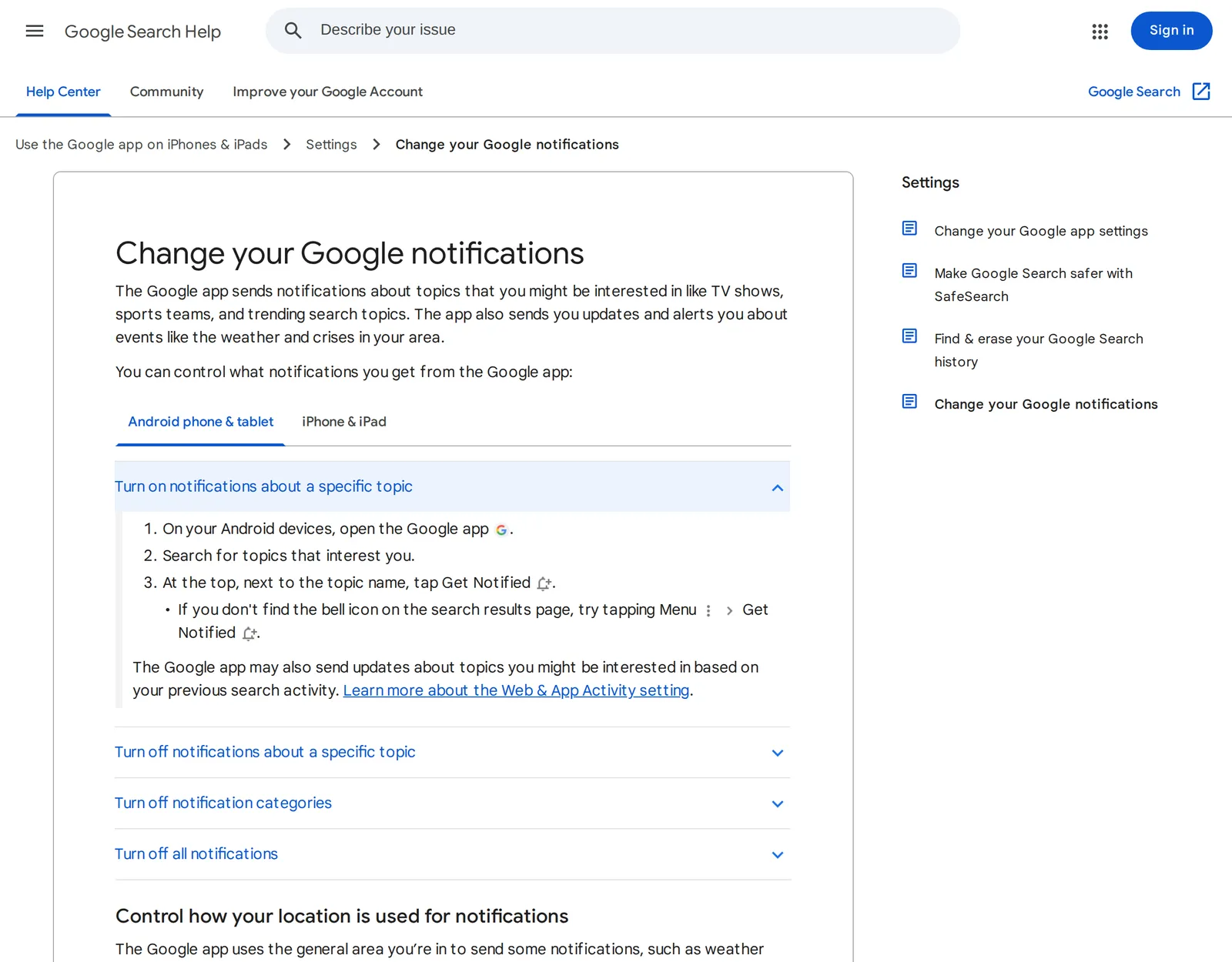 Google’s “Change your Google notifications” help page, Android tab, 24 October 2026. Source: support.google.com
The catch is in the word “topic”. Google’s examples of what the app sends notifications about are TV shows, sports teams and trending search topics, and the bell sits next to a topic name at the top of the results. If your search doesn’t bring up a topic with a bell, Google Alerts is the fallback. The same page also warns that the app may send updates about topics you might be interested in based on your previous searches, so you can get pushes you never asked for. How to stop breaking news alerts covers switching those off.
Google News: follow a topic, but don’t expect a push
The Google News app lets you follow a topic, place or source: tap Search, find it, and tap Follow. You need to be signed in, and what you follow appears in the feed on the Following tab (Google News Help).
That’s a reading list, not an alert. Google News does send notifications, but its settings only let you pick an amount between Low and High under Number of notifications and switch whole notification types on or off (Google News Help). Neither help page offers a push for one followed topic. If you follow “chip exports” in Google News, you’ll see it when you open the Following tab, and not before.
Google News can still feed an alert, though. A Google News search, turned into an RSS feed, is the widest free source of news on a topic, and Google News RSS feeds covers how to build the URL and its limits.
Apple News: alerts from channels, not topics
On an iPhone, Apple News alerts are set in the app: go to Following, swipe to the bottom of the screen, tap Notifications & Email below Manage, then turn on notifications for the channels you want, plus Apple’s own, such as Apple News Top Stories and Apple News Spotlight (Apple Support).
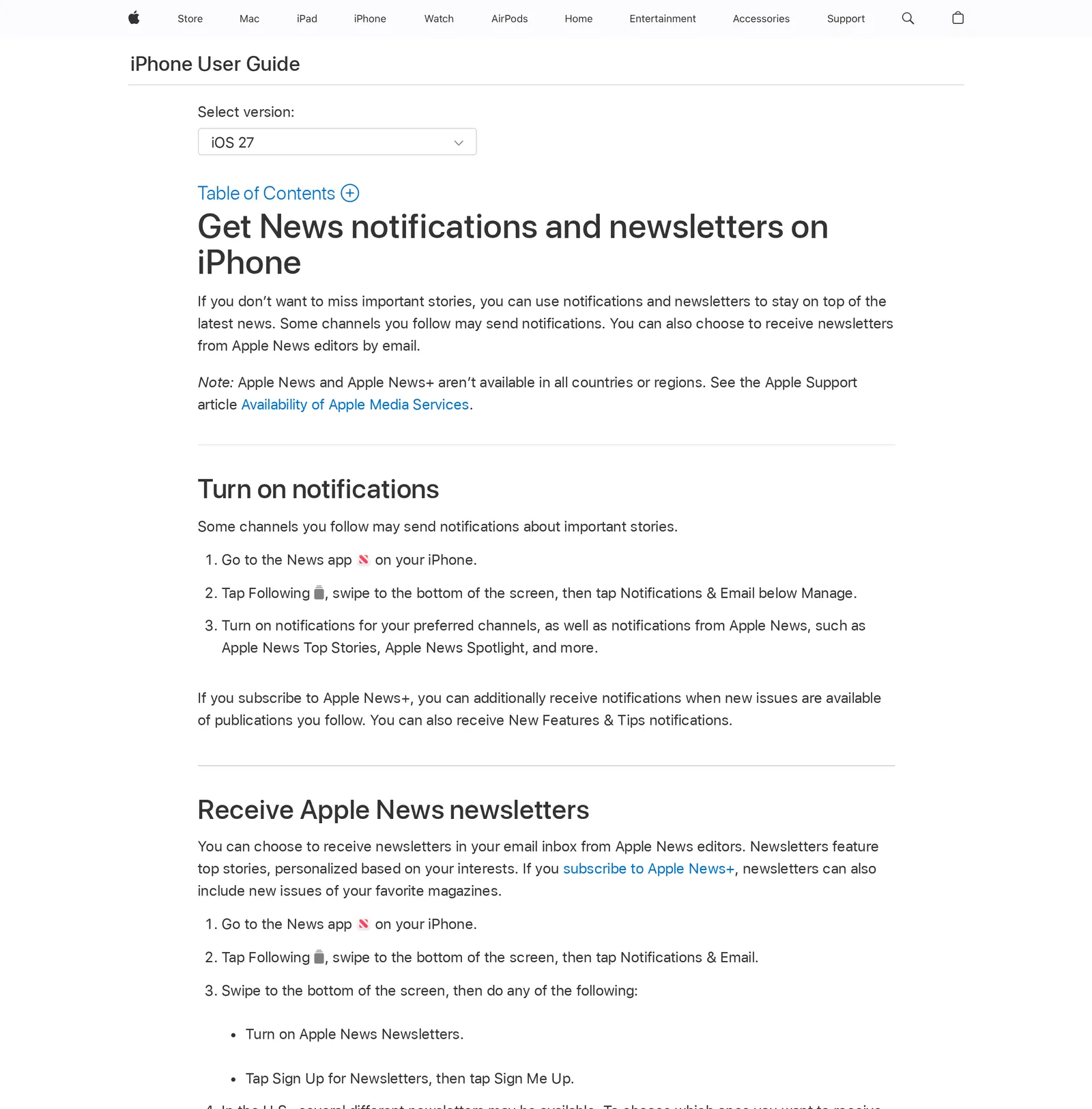 Apple’s iPhone User Guide for iOS 27, as shown on Apple’s India site, 24 October 2026. Source: support.apple.com
Read Apple’s wording closely: “Some channels you follow may send notifications about important stories.” The switches are per channel, and the channel decides what counts as important. The guide lists no alert for a topic or a keyword. So Apple News is good for “tell me when the Guardian thinks something big has happened” and no help for “tell me when anyone writes about my town’s new bridge”. Apple also notes that Apple News isn’t available in every country.
An outlet’s own app
Most big news apps have alerts beyond breaking news. The New York Times app on Android, for one, has Top Stories alerts for breaking stories, special reports and selections from its editors, plus topic and event alerts for subjects like Sports or Business. You choose them under the You tab, the Settings icon, then Notifications (NYT Help Center).
These are the outlet’s categories, not your keywords, and they only ever cover that one outlet. They’re worth it for the one or two publications you’d read anyway. Install five news apps for their alerts and you’ll get the same story five times. It’s no surprise that the Reuters Institute found 79% of people across markets “either have never received alerts or have actively disabled them because they say they get too many or they are not relevant to their lives” (Reuters Institute).
Keyword alerts from sources you choose
The method none of the above covers is a push for your own keyword, limited to sources you trust. That’s what a feed reader with keyword notifications does: you add your sources, then a rule that fires when a new article mentions the word. Readers that do this are compared in RSS readers with notifications.
In Hushread it’s two steps. Add the subject as a topic (Add source, type the words, tap Track ”…” on the internet), so coverage from any outlet arrives in your feed (Hushread docs). Then open Rules, type the keyword, and pick Notify: with Applies to left on All sources, you get a push for every matching article, from the topic or from any of your other sources (Hushread docs). Notify rules are free; only source alerts, which push every new post from a source you pick, need Pro. A Mute rule on a word like opinion keeps the topic from getting noisy.
The limits, plainly: pushes work in the iPhone, iPad and Android apps, not on the web (Hushread docs). Topics and Notify rules work on the free plan, which has no limit on sources. Pro is $2.08 a month billed yearly ($24.99 a year in the US) and adds instant alerts when a source you pick publishes (Hushread plans). Hushread’s email alerts cover only major breaking stories, not your keywords, so for keyword alerts in your inbox Google Alerts is the better tool.
FAQ
How do I set up a news alert on my phone?
For a push about a topic, open the Google app, search the topic and tap the Get Notified bell next to its name. For alerts from particular outlets, turn them on in that outlet’s app, or in Apple News under Following › Notifications & Email on an iPhone.
How do I get news alerts for a specific topic?
Create a Google Alert at google.com/alerts with Sources set to News, which emails you when Google finds new articles. For a push instead of email, use the Google app’s Get Notified bell, or a feed reader with a keyword Notify rule.
Can Google News send alerts for a topic?
Not for a single topic, per Google’s help pages. Following a topic in the Google News app adds it to the Following tab, and its notification settings only set an overall amount and the types you get. Google Alerts and the Google app’s Get Notified bell are Google’s topic alerts.
Are Google Alerts only for news?
No. The Sources setting also offers Blogs, Web, Video, Books, Discussions and Finance besides News, plus Automatic. Pick News under Show options to get news only.
Can Apple News alert me about a topic?
Apple’s guide lists notifications for the channels you follow and for Apple News picks such as Top Stories, not for topics. To be alerted about a word or subject on an iPhone, use Google Alerts, the Google app, or a reader with keyword alerts.
If you only need to know when a name or company turns up anywhere online, Google Alerts by email is free and hard to beat; the paid monitoring tools in Google Alerts alternatives are for brands that need social media too. If you want a push only from outlets you picked, set up a keyword rule in a feed reader, Hushread or any other reader with keyword notifications.