
Disclosure: Hushread is my app. I’ve tried to be fair, and I say where the others are the better choice.
To stop breaking news alerts, you don’t have to turn off the whole app. On an iPhone, go to Settings › Notifications, tap the news app, and use Customize Notifications (or the app’s own notification settings link at the bottom) to switch off just the breaking news type. On Android, open Settings › Notifications › App notifications, tap the app, and switch off only its breaking news category if it has one. If the app offers neither, turn off Allow Notifications for it, or batch its alerts into a Scheduled Summary on iPhone.
Breaking news usually reaches you from several places at once: the Google app, Google News, Apple News, an outlet’s app, a website you once allowed in the browser. Switch off each one, or the alerts seem to keep coming back. You’re in good company: the Reuters Institute’s 2025 Digital News Report found that 79% of people across markets “either have never received alerts or have actively disabled them because they say they get too many or they are not relevant to their lives” (Reuters Institute).
Turn off news notifications on iPhone
Open the Settings app, tap Notifications, then tap the app below Notification Style. From there you can turn off Allow Notifications entirely, or, if the app supports it, tap Customize Notifications to choose which types of notifications it sends. For some apps, a link at the bottom of the screen opens the app’s own notification settings (Apple Support).
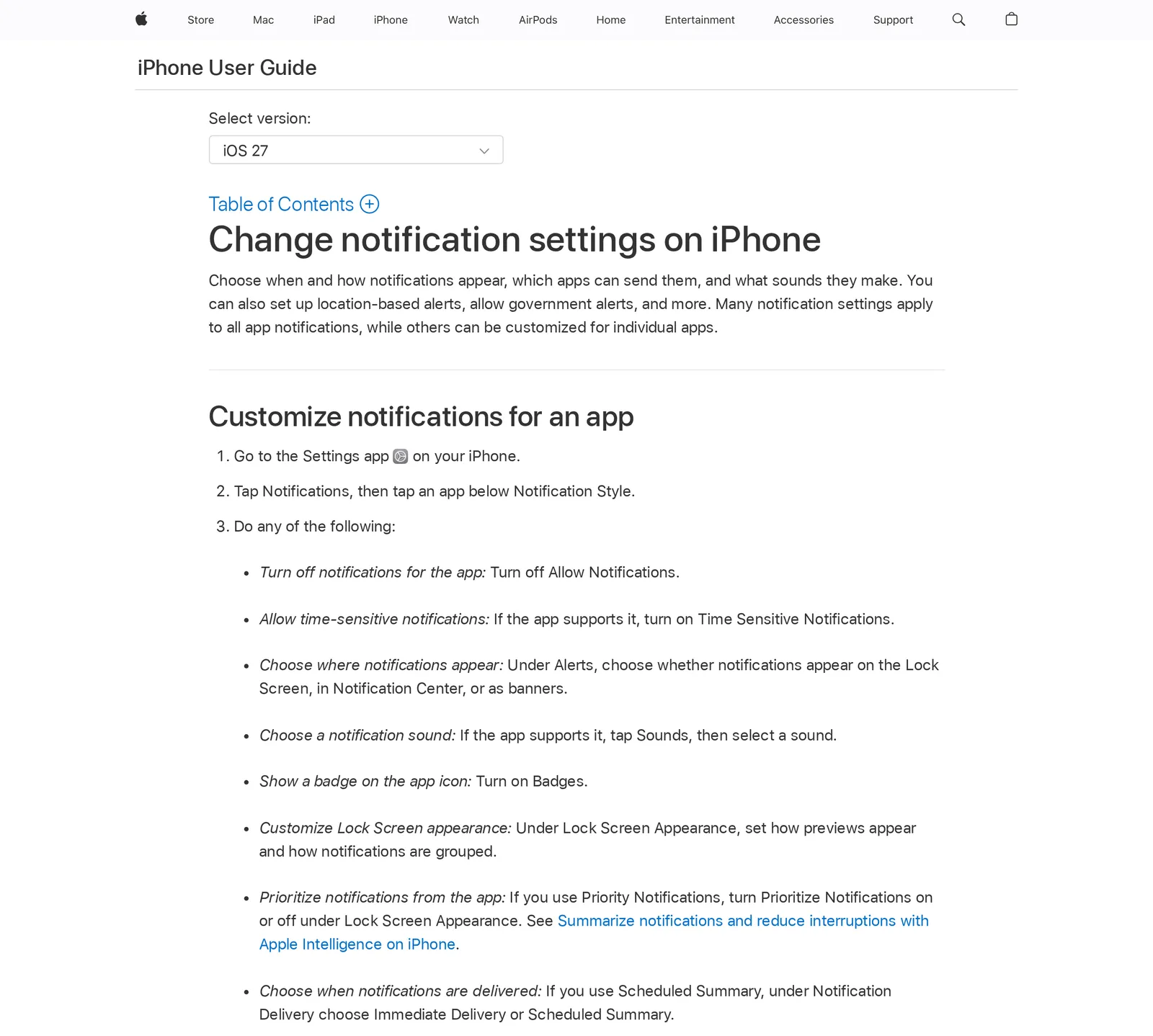 Apple’s iPhone User Guide for iOS 27, as shown on Apple’s India site, 24 October 2026. Source: support.apple.com
The type switch is the one to look for. A news app that sorts its alerts lets you keep, say, sports scores and drop breaking news. While you’re on that screen, check Time Sensitive Notifications too: a news app you only want to read in your own time has no need for it.
Keep the alerts but get them twice a day
If you’d rather not lose a news app’s alerts, Scheduled Summary is the middle path. Under Settings › Notifications › Scheduled Summary, turn it on, set the times, and choose the apps to include under A to Z. Their notifications then arrive together at those times instead of one by one through the day. Per app, the delivery choice is Immediate Delivery or Scheduled Summary.
Turn off news notifications on Android
On Android, open Settings, tap Notifications, then App notifications, and tap the app. You can turn off all of its notifications, or, if the app sorts them into categories, switch off only the ones you don’t want and tap a category for more options (Android Help).
The category list is the useful part for breaking news: switch off that one and keep the rest. You can also start from an alert itself: swipe down, touch and hold the notification and tap Settings to reach the settings for the app that sent it. Google notes that “Settings can vary by phone”, so a Samsung or Pixel may word these screens differently.
Stop Google News notifications
Google News has its own controls inside the app. Tap your profile picture or initial at the top right, tap News settings, and under Alerts tap Notifications. Turn off Get notifications to stop all of them, or keep it on and lower Number of notifications toward Low, and switch off the notification types you don’t want (Google News Help).
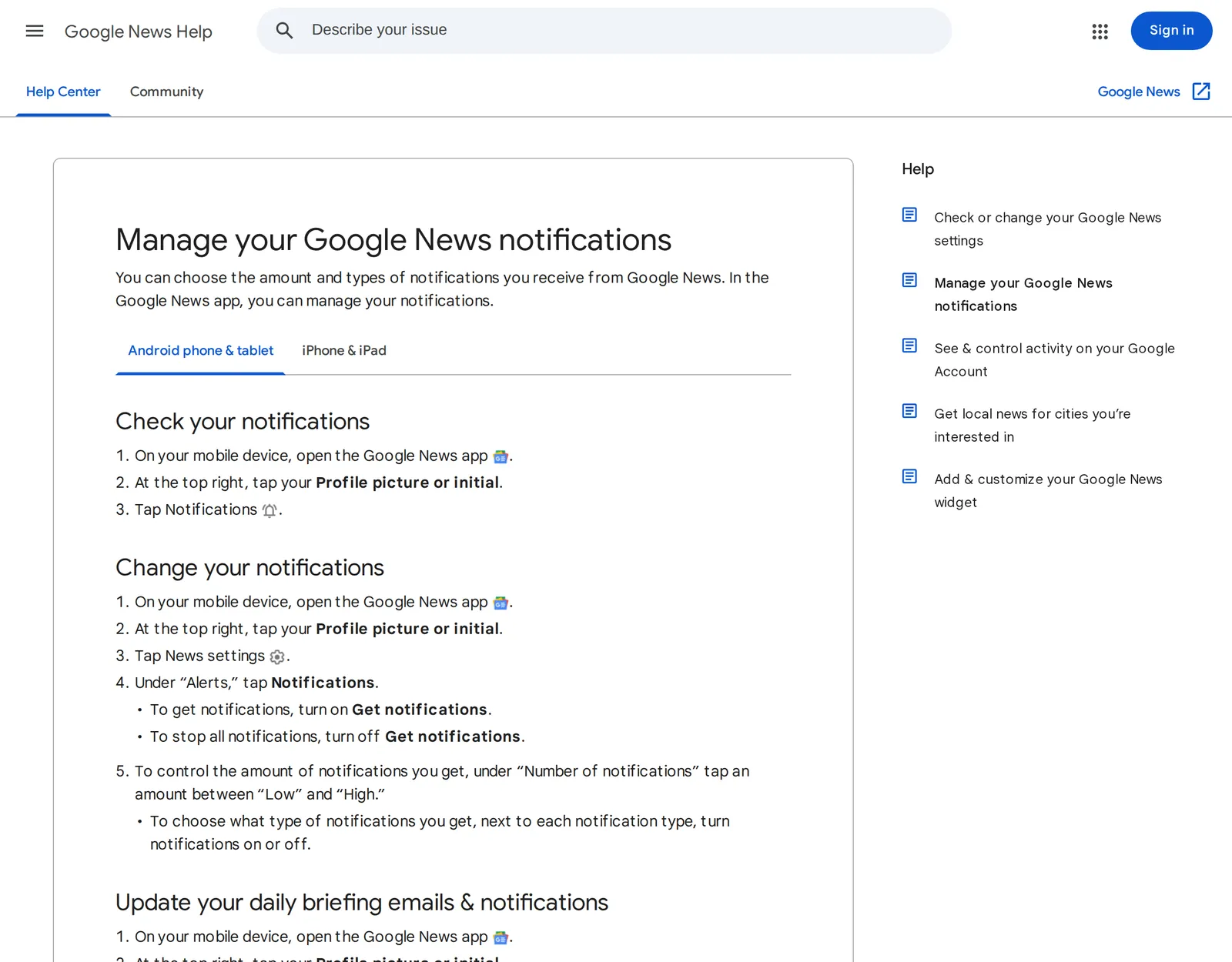 Google News Help, “Manage your Google News notifications”, Android tab, 24 October 2026. Source: support.google.com
The iPhone app uses the same path: profile picture, News settings, Notifications (Google News Help). Both versions need you signed in to change these settings.
Alerts from the Google app, not Google News
If the alerts carry the Google “G” instead of the Google News icon, they come from the Google app, which sends notifications about topics like TV shows, sports teams and trending searches, and about the weather and crises in your area. On iPhone, tap your profile picture, then Settings, Notifications, Notification categories, and tap Turn off next to each category you don’t want. For one topic, tap Notifications at the bottom right, tap the Menu icon next to an alert and choose Turn off notifications for … (Google Search Help). On Android the categories are under the same profile picture, Settings, Notifications (Google Search Help).
Stop Apple News breaking news alerts
Apple News splits its alerts by channel, which makes it easy to keep one outlet and drop the rest. In the News app, tap Following, swipe to the bottom, and tap Notifications & Email below Manage. The list has a switch for each channel you follow and for Apple’s own alerts, such as Apple News Top Stories and Apple News Spotlight (Apple Support).
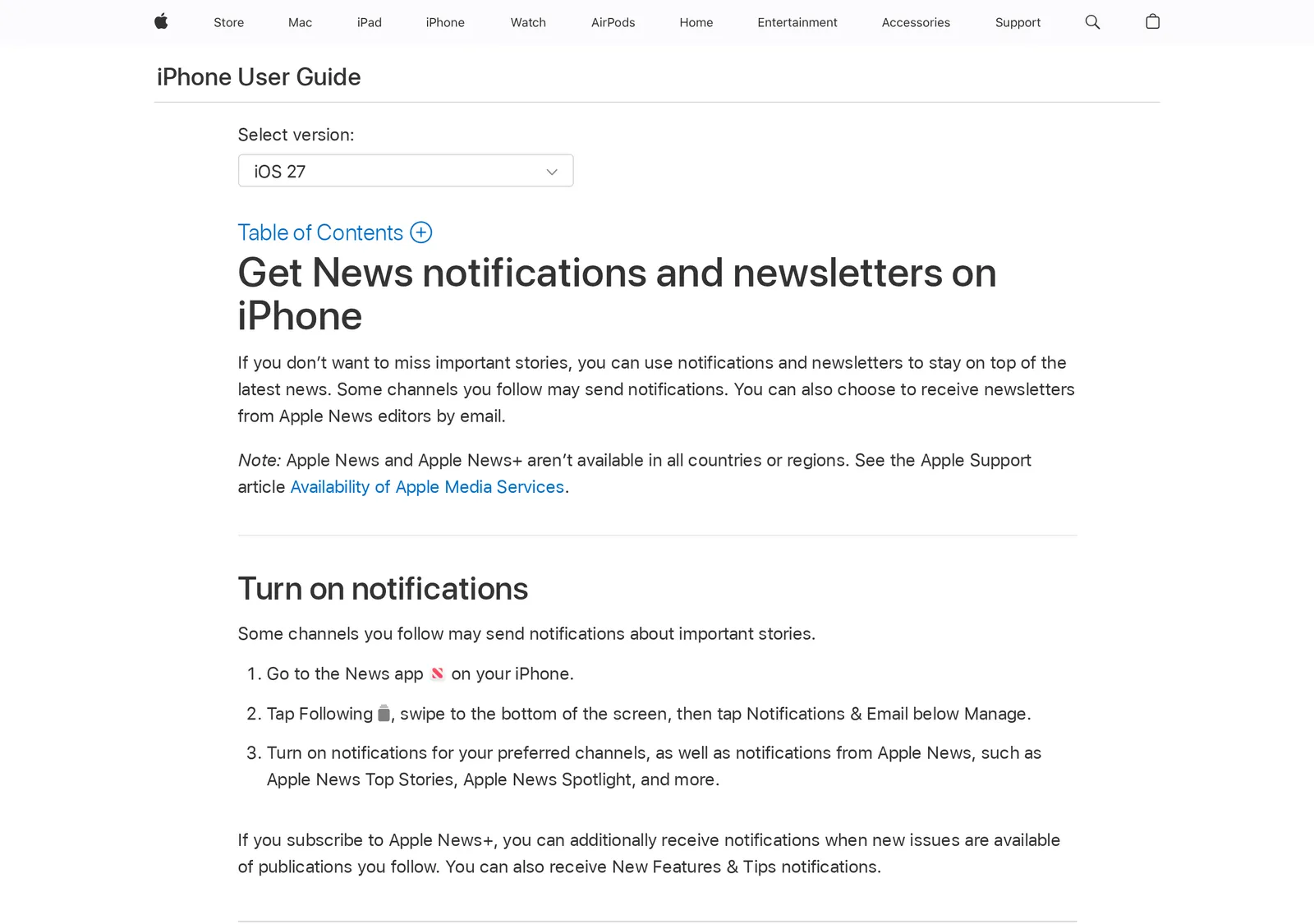 Apple’s iPhone User Guide for iOS 27, as shown on Apple’s India site, 24 October 2026. Source: support.apple.com
I’d start with Top Stories, because it isn’t tied to any channel you chose. Switch it off and leave on the one or two outlets you trust to judge what’s urgent. To silence Apple News completely, use Settings › Notifications › News › Allow Notifications as with any app.
Stop breaking news from news apps
Each outlet’s app has its own switch, and the in-app one is better than the phone’s because it can leave the alerts you like on.
- The New York Times (Android): tap the You tab, the Settings icon at the upper right, then Notifications, and uncheck Top Stories (breaking stories, special reports and selections from its editors), and Breaking News if it’s listed. Topic and event alerts such as Sports or Business are separate boxes you can leave on (NYT Help Center).
- BBC: World News & Stories (iPhone): the app’s store listing says you can opt in or out of breaking news alerts, and that you can unsubscribe from them in your device’s Notifications screen (App Store).
Stop news alerts from websites in Chrome and Safari
Some breaking news pushes come from a website, not an app: you once clicked Allow on a news site. In Chrome on Android, open the site, tap the Page info control to the left of the address bar, tap Permissions and turn notifications off. To stop every site, tap More › Settings › Site settings › Notifications and turn the setting off (Chrome Help). On a computer, it’s Settings › Privacy and security › Site settings › Notifications, where you can choose a default setting for all sites, or add one site under Not allowed to send notifications (Chrome Help).
On a Mac, website alerts from Safari are switched off in System Settings › Notifications: under Application Notifications, click the website and turn off Allow Notifications. To stop sites asking at all, open Safari › Settings › Websites › Notifications and deselect “Allow websites to ask for permission to send notifications” (Apple Support).
Keep one alert you actually want
Turning everything off leaves a fear of missing the one thing that matters to you. The fix is to pick that thing yourself instead of letting an editor pick for you: your company, your city, your child’s school. How to set up news alerts covers the ways to do that.
In Hushread, new sources start with alerts off, so nothing pushes until you choose. Alerts for a single source are part of Pro. On every plan, a Notify rule with your keyword sends an alert for every matching article from your sources, including ones you haven’t turned source alerts on for (Hushread docs). Hushread does have one automatic breaking alert of its own, sent when a story your sources cover surges to 8 or more publishers within about 3 hours, at most one per story and one an hour. It’s a single switch: Settings › Notifications, then Breaking stories under Automatic (Hushread docs).
Pushes work in the iPhone, iPad and Android apps, not on the web, and the free plan has no limit on sources.
FAQ
How do I turn off news notifications on my iPhone?
Open Settings › Notifications, tap the news app and turn off Allow Notifications. To drop only breaking news, use Customize Notifications on that screen if the app supports it, or the app’s own notification settings.
How do I stop Google News notifications?
In the Google News app, tap your profile picture, then News settings › Notifications, and turn off Get notifications. To keep a few, leave it on, set Number of notifications to Low and switch off the types you don’t want.
How do I stop breaking news on my lock screen?
Turn off the alerts at the source with the steps above, or keep them out of sight: on iPhone, under the app’s Alerts setting in Settings › Notifications, choose Notification Center and not Lock Screen (Apple Support). A Scheduled Summary also holds them until the times you set.
Why do I keep getting news alerts I never turned on?
Often they come from an app you didn’t think of as a news app, such as the Google app, which sends alerts about trending topics and may base some on your past searches. Websites you allowed in the browser are the other common source.
How do I deal with too many news alerts?
Keep alerts from one or two outlets you trust, switch off the general ones such as Apple News Top Stories and Google News, and batch the rest with Scheduled Summary on an iPhone. Then add one alert for the subject you’d genuinely act on.
If one outlet’s alerts are already right for you, keep that app and switch off the rest; nothing here needs a new app. If you want to rebuild how you read the news with fewer interruptions, how to read the news without wasting time shows the whole setup, in Hushread or any reader with folders and rules.