
Disclosure: Hushread is my app. I’ve tried to be fair, and I say where the others are the better choice.
Every public Mastodon account has an RSS feed: add .rss to the end of the profile address, as in https://mastodon.social/@Mastodon.rss. Every hashtag has one too, at https://SERVER/tags/NAME.rss. A profile feed shows the account’s last 20 public posts, leaves out boosts and replies to other people, and needs no Mastodon account to read. Your own posts work the same way: your profile address plus .rss is a public feed anyone can follow.
Mastodon documents the feeds in two sentences: “Every account and tag page provide an RSS feed for syndication onto other platforms. Those feeds are auto-discoverable from the account and tag pages” (Mastodon docs).
 The Syndication Feeds section of Mastodon’s user guide, 21 October 2026. Source: docs.joinmastodon.org
Mastodon RSS feed URLs
All fetched on 21 October 2026. Swap mastodon.social, Gargron and rss for the server, account and hashtag you want.
| Feed | URL | What I got |
|---|---|---|
| A profile | https://mastodon.social/@Gargron.rss | 20 posts, newest from 18 Oct |
| Profile with replies | https://mastodon.social/@Gargron/with_replies.rss | 20 posts, all from 19 and 20 Oct |
| Only posts with media | https://mastodon.social/@Gargron/media.rss | 20 posts |
| One account’s posts with a hashtag | https://mastodon.social/@Gargron/tagged/mastodon.rss | 20 posts |
| A hashtag | https://mastodon.social/tags/rss.rss | 20 posts from many servers |
| A hashtag, this server only | https://mastodon.social/tags/rss.rss?local=true | 20 posts, all mastodon.social accounts |
| More posts | add ?limit=200 (or &limit=200 after ?local=true) | 200 posts from the profile, replies and hashtag feeds |
The old /users/NAME.rss form also still works: https://mastodon.social/users/Gargron.rss returned the same feed.
How to get the RSS feed for a Mastodon account
- Open the account’s profile on its own server, for example
https://mastodon.social/@Mastodon. - Add
.rssto the end of the address. - Paste the result into your reader’s add-feed box.
Readers that look for feeds on a page can start from the plain profile address too. The profile page I fetched carried a <link rel="alternate" type="application/rss+xml"> tag pointing at @Mastodon.rss. If yours finds nothing, add .rss yourself.
Use the account’s home server
The feed only exists on the server where the account lives. A profile you are browsing through another server won’t work: https://mastodon.social/@[email protected] returned a 404. The working version is https://mas.to/@lwindolf.rss. The part after the second @ in a full handle is the server to use.
Timelines have no feed. https://mastodon.social/timeline/local.rss returned a 404. Mastodon’s docs promise feeds for account and tag pages only, so don’t expect one for the local, federated or home timeline or your lists.
Why boosts and replies are missing from the feed
Mastodon’s code shows that replies are left out unless you ask for them, and boosts are always left out.
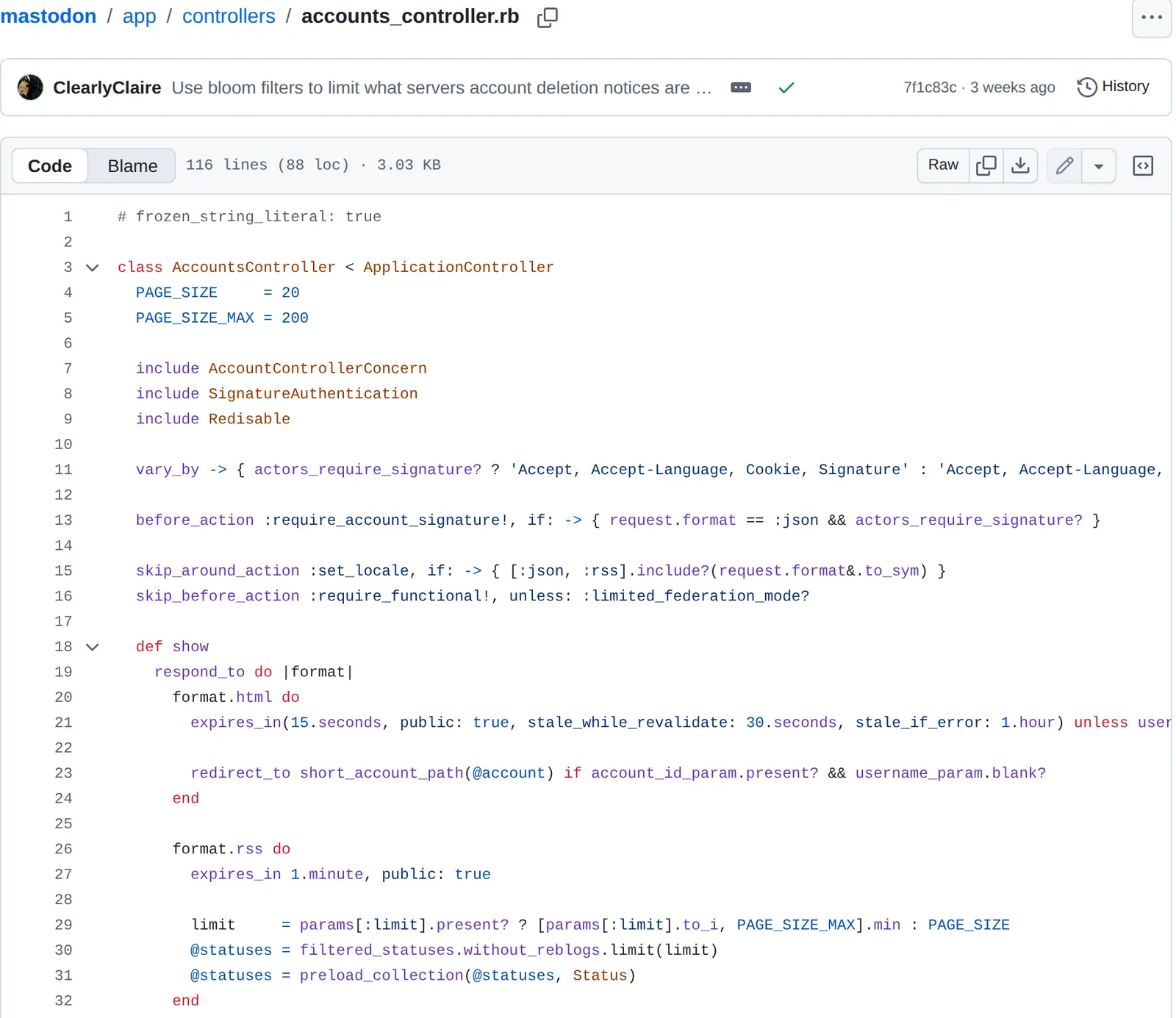 Mastodon’s AccountsController, which builds profile feeds, 21 October 2026. Source: github.com
The controller that answers a profile’s .rss request does three things:
- It drops boosts. The feed is built from
filtered_statuses.without_reblogs, so posts the person boosted never appear. Feedly’s help page says the same: “Mastodon RSS feeds do not include the ‘boosted’ posts at this time” (Feedly). - It drops replies unless you ask. Replies are filtered out unless the path ends in
/with_replies. The filter keeps replies to the account’s own posts (status.rb), so threads stay whole. - It shows 20 posts unless you ask.
PAGE_SIZEis 20 andPAGE_SIZE_MAXis 200, read from alimitparameter.
The difference is large for a chatty account. The plain feed for @Gargron (Eugen Rochko) on mastodon.social had nothing newer than 18 October. The /with_replies.rss feed had 20 posts from 19 and 20 October alone, all replies the plain feed hid.
Only public and unlisted posts are included; followers-only posts and direct messages never are (visibility.rb).
Mastodon hashtag RSS feeds
A hashtag feed lists the newest posts with that tag that one server knows about. On the same evening I fetched #rss from mastodon.social and from fosstodon.org. Over the same 19 hours, mastodon.social’s feed had 20 posts and fosstodon’s had 12, all of them also in mastodon.social’s. In that test the bigger server’s feed held everything the smaller one did and more, so it’s worth starting with a big server for hashtags even if your own account lives elsewhere.
The tags controller takes the same limit parameter, up to 200, and a local parameter. ?local=true keeps only posts from accounts on that server, which is useful when a server is built around a topic.
A hashtag feed is a tag search, not a word search. Posts that mention “RSS” without the hashtag don’t appear. If you want everything said about a subject, a hashtag is one part of it; following a topic in RSS covers the news and discussion feeds that catch the rest.
What a Mastodon feed item looks like
Feeds are standard RSS 2.0, but the items are unusual:
- No title. Items have a link, a date and the post as HTML in the description, with no
<title>. Your reader has to show the post without a headline or invent one from its first words, so Mastodon items can look odd next to news. - Media as attachments. Images and videos come as
media:contentelements, so readers that show them will. - Hashtags as categories. Each hashtag in the post becomes a
<category>, which readers with tag filters can use.
Reading Mastodon in a feed reader
Any RSS reader takes these URLs; Feedly’s help gives the same steps, add “.rss” to the link and follow it. If you don’t have a reader yet, the best RSS readers compares the main ones. New to feeds? What RSS is explains how they work.
Paste the .rss address into Add source in Hushread and the account’s posts land in the same newest-first feed as your news sites, with no Mastodon account. Add a Notify rule on a word and you get a push alert when one of those posts mentions it (Hushread rules). It only reads the feed: you can’t reply, boost or follow from it. Feeds are free to add, with no limit on sources.
FAQ
Does Mastodon have RSS feeds?
Yes. Every public profile has one at https://SERVER/@NAME.rss and every hashtag at https://SERVER/tags/NAME.rss. No Mastodon account is needed to read them.
Does a Mastodon RSS feed include boosts and replies?
Boosts, no. Replies to other people are left out unless you use /with_replies.rss, as in https://mastodon.social/@Gargron/with_replies.rss. Replies that continue the account’s own thread are included either way.
How many posts does a Mastodon RSS feed show?
20 by default. Add ?limit=200 to the URL for up to 200.
How do I get an RSS feed for a Mastodon hashtag?
Use https://SERVER/tags/NAME.rss without the #, for example https://mastodon.social/tags/rss.rss. Add ?local=true to see only posts from that server’s own accounts.
Can I get an RSS feed of my Mastodon home timeline or a list?
Not from Mastodon itself. Only profiles and hashtags have built-in feeds; a feed of your timeline or a list needs a third-party tool.
If you follow a lot of people and want to talk back, a Mastodon app is still the better tool, because a feed can’t show boosts or let you reply. If you want a few accounts or hashtags next to your news without opening another app, these feeds do it in any reader. To read them alongside everything else, newest first, get Hushread.