
Disclosure: Hushread is my app. I’ve tried to be fair, and I say where the others are the better choice.
OPML is the file you take with you when you change feed readers. It is plain XML, typically small, and it records the address of every feed you subscribe to and which folder you keep it in. No articles, just the list. Most readers import and export one, so moving from Feedly to Inoreader, or from either to something else, is an export, an import, and no retyping. The name stands for Outline Processor Markup Language, because the format was designed for outlines and feed readers adopted it later.
What is an OPML file, exactly?
The specification, written by Dave Winer, describes “a format for storing outlines in XML 1.0” and adds that it “has also become popular as a format for exchanging subscription lists between feed readers and aggregators” (OPML 2.0 specification). Version 1.0 was published in September 2000 (Library of Congress), as the native format of Winer’s Radio UserLand outliner (Cover Pages). Version 2.0 is dated 22 November 2007 and the spec says it is frozen, so a file made today uses the same rules as one from 2008.
A valid file is simple. The spec requires an opml element with a version attribute, then a head and a body, “both of which are required”. The body “contains one or more outline elements”, and every outline needs a text attribute: “a missing text attribute in any outline element is an error”. For a feed, the outline also needs type="rss" and xmlUrl, “the http address of the feed”. Everything else, including htmlUrl for the site’s home page, is optional; title is listed as optional too, though the spec says it should not be omitted.
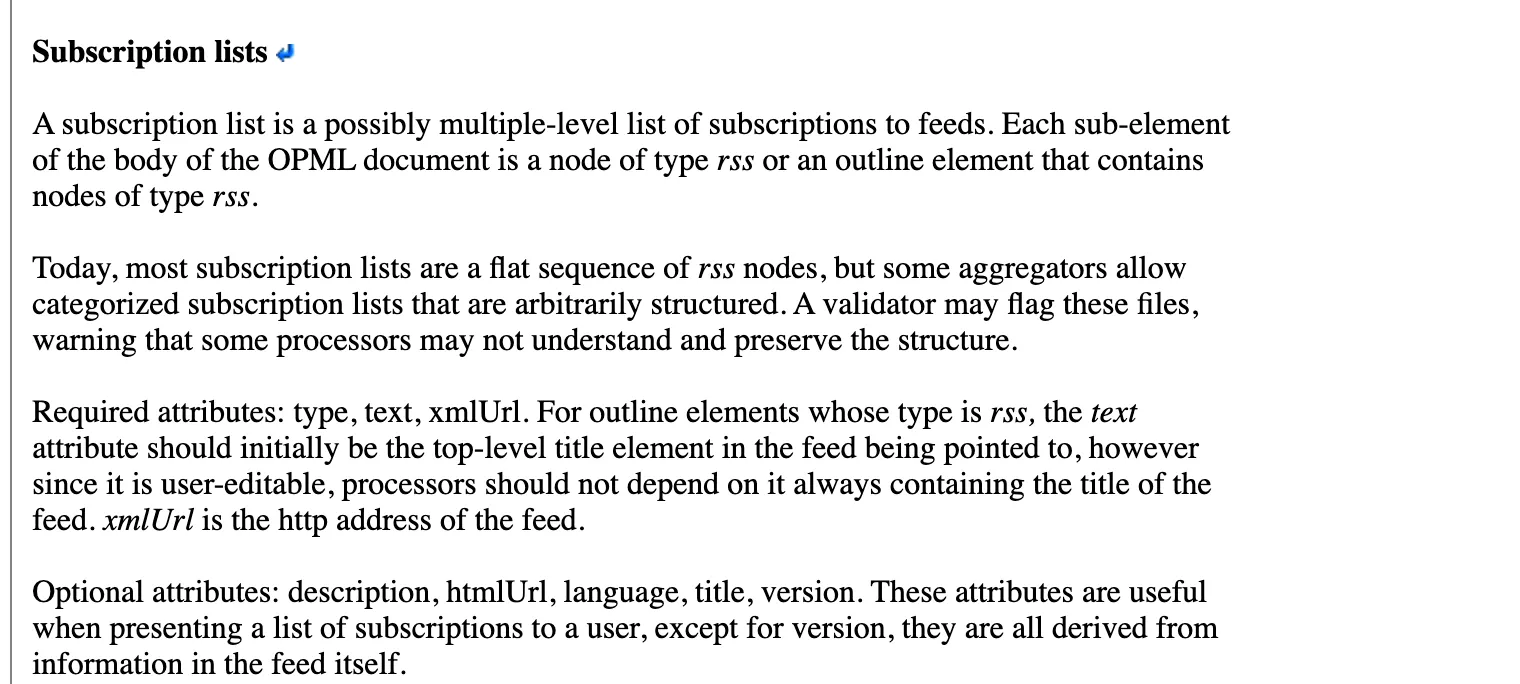 The rules for a feed entry in the OPML 2.0 specification, 13 October 2026. Source: opml.org
Here is the smallest useful OPML file I could make. I checked it against those rules and the feed address in it works:
<?xml version="1.0" encoding="UTF-8"?>
<opml version="2.0">
  <head>
    <title>My feeds</title>
  </head>
  <body>
    <outline text="News">
      <outline type="rss" text="Hushread Blog" xmlUrl="https://hushread.com/rss.xml" htmlUrl="https://hushread.com/"/>
    </outline>
  </body>
</opml>
The outer outline with no xmlUrl is a folder. Nesting an outline inside it files the feed under that folder, and that is how your reader’s folders travel with you. The spec notes that “some aggregators allow categorized subscription lists that are arbitrarily structured” and that a validator may flag them. Readers with one level of folders, Hushread among them, flatten anything deeper.
A real export looks the same, only longer. The blogroll I opened from a personal site had 139 outlines and a dateCreated line in the head (chrisburnell.com). One quirk worth knowing: its outlines are indented as if nested, but every tag closes itself, so they are all siblings. Readers go by the tags, not the indentation.
How to export OPML from your reader
The menu path differs in every app. These are the paths each reader’s own documentation, blog or forum gives, as of 13 October 2026.
- Feedly. Feedly’s help page gives no menu path, only an address: http://feedly.com/i/opml, which “works only via the web app, not the mobile app”. The export covers public RSS feeds and leaves out Boards, Read Later, Feedly AI Feeds and Reddit feeds (Feedly).
- Inoreader. Inoreader’s 2014 blog post places its OPML tools under “Preferences -> Import, Export, Backup” (Inoreader). I could not find a newer help article, so check the Preferences page if the label has moved.
- NetNewsWire on the Mac. “From the menu bar, choose File › Export Subscriptions…”, then name the file and click Export OPML (NetNewsWire).
- Reeder. “You can export your feeds as OPML in Settings → Your Data.” Only feeds that are RSS or JSON, or can be converted to them, are included (Reeder). The button arrived in early 2025 (the App Store notes say version 2025.2.2, Reeder’s help says 2025.2.1), so an older install does not have it (App Store).
- NewsBlur. The developer’s answer on the NewsBlur forum is “Manage > Account > Download OPML” (NewsBlur forum). That was 2014; a 2025 thread has a user finding it under Account instead, and the developer saying a large list is now emailed to you (NewsBlur forum).
- FreshRSS. “To export your list of feeds, go to Subscriptions management”, then the Import / export page (FreshRSS). Miniflux lists “OPML file import/export and URL import” among its features (Miniflux).
- The Old Reader. Its 2014 premium FAQ promises “you’ll always be able to export your subscriptions to OPML” (The Old Reader), but its help pages, theoldreader.com/pages/faq among them, returned a 404 when I tried, so I have no current path to give you.
- Hushread does not export OPML yet (Hushread docs).
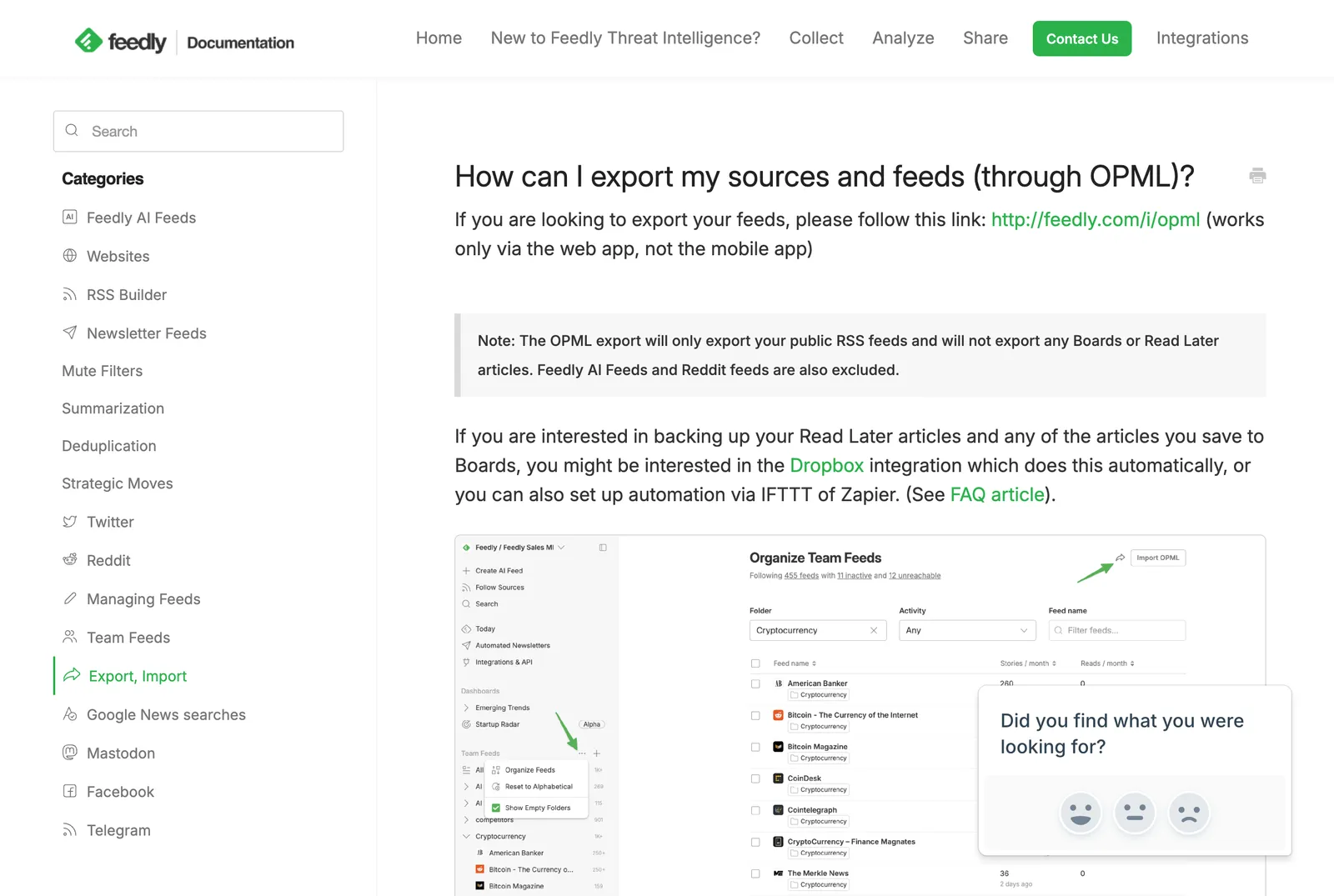 Feedly’s export instructions, 13 October 2026. There is no menu path, only the link. Source: docs.feedly.com
Two services people still ask about have no export. Google Reader let you download your OPML subscription list through Google Takeout until 15 July 2013, two weeks after it shut down (LWN). YouTube removed the OPML export button from its subscriptions page in late 2020: a NewPipe bug report dated 21 November 2020 found the page redirecting with no export button, a contributor replied that YouTube had removed it “some time ago”, and Google never announced the removal that I can find (NewPipe issue tracker).
The Takeout archive now gives you a subscriptions.csv instead, which readers such as FreeTube can import (FreeTube docs). If you want your YouTube channels in an RSS reader, the YouTube RSS feed generator makes the feed address for a channel.
How to import OPML, and the limits that cut it short
A plan limit can silently drop most of your feeds, and the help pages bury it.
- Import OPML into Feedly. Log in on the web, open https://feedly.com/i/cortex, then the Choose OPML file button or drag and drop. Import “works only via the web app for now (not via the mobile app)” and does not remove feeds you already have (Feedly). The Basic plan has a “100 sources” limit (Feedly), and the import page does not say what happens to the rest.
- Inoreader. The 2024 getting-started post says to “use the Import feeds option in the sidebar” (Inoreader), which is not the 2014 Preferences path, so look in both places. The free plan allows 150 subscriptions, Pro allows 2,500 (Inoreader pricing).
- Reeder. The free tier takes 10 feeds, and because of that “OPML Import is not available to prevent exceeding this limit” (Reeder).
- NetNewsWire on the Mac. Choose File, then Import Subscriptions, pick the account if you have more than one, and open the file. “Your current subscription list won’t be affected” (NetNewsWire). No limit.
- Hushread. Open Add source, tap Import OPML instead, choose the file, and the result screen says how many feeds were imported, skipped and filed into folders. Folders in the file are created or matched to yours, and feeds you already follow are skipped (Hushread docs). The free plan has room for 5 sources, so an import fills the slots you have left and skips the rest; Pro takes the whole file at $1.25 a month billed yearly (Hushread docs). The skipped count on the result screen tells you whether the limit bit, which is the thing the Feedly and Inoreader pages leave you to work out.
Why an OPML import shows no feeds
When a reader says “no feeds found” or refuses the file, these are the four causes I have seen, and you can tell which in a minute.
- A raw ampersand. XML requires
&to be written as&. The blogroll above had feed addresses with a bare&in them, four parser errors on two lines, and a strict parser rejects the file at the first one. The file looks fine in a text editor and fails in the reader. - An empty body. A subscription list I fetched from FeedLand came back with a head, a description, and no outlines at all (FeedLand), which breaks the rule that a body “contains one or more outline elements”. Nothing to import.
- Outlines without a feed address. Folders and notes are outlines too. If an export writes folder entries but forgets the
xmlUrlon the feeds inside, the reader sees structure and no feeds. - The wrong file. Some sites serve
.opmlas a generic download rather than XML. The blogroll above came with a content type ofapplication/octet-stream, so a browser saves it instead of showing it. Check that what you uploaded starts with<?xmlor<opml.
The quickest check is the free OPML viewer and validator. It opens or takes a pasted file in your browser, lists every folder and feed address, flags broken XML, entries with no feed URL and duplicates, and downloads a cleaned copy with the titles escaped and the duplicates dropped. Nothing you load is sent anywhere; the page says so and I built it that way. If the viewer shows your feeds and your reader still refuses them, look at the reader’s plan limit next.
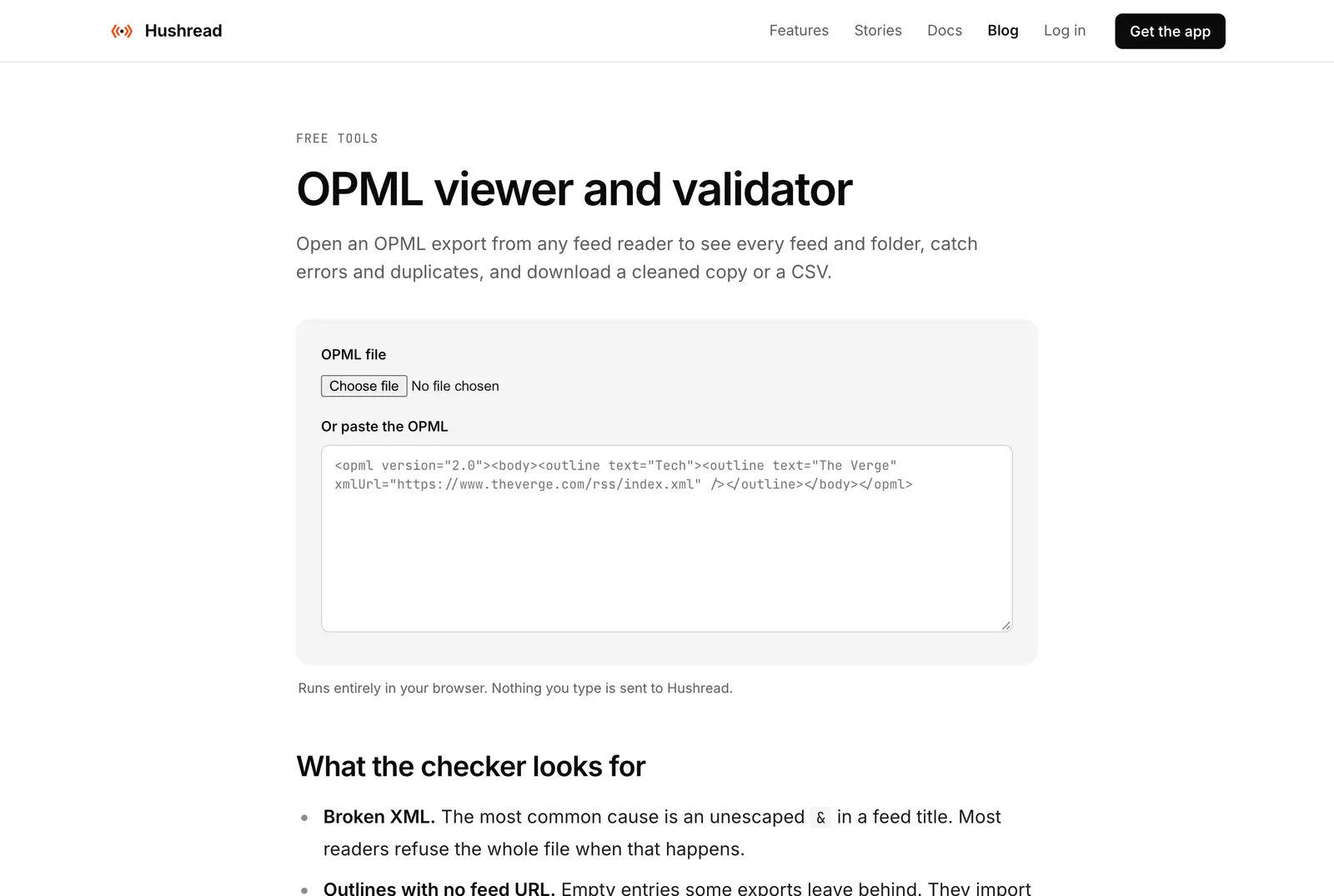 The OPML viewer on hushread.com, 13 October 2026. Source: hushread.com
OPML to RSS: it is a list, not a feed
Searches for “opml to rss” usually mean one of two things. If you want the feed addresses out of an OPML file, any text editor shows them as the xmlUrl attributes, and the viewer above also exports a CSV. If you want to subscribe to an OPML file as if it were a feed, you cannot: an OPML file contains no articles, only pointers to the feeds that do. My RSS explainer covers what a feed itself contains, and if the site you want has no feed listed, the guide to finding the RSS feed of any website shows where they hide.
FAQ
What is an OPML file?
An XML text file that lists the feeds you subscribe to, with the folder each one sits in. Feed readers export and import it so you can move your subscriptions between apps.
How do I export OPML?
Look for Export OPML, Export Subscriptions or Import, Export, Backup in your reader’s settings. Feedly exports from feedly.com/i/opml on the web, NetNewsWire from File then Export Subscriptions, Reeder from Settings then Your Data.
Can I import OPML into Feedly?
Yes, on the web at feedly.com/i/cortex, not in the mobile app. Feedly’s Basic plan has a 100-source limit, and its import page does not say what happens to feeds beyond it.
Is OPML the same as RSS?
No. RSS is the feed a site publishes, with its articles in it. OPML is a list of feed addresses. You subscribe to RSS; you use OPML to carry your subscriptions from one reader to another.
Why does my OPML import say no feeds found?
Usually a bare ampersand that breaks the XML, an export with no outline entries, feed entries missing the xmlUrl attribute, or the wrong file. Open it in a validator to see which.
If you are leaving a reader, export the file first and keep a copy somewhere safe. It is the one thing a shutdown or a lost login cannot take from you.