
Disclosure: Hushread is my app. I’ve tried to be fair, and I say where the others are the better choice.
There’s no mainstream news app without politics, and none of the big ones has a switch that removes it. Apple News, Google News, Flipboard and SmartNews let you block topics, hide sources or drop sections, and political stories still get through. What works is a combination: build your feed from outlets’ non-political section feeds (science, sport, tech) instead of their front pages, then mute the political words that still slip in. When I counted, six section feeds carried 5 headlines about politicians in about 150, against 9 in 47 on two front pages.
Is there a news app without politics?
A few small apps promise it. The closest match on the US App Store is Not Politics, a free app from KKIT Creations that calls itself a nonpartisan news aggregator and says it “filters out overtly political content” from RSS feeds you add. It had no ratings yet, and its last update was version 1.0.6 on 9 October 2025 (App Store). Apps that call themselves “unbiased” are a different thing: they still cover politics, just with a claim about balance.
How to hide politics in the apps you already use
| App | What you can hide | Keyword mute? |
|---|---|---|
| Apple News | Channels and topics, plus Suggest Less per story | No |
| Google News | Sources, “fewer stories” about a topic (signed in only) | No |
| Sources, “Less Like This” per story | No | |
| SmartNews | Whole channel tabs | No |
| Feedly | Keywords and phrases (Mute Filters, Pro+ and Enterprise) | Yes |
| Inoreader | Keywords in title or content (Filters, Pro) | Yes |
| Hushread | Keywords and phrases (Mute rules, every plan) | Yes |
Apple News
Open the Politics topic (or any channel), tap ··· at the top and choose Block Topic or Block Channel. Apple’s guide adds a catch: Top Stories “appear the same for everyone”, so a blocked channel’s headline can still appear there (Apple support).
Blocking the topic isn’t enough on its own. In November 2024 an Apple News+ reader wrote on Apple’s forum, “I removed the Politics topic and Election special coverage, but I still get political stories.” The first reply was a flat “No”, and the other suggested Suggest Less on each story and turning on Restrict Stories in Today (Apple Community). Apple’s own guide puts that setting under Settings > Apps > News and says that with it on, “you don’t see Top Stories and Trending Stories”, which in my experience is where a lot of the politics shows up.
Google News
Customising Google News needs you to be signed in to a Google account. On Android, tap More under a story and choose Fewer stories like this or Fewer stories about a topic, or Hide all stories from [source] to drop an outlet completely (Google News Help). There’s no keyword filter on that page, so a political story from a source you like still shows up.
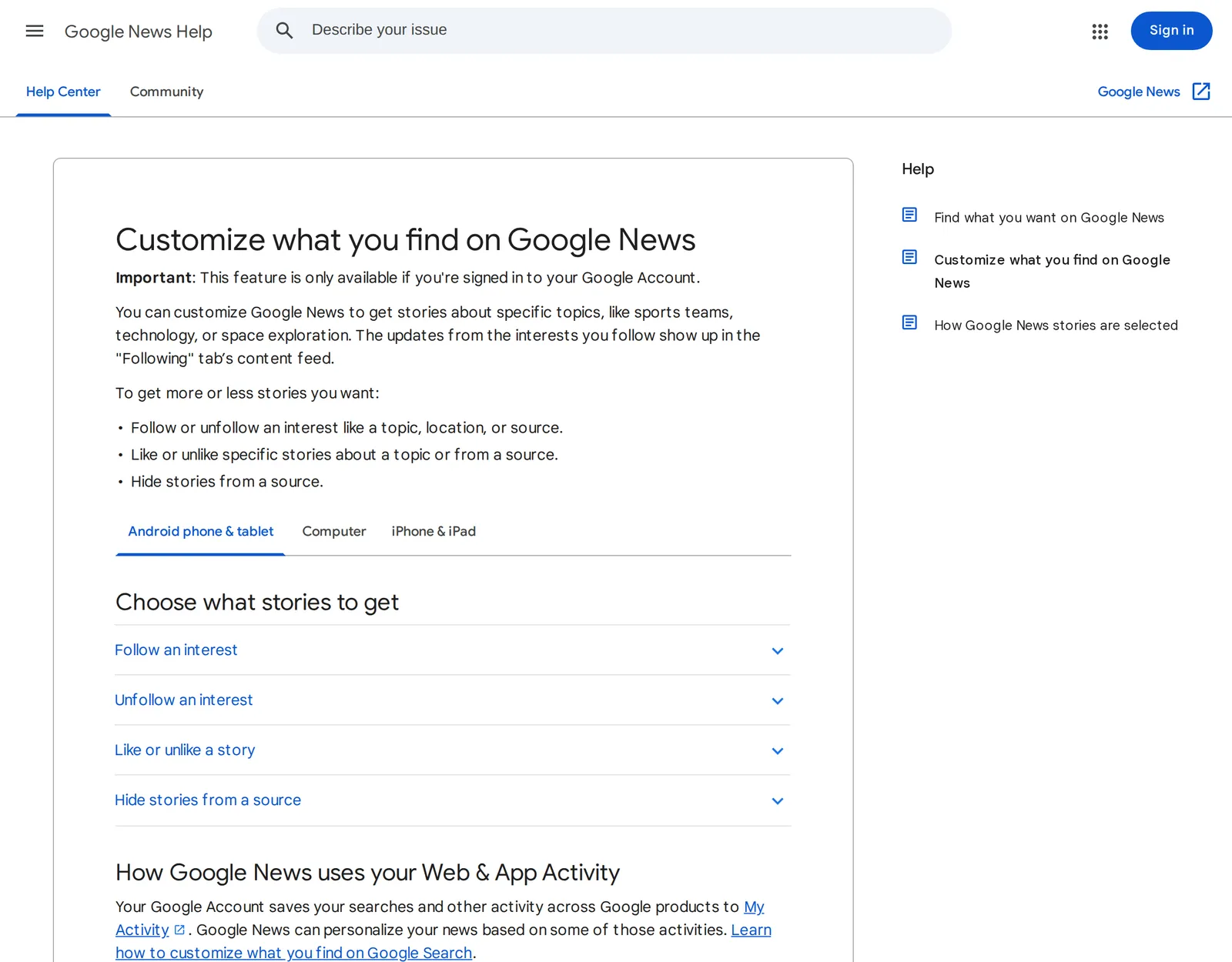 Google’s list of ways to change Google News, 1 November 2026. Source: support.google.com
Flipboard and SmartNews
Flipboard puts Less Like This in the three-dot menu on each story and lets you say why, with an option to mute a source entirely; muted sources are listed under Settings > Muted sources (Flipboard).
SmartNews works by tabs. Tap and hold a tab at the top of the screen, and on the list that opens, uncheck any channel you’d like to hide (SmartNews Help). That removes a politics tab, but not political stories in the tabs you keep.
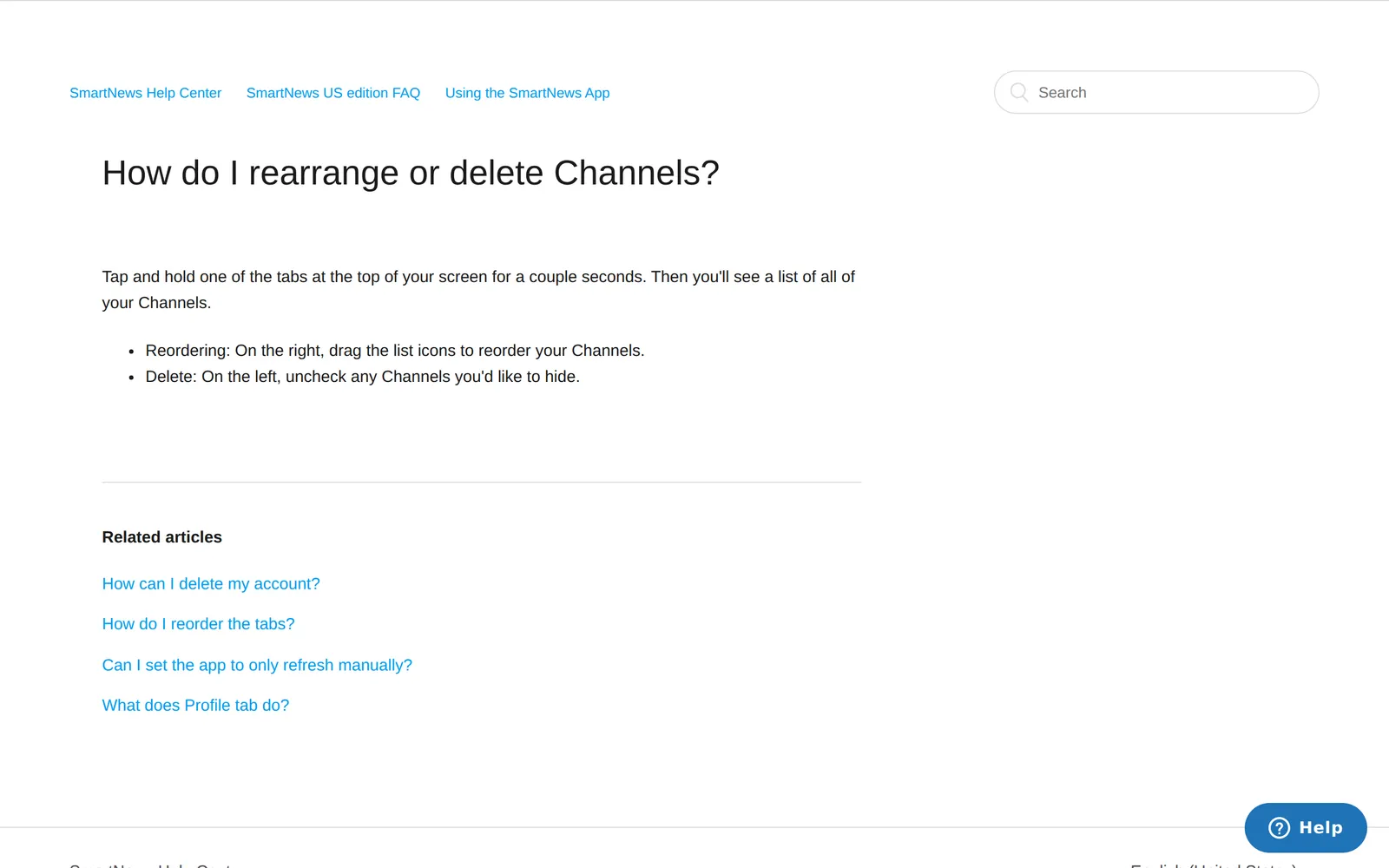 SmartNews’ instructions for hiding channel tabs, 1 November 2026. Source: support.smartnews.com
How to filter politics out of news with keyword mutes
A keyword mute hides any article whose text contains a word you pick. It’s the only control above that targets the subject itself instead of a source or a topic label, and among the apps above, only the readers offer it.
- Feedly has Mute Filters: pick a folder or all folders, type a word or phrase and set it for a day, a week, a month or forever, which suits an election season you want to sit out. They’re active on the Pro+ and Enterprise plans (Feedly docs). Prices are in my Feedly pricing guide.
- Inoreader has Filters under Automate > Filters, matching on title, content, author and more. They’re a Pro feature with 50 per account, and Free gets none (Inoreader help). Plans are in Inoreader pricing.
- Hushread has Mute rules: type a keyword or phrase, choose Mute, and pick whether it applies to all sources, one folder or one source. It’s matched against each article’s title and summary (Hushread docs).
How much politics a mute list misses
Here’s the list of 34 words I ran, matched as whole words, over the headlines of two front-page feeds. It’s written for UK and US news, so swap in the names where you live:
election, president, Trump, minister, government, senate, congress,
parliament, vote, voters, tariff, White House, Labour, Tory, Tories,
Conservative, Republican, Democrat, Starmer, Reform UK, politics,
administration, lawmakers, federal, shutdown, budget, MP, MPs,
chancellor, Reeves, Badenoch, Farage, Vance, GOP
(“Politics” here stood for political, politician and the rest; in an app that matches whole words, add each form.) Headlines counted on 1 November 2026:
| Feed | Items | About politicians, parties or elections, by my count | Caught by the list |
|---|---|---|---|
| BBC News top stories | 37 | 4 | 2 |
| NPR News | 10 | 5 | 3 |
The misses are the useful part. The list caught “Judge orders Trump administration to stop threatening US election officials” but not “Laura Kuenssberg: Healey risks breaking minimum wage promise for younger workers”, or a BBC story on changes to indefinite leave to remain. On NPR it missed “Mixed economic forecast weighs heavy ahead of midterms” because “midterms” wasn’t on my list. Politics is written in names and issues, and a list of words never catches them all.
It also hides things you wanted. “Budget” caught a Guardian sport piece on “the low-budget Brewers” winning the World Series. Without whole-word matching it’s worse: “Tory” matches the “history” in a Formula 1 headline. Whatever app you use, add one word at a time and check what it hides for a day.
Build a feed without politics from section feeds
Most news sites publish a feed for each section, not just the front page. Following those instead of the front page removes most politics before any filter runs. On a site you already read, look for an RSS link on the section page; on the Guardian, adding /rss to a section’s address works, as in the table. More ways are in my guide to finding any website’s RSS feed.
Headlines counted on 1 November 2026, the same way as above, plus a column for stories about governments, regulators or wars that never name a politician:
| Section feed | URL | Items | Politicians, parties, elections | Other government or geopolitics |
|---|---|---|---|---|
| BBC Science & Environment | https://feeds.bbci.co.uk/news/science_and_environment/rss.xml | 42 | 3 | 3 |
| BBC Technology | https://feeds.bbci.co.uk/news/technology/rss.xml | 21 | 1 | 3 |
| Guardian Science | https://www.theguardian.com/science/rss | 29 | 1 | 2 |
| Guardian Sport | https://www.theguardian.com/sport/rss | 49 | 0 | 2 |
| NPR Science | https://feeds.npr.org/1007/rss.xml | 10 | 0 | 0 |
| Ars Technica Science | https://feeds.arstechnica.com/arstechnica/science | 20 | 0 | 4 |
Items include some padding: BBC feeds repeat stories and list podcast episodes, and the Guardian’s sport feed carries newsletter sign-ups, so there are about 150 distinct headlines. That’s 5 about politicians in roughly 150, against 9 in 47 on the two front pages. Two were BBC Science stories on the Labour row over the Rosebank oil field; the other three were one story, Putin calling Elon Musk a “real genius”, which turned up in three different feeds. The second column is the part no filter handles well: a US immigration agents data leak in Technology, Houthi attacks in a boxing report, the FDA and the Pentagon in Ars Technica’s science feed. Energy, space and big tech are where politics creeps into these sections, so that’s where a mute word or two earns its place. For more working feeds by outlet, see my list of the best RSS feeds for news.
This is how I’d set it up in Hushread. Paste a section feed from the table (Guardian Science, say) and Hushread follows that section, newest first, with nothing ranked or added from outside your sources. Then add Mute rules for the few words that still get in, such as the party names where you live, scoped to All sources. The free plan has no limit on sources, so you can add as many sections as you like.
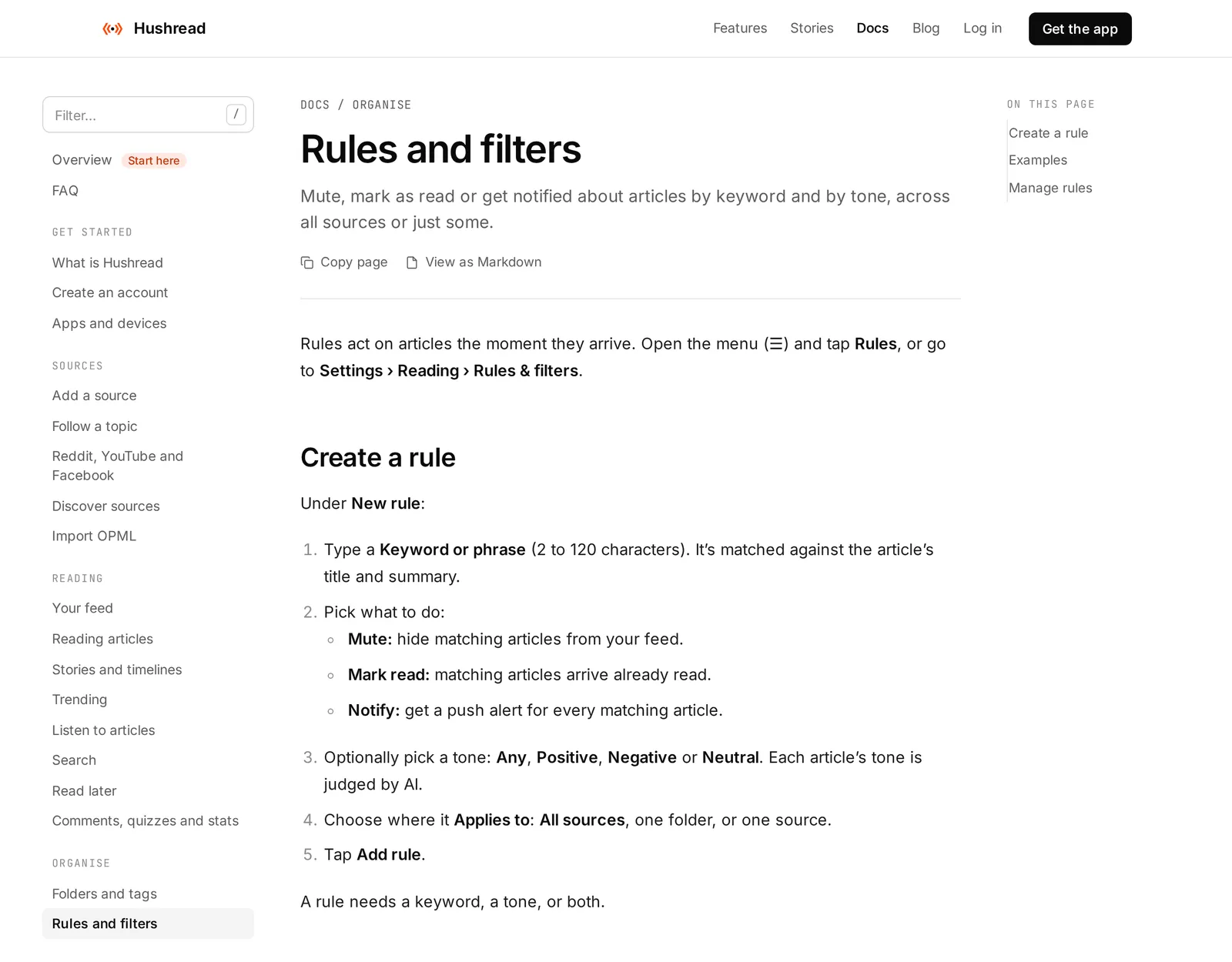 How a Mute rule works in Hushread, 1 November 2026. Source: hushread.com
FAQ
Is there a news app without politics?
Not among the big ones. Small apps such as Not Politics on iPhone filter “overtly political content” from feeds you add, but the dependable approach is to follow non-political section feeds and mute political keywords in a reader.
How do I filter politics out of my news feed?
Swap front-page feeds for section feeds such as science, sport and technology, then add keyword mutes for the names and words that still get through. Add mute words one at a time, because broad ones like “budget” also hide stories you wanted.
Can you mute politics in Apple News?
Partly. You can block the Politics topic and turn on Restrict Stories in Today, but Apple says Top Stories are the same for everyone, and readers report political stories still appear.
Does Google News let you block politics?
Only by source or topic, and only when you’re signed in. You can choose Fewer stories about a topic or hide a source, but there’s no keyword filter.
Which news apps let you mute keywords?
RSS readers do: Feedly on its Pro+ plan, Inoreader on Pro, and Hushread on every plan, including the free one.
If you only want a calmer front page and you’re happy with one app’s picks, blocking topics in Apple News or Google News may be enough, and it costs nothing. If you want politics gone, choose the sources yourself: section feeds in any reader, with a few mute words on top. Hushread is one way to do that, free with no limit on sources.