
Disclosure: Hushread is my app. I’ve tried to be fair, and I say where the others are the better choice.
RSS and Atom are two XML formats for the same job: a file at a fixed address that lists a site’s newest posts so a feed reader can pick them up. The difference between RSS and Atom is in the rules, not the result. RSS 2.0 is loose, frozen in its features and last revised in 2009; Atom is a stricter IETF standard from 2005 that requires an ID, a title and an update time on every entry and labels whether text is plain or HTML. If you read feeds, it doesn’t matter which one a site uses: every reader I’ve used takes both, and some sites, GitHub among them, only offer Atom. If you publish a podcast, it does matter: Apple Podcasts requires RSS 2.0.
RSS vs Atom at a glance
| RSS 2.0 | Atom 1.0 | |
|---|---|---|
| Who maintains it | RSS Advisory Board | IETF, RFC 4287 |
| Current version | 2.0.11, 30 March 2009 | RFC 4287, December 2005 |
| Root element | <rss> with a <channel> | <feed> |
| A post is called | item | entry |
| Required per post | A title or a description | id, title and updated |
| Date format | RFC 822, Mon, 26 Oct 2026 23:10:59 GMT | RFC 3339, 2026-10-26T17:56:36-04:00 |
| Says whether text is HTML | No | Yes: text, html or xhtml |
| Summary and full text | One description field (full text needs an extension) | Separate summary and content |
| Registered media type | No | application/atom+xml |
RSS: loose, frozen and everywhere
The RSS 2.0 specification requires three things of the channel, a title, a link and a description, and almost nothing of a post beyond a title or a description. The format is frozen, so anything new has to come from extensions “defined in a namespace”, which is how podcast tags, Dublin Core authors and media thumbnails got into RSS feeds. (The history and a feed read line by line are in What is RSS?)
The looseness shows in one place readers notice: a post’s description can hold a summary or the whole article, and “entity-encoded HTML is allowed”, but nothing in the feed says which you’re getting.
Atom: written to fix those gaps
Atom was published as a Standards Track RFC in December 2005 (RFC 4287). It closes each gap RSS leaves open. Every feed and every entry “MUST contain exactly one atom:id element”, one atom:title and one atom:updated. Text carries a type of “text”, “html” or “xhtml”, so a reader knows whether <b> is markup or two characters. A short summary and the full content are separate elements, and dates use RFC 3339, the 2026-10-27T09:30:00Z style that software parses without guessing.
Atom also has a registered media type, application/atom+xml, while application/rss+xml isn’t on IANA’s list at all, and servers send RSS under all sorts of types.
What a real RSS feed and Atom feed look like
The quickest way to see the difference is to open one of each. Here is the BBC News feed in Chrome: an <rss version="2.0"> root, a <channel>, and items with an RFC 822 pubDate and a guid marked isPermaLink="false".
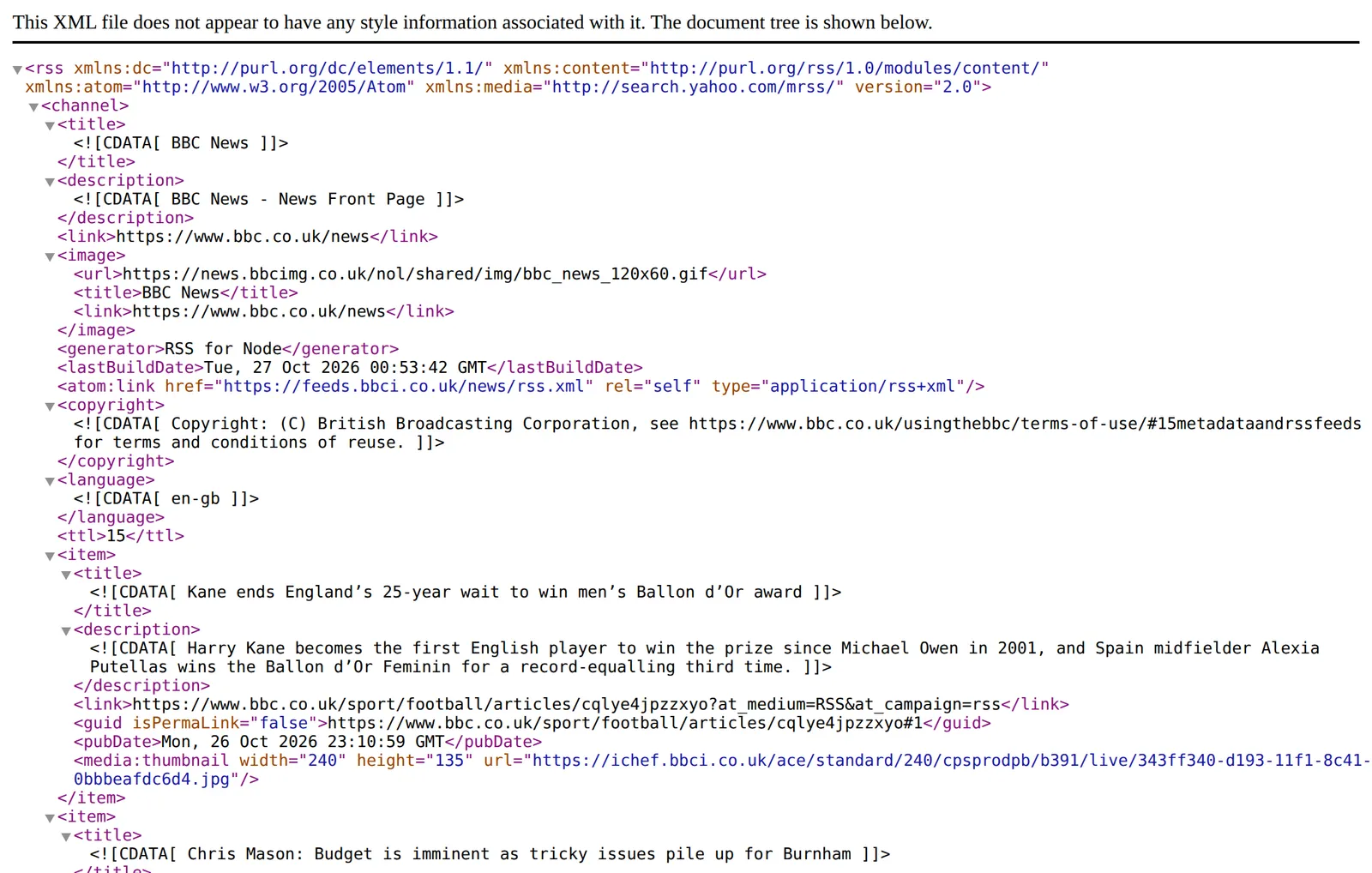 The BBC News RSS 2.0 feed, 27 October 2026. Source: feeds.bbci.co.uk
Look at the root element: it declares xmlns:atom, and a few lines down there’s an <atom:link rel="self">. That element comes from the Atom spec, where a feed “SHOULD contain one atom:link element with a rel attribute value of ‘self’”, the feed’s own address. Many RSS feeds borrow it: seven of the nine RSS 2.0 feeds in the table below carry one. The two formats aren’t rival camps so much as one borrowing from the other.
And here is The Verge’s feed. Its address is theverge.com/rss/index.xml, but the file starts with <feed xmlns="http://www.w3.org/2005/Atom">: it’s Atom. Every entry has an id, an updated time in RFC 3339, and a summary and content each marked type="html".
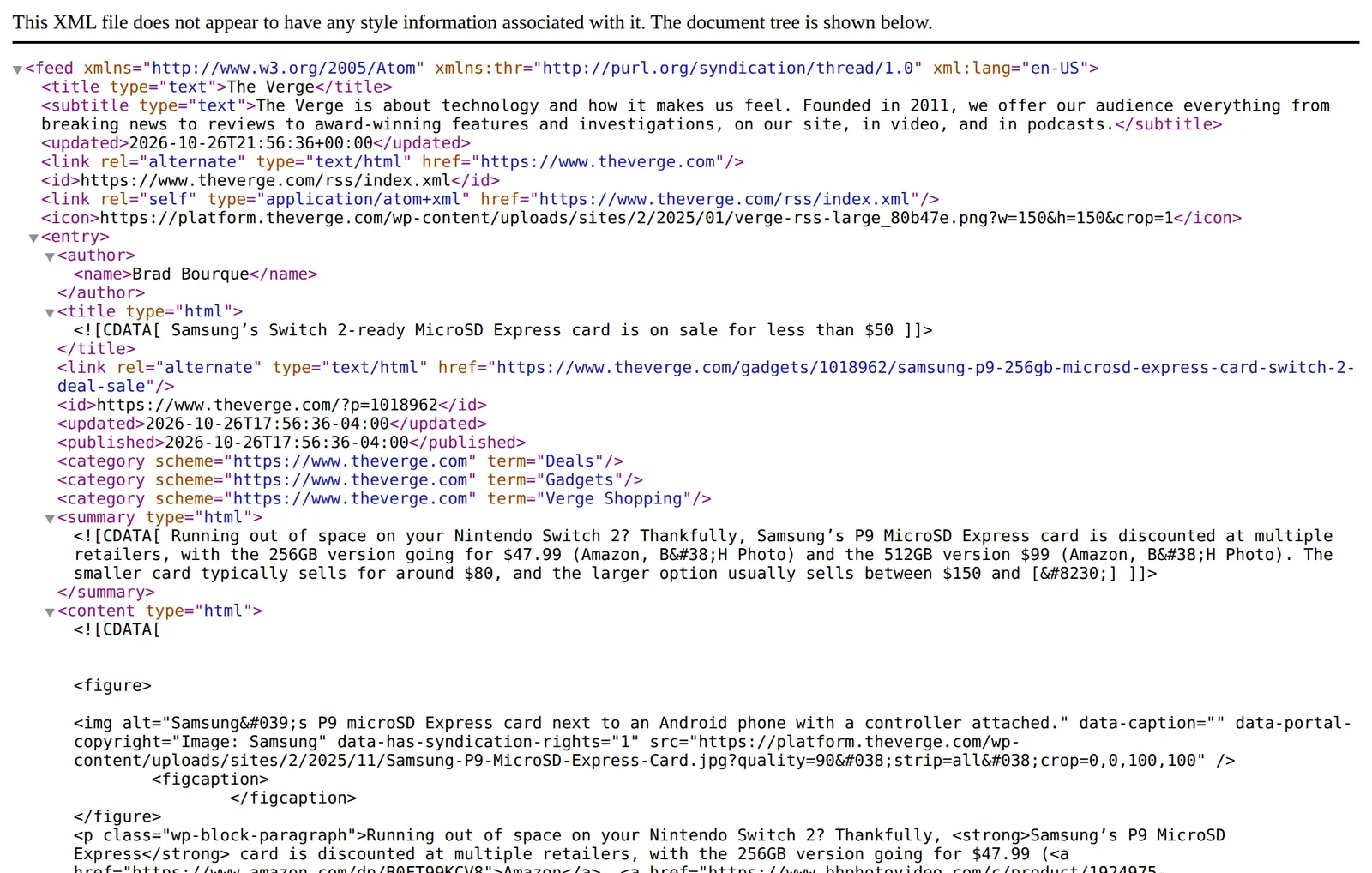 The Verge’s feed, an Atom file at an /rss/ address, 27 October 2026. Source: theverge.com
That’s the main lesson for anyone hunting feeds: the word “rss” in a URL tells you nothing about the format. People say “RSS feed” for both.
Which sites use RSS and which use Atom
I opened fifteen feeds from well-known sites and platforms on 27 October 2026:
| Feed | Format | Sent as |
|---|---|---|
BBC News, feeds.bbci.co.uk/news/rss.xml | RSS 2.0 | text/xml |
The Verge, theverge.com/rss/index.xml | Atom | application/xml |
WordPress News, wordpress.org/news/feed/ | RSS 2.0 | application/rss+xml |
The same site, wordpress.org/news/feed/atom/ | Atom | application/atom+xml |
Daring Fireball, daringfireball.net/feeds/main | Atom | text/xml |
GitHub, github.com/nodejs/node/releases.atom | Atom | application/atom+xml |
Jekyll, jekyllrb.com/feed.xml | Atom | application/xml |
Hugo, gohugo.io/news/index.xml | RSS 2.0 | application/xml |
A Substack, lennysnewsletter.com/feed | RSS 2.0 | application/xml |
A Ghost site, platformer.news/rss/ | RSS 2.0 | application/rss+xml |
Medium, medium.com/feed/@Medium | RSS 2.0 | text/xml |
Mastodon, mastodon.social/@Mastodon.rss | RSS 2.0 | application/rss+xml |
| Google News search feed | RSS 2.0 | application/xml |
Google’s blog, blog.google/rss/ | RSS 2.0 | application/xml |
JSON Feed, jsonfeed.org/feed.json | JSON Feed | application/json |
RSS is the majority in this sample. Atom turns up where developers built the feed: GitHub, Jekyll, Daring Fireball. Google mixes both: News search feeds are RSS, while Google Alerts feeds are Atom, as my Google Alerts RSS feed guide shows. GitHub offers no choice: its feeds only come as Atom, and asking for releases.rss instead of releases.atom returned HTTP 406; the GitHub RSS feeds guide lists every working .atom address.
Some platforms let the site owner pick. WordPress builds an RSS 2.0, an Atom, an RSS 0.92 and an RDF/RSS 1.0 feed for every site (WordPress developer docs), which is why /feed/ and /feed/atom/ both worked above. Static site generators each have a default: Jekyll’s feed plugin makes Atom (jekyll-feed). Hugo makes RSS (Hugo docs).
Does it matter for your feed reader?
No. The NetNewsWire help page puts it in five words: “Atom does the same thing as RSS” (NetNewsWire help). Every reader I’ve used takes both. If a site offers both, pick either: they carry the same posts.
Where Atom’s stricter rules can show up is in small annoyances. An RSS item’s guid is optional, so a reader may have nothing stable to recognise a post by, and an RSS description doesn’t say whether it holds HTML, so a reader has to guess how to display it. Atom’s required id and typed content take the guessing away, if the publisher follows the spec.
To check a feed yourself, open it in a browser: <rss> at the top means RSS, <feed> with the Atom namespace means Atom. The W3C’s validator, “a free service that checks the syntax of Atom or RSS feeds” (W3C Feed Validation Service), will tell you whether it’s valid as well.
In Hushread you never need to check which format a site picked. Paste the feed link, Atom or RSS, or just the site’s address, and it finds the feed and shows a preview before you add it; if the site has no feed, it offers Follow this page and turns new articles into feed items (Hushread docs). The free plan has no limit on sources.
Should you publish RSS or Atom?
If your platform makes the feed for you, keep its default. WordPress, Ghost, Substack and Hugo will all produce a feed every reader accepts, and switching formats changes the feed address, which can break existing subscriptions.
If you’re choosing from scratch:
- A podcast should be RSS 2.0. Apple’s requirements say “RSS feed URLs must adhere to RSS 2.0 specifications” (Apple Podcasts for Creators), and podcast episodes ride on the RSS
enclosureelement. - A blog or changelog can be either. Atom is the cleaner spec to write by hand or generate yourself, because its required fields stop you from leaving out the ID and date that readers rely on.
- Offer one autodiscovery link, not three. The RSS Advisory Board’s autodiscovery spec advises publishers with the same content in several formats against advertising all of them, since new subscribers may not be able to tell “the Atom, RSS 1.0 and RSS 2.0 formats” apart (RSS Board).
And JSON Feed?
JSON Feed is a third option: “a pragmatic syndication format, like RSS and Atom, but with one big difference: it’s JSON instead of XML”, by Brent Simmons and Manton Reece, version 1.1 in August 2020 (JSON Feed). It’s pleasant for developers and NetNewsWire reads it, but support is thinner than for the XML formats, so I’d offer it alongside RSS or Atom, never instead.
FAQ
What is the difference between an RSS feed and an Atom feed?
Nothing, for the reader: both list a site’s newest posts. Atom’s rules are stricter, with a required ID, title and update time on every entry and labelled HTML.
What is an Atom feed?
An Atom feed is an XML file in the Atom Syndication Format, starting with <feed xmlns="http://www.w3.org/2005/Atom">. GitHub, Google Alerts and many developer blogs publish Atom, and any RSS reader can subscribe to it.
Is Atom better than RSS?
As a specification, Atom is stricter and less ambiguous, which makes feeds easier to process correctly. In practice RSS 2.0 is more common and Apple Podcasts requires it, and readers handle both equally, so neither is better for someone reading feeds.
How can I tell if a feed is RSS or Atom?
Open the feed address in a browser. If the first element is <rss> it’s RSS; if it’s <feed> with the Atom namespace, it’s Atom. The URL isn’t a reliable clue: The Verge serves Atom from an address containing “rss”.
Can an RSS reader read Atom feeds?
Yes. Every feed reader I’ve used reads both RSS and Atom, and some, NetNewsWire among them, read JSON Feed too. The term “RSS reader” covers all of them.
If you publish a podcast, the choice is made for you. For everything else, use what your platform produces and spend the time on the feed’s contents instead: full text, stable IDs, real dates. And if you only want to read, the format is your reader’s problem, not yours: paste whatever address you have into any of them, Hushread included.